AI Agents for Supplier Follow-Up and Late Delivery Alerts: A Practical Guide

Author
Ravi Prajapati
Learn how AI agents automate supplier follow-up, detect late deliveries, prioritize procurement exceptions, and improve purchase order visibility.
AI agents for supplier follow-up help procurement teams identify purchase orders that need attention, interpret supplier communications, draft follow-up messages, and alert buyers when deliveries are overdue or at risk. When connected to reliable purchase order, inventory, and shipment data, these agents can reduce repetitive administrative work and help teams prioritize exceptions before they disrupt operations.
The value is not simply sending more emails. It is connecting order information, supplier responses, delivery commitments, and internal escalation rules so that purchasing teams can respond to problems earlier.
Microsoft's Dynamics 365 Supply Chain Management documentation describes a Procurement Agent that can identify unconfirmed purchase orders and late deliveries, generate supplier follow-up emails, and allow purchasers to review drafts before sending. The feature is documented as a preview, so buyers should verify its current availability, scope, and limitations before selecting it. Microsoft's Procurement Agent documentation provides a concrete example of this category of automation.
This guide explains how AI agents for supplier follow-up work, which use cases offer the most practical value, how they differ from traditional workflow automation, and what businesses should evaluate before implementing them.
What Are AI Agents for Supplier Follow-Up?
AI agents for supplier follow-up are software systems that use AI to interpret procurement information, identify actions that need attention, and perform or recommend tasks according to defined business rules.
Depending on their integrations and permissions, they may identify unconfirmed purchase orders, detect overdue delivery commitments, interpret supplier emails, prepare reminders, extract revised delivery dates, update workflow records, and escalate unresolved exceptions.
A supplier follow-up agent typically combines three capabilities:
Business data access: Reads purchase orders, promised delivery dates, supplier details, and shipment statuses.
Language understanding: Interprets supplier messages and generates context-specific communications.
Workflow execution: Creates tasks, prepares emails, updates approved fields, or routes exceptions to procurement staff.
Not every product supports all three capabilities. Some generate recommendations and draft messages, while others can execute approved actions through connected enterprise systems.
The distinction matters when evaluating products. An AI assistant that writes an email is not necessarily an agent that can identify which supplier needs the email, retrieve the correct order details, track the response, and escalate a missed commitment.
Why Supplier Follow-Up and Late Delivery Alerts Need Automation
Supplier follow-up becomes difficult when purchasing teams manage many orders, suppliers, delivery schedules, and communication channels simultaneously.
A buyer may need to confirm whether a supplier has accepted an order, check whether the promised shipment date has changed, ask why an order is late, or determine whether a delay will affect production or store replenishment.
When these activities depend on manually reviewing spreadsheets, ERP screens, and email inboxes, important exceptions can compete for attention with routine administrative work.
Common operational problems include:
Purchase orders that remain unconfirmed after submission.
Delivery dates that pass without a shipment update.
Supplier emails containing revised dates that are not reflected in the ERP.
Repeated reminders sent without considering the latest supplier response.
Delays that affect production schedules, inventory availability, or customer commitments.
Procurement teams that cannot easily distinguish a critical shortage from a low-impact delay.
Traditional rules can detect many of these conditions. For example, a workflow can flag every purchase order whose promised date is in the past. The challenge is deciding what to do next when the situation requires interpreting an email, checking other orders, or determining the right escalation.
AI agents can help bridge this gap by combining structured business data with unstructured supplier communications.
However, automation will not fix missing purchase order records, inaccurate delivery dates, or suppliers who do not provide timely updates. Those remain data-quality and supplier-management problems.
How AI Agents for Supplier Follow-Up Work
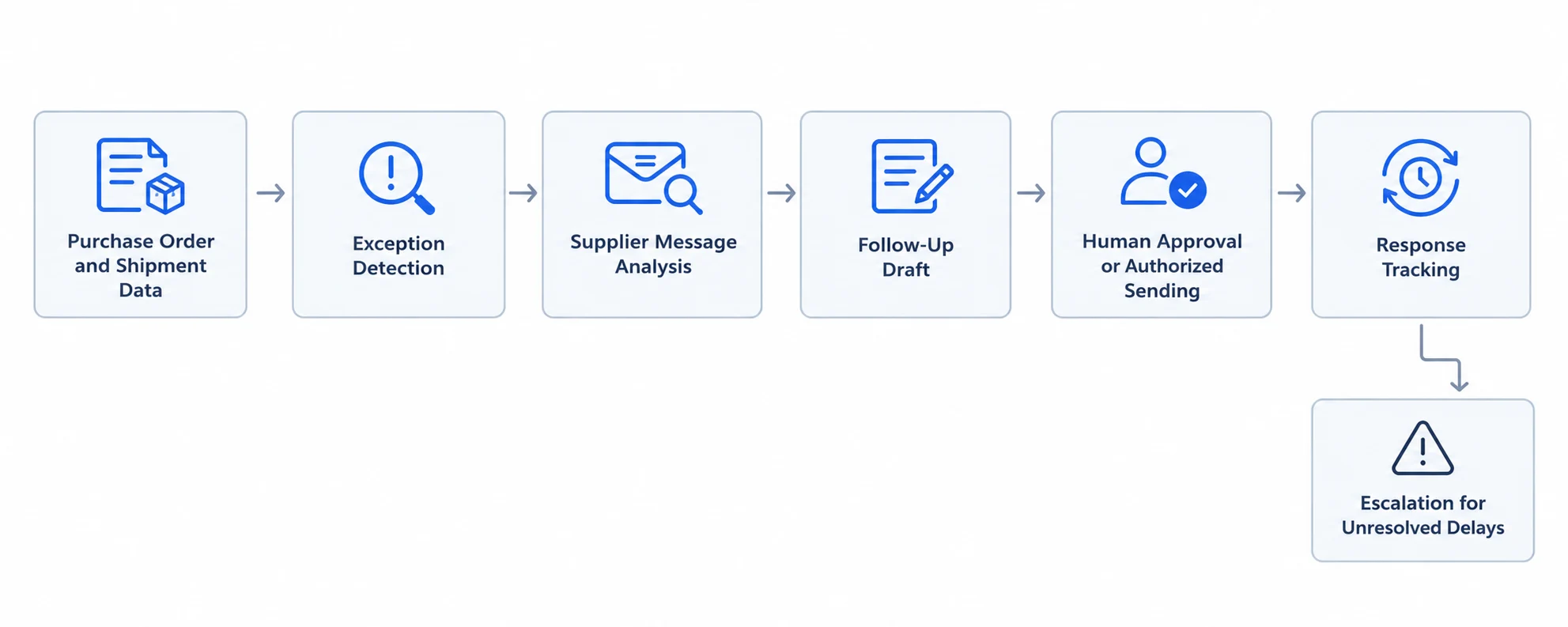
A supplier follow-up workflow generally moves through six stages, from identifying an exception to recording the outcome.
1. Collect purchase order and delivery data
The agent retrieves relevant information from connected systems, such as:
Purchase order number and line items.
Supplier name and contact details.
Order quantity and outstanding quantity.
Requested and confirmed delivery dates.
Shipment status and tracking events.
Product criticality and inventory availability.
Previous supplier communications.
Applicable escalation and approval rules.
This information provides the context needed to determine whether a follow-up is necessary.
For example, an order with no supplier confirmation may require a different message from an order that has already shipped but has an unexpected transit delay.
2. Identify purchase orders that need attention
The agent checks business conditions to find exceptions.
These might include an order awaiting confirmation beyond a defined period, a promised delivery date that has passed, a missing shipment milestone, or a supplier response that conflicts with the current purchase order record.
The most reliable systems combine deterministic rules with AI interpretation.
A date comparison should normally be handled by a rule or application logic. AI becomes more useful when the system needs to interpret a supplier's explanation, distinguish a tentative date from a confirmed commitment, or summarize the operational implications.
3. Interpret supplier communications
Suppliers may communicate through email, procurement portals, electronic data interchange (EDI), or other integrated channels.
A supplier might write:
"We are still waiting for the components required to finish your order. We expect to dispatch it early next week, subject to material availability."
An AI-enabled system could extract the following information:
Field | Interpretation |
|---|---|
Purchase order | The order referenced in the message, if reliably identified |
Current status | Production or fulfillment delayed |
Revised timing | Early next week, not an exact confirmed date |
Reason | Missing components |
Confidence | Requires assessment against the message and available records |
Recommended action | Request a confirmed dispatch date and assess the impact |
The system should not convert "early next week" into a definite delivery commitment without clarification. It should also avoid updating the official purchase order unless the business process permits it and the information meets the required validation criteria.
4. Prepare the right follow-up action
Once an exception is identified, the agent can prepare an action based on its type and urgency.
For example:
An unconfirmed order may require a confirmation request.
A late order may require an explanation and revised delivery commitment.
A critical component shortage may require immediate escalation.
A supplier response with an ambiguous date may require clarification.
An order with a valid tracking update may need monitoring rather than another email.
The message should reference the correct purchase order, item, outstanding quantity, and delivery commitment. This reduces the risk of sending generic reminders that suppliers cannot act on.
5. Send, route, or request approval
The next step depends on the organization's risk tolerance and the agent's permissions.
Low-risk reminders may be eligible for automatic sending after appropriate testing. Messages involving contractual disputes, expensive orders, delivery penalties, or production-critical materials may require human review.
Microsoft's Procurement Agent supplier follow-up documentation describes draft generation and purchaser review. Its broader supplier communications documentation explains how the agent can classify supplier emails and associate them with purchase orders.
These are useful examples of documented product capabilities, not proof that every procurement agent provides the same features.
6. Record the outcome and monitor the order
The workflow should record what happened after the follow-up.
Depending on the integration, this may include the date a message was sent, the supplier's response, a revised delivery commitment, the assigned owner, and the next action.
If the supplier does not respond within the configured period, the workflow can escalate the exception. If the supplier confirms a revised date, the system can route that commitment for validation or update an authorized field.
This final stage is essential. Sending a reminder without tracking the response merely automates one administrative task. Closing the loop creates a usable record of the supplier commitment and the next decision.
The Main Use Cases for AI Agents in Procurement
Supplier follow-up is not one task. It is a collection of related activities that can be automated to different degrees.
1. Following up on unconfirmed purchase orders
After a purchase order is sent, the buyer may need confirmation that the supplier has accepted the order, quantity, price, and delivery schedule.
An agent can identify orders that lack confirmation, prepare a supplier-specific reminder, and monitor whether a response arrives.
This is a strong starting use case because the trigger can often be defined clearly: the purchase order has been transmitted, the required confirmation has not been recorded, and a configured time threshold has passed.
Before automating this process, confirm that the system can distinguish an unconfirmed order from an order whose confirmation was received through another channel.
2. Detecting late deliveries
A late delivery alert can be triggered when an order passes its confirmed delivery date without the required receipt or shipment milestone.
A useful alert should include more than a late-status label. It should identify the purchase order, supplier, affected items, outstanding quantity, expected date, latest known status, and the next recommended action.
The agent may also summarize whether the delay affects a critical material or a replenishment order. That assessment is only as reliable as the inventory, production, and order data available to the system.
3. Extracting revised delivery commitments from emails
Suppliers frequently provide updates in natural language rather than structured fields.
An AI agent can classify the message, identify the relevant purchase order, extract the proposed date, and flag uncertainty.
The system should distinguish among:
A confirmed revised delivery date.
An estimated dispatch date.
A tentative commitment.
A delay explanation with no revised date.
A message that needs clarification.
This distinction prevents a potentially misleading supplier statement from being treated as a confirmed operational commitment.
4. Managing repeated supplier reminders
Repeated follow-up is necessary when suppliers do not respond, but sending the same email repeatedly can damage supplier relationships.
An agent can check communication history before preparing another message. It can adjust the follow-up according to how long the order has been unresolved, whether the supplier has acknowledged the issue, and whether the delivery date is approaching.
The organization should define reminder frequency, escalation thresholds, quiet periods, and rules for stopping reminders once a satisfactory response has been received.
5. Prioritizing high-impact delivery exceptions
Not every late order has the same operational consequences.
A delayed noncritical office supply may be less urgent than a missing component required to complete a production run. An agent can combine delivery status with inventory coverage, item criticality, production schedules, and customer commitments to help prioritize exceptions.
The underlying priority logic should be explicit and reviewable. AI may summarize the reasons for a high-priority alert, but the business should define which conditions warrant escalation.
6. Coordinating supplier escalation
When a supplier repeatedly misses commitments or does not respond, an agent can prepare an escalation summary for the procurement manager.
The summary may include the original commitment, revised dates, outstanding quantity, previous communications, operational impact, and proposed next steps.
This helps managers make decisions without reconstructing the order history from multiple systems. Contractual notices, supplier penalties, purchase order cancellations, and alternative sourcing decisions should remain subject to appropriate authorization.
AI Agents vs. Traditional Workflow Automation
AI agents and traditional automation solve overlapping but different problems. A practical procurement system often uses both.
Capability | Traditional workflow automation | AI-enabled agent |
|---|---|---|
Detect a missed delivery date | Strong fit for predefined rules | Can use the same rules and help interpret related context |
Send a standard reminder | Strong fit | Can personalize the message using order and communication context |
Interpret supplier emails | Usually needs structured inputs or additional logic | Can classify messages and extract likely meaning |
Handle ambiguous delivery commitments | Requires custom rules or human review | Can identify ambiguity and propose clarification |
Prioritize exceptions | Works well with defined scoring rules | Can summarize multiple factors, subject to data and validation |
Update ERP records | Can execute authorized updates | Can propose or execute updates if the integration and permissions allow |
Manage unusual cases | Often requires exception branches | May help interpret cases, but still needs guardrails and escalation |
Traditional automation is often the better choice for stable, deterministic steps. AI agents become useful when the workflow includes unstructured information, context-dependent decisions, or multiple connected actions.
For example, a rule can reliably determine that a delivery date has passed. An AI agent can help interpret a supplier's explanation, identify whether the message contains a firm new commitment, and draft the next response.
The strongest architecture does not replace every rule with AI. It uses deterministic logic for facts and controls, and AI for tasks where language understanding and contextual reasoning add value.
Which Tools Should Businesses Evaluate?
The right tool depends on the existing ERP, supplier communication channels, workflow requirements, and the degree of autonomy the business wants to allow.
The following options are starting points for evaluation, not a universal ranking. Their capabilities, packaging, licensing, and availability can change, so verify the current product documentation and test each option against real procurement scenarios.
1. Microsoft Dynamics 365 Procurement Agent
Best suited for: Organizations already using Dynamics 365 Supply Chain Management that want procurement follow-up integrated with purchase order data.
Microsoft documents a Procurement Agent that can identify unconfirmed purchase orders and late deliveries, generate supplier follow-up emails, and support purchaser review. Its supplier communications capabilities also include classifying incoming emails and associating them with relevant purchase orders.
What to evaluate:
Current preview or general-availability status in your environment.
Eligibility, licensing, and regional availability.
Supported email and purchase order scenarios.
Whether messages are drafted or sent automatically.
How supplier responses are associated with orders.
Audit trails, permissions, and exception handling.
Official documentation: Follow up on purchase orders using the Procurement Agent.
2. Microsoft Power Automate
Best suited for: Organizations that need to connect supported business applications and implement rule-based follow-up, notifications, and approval processes.
Power Automate can orchestrate workflows across connected services and includes approval capabilities. It can form part of a supplier follow-up solution even when the business does not use a dedicated procurement agent.
What to evaluate:
Availability of connectors for the ERP and communication systems.
How purchase order changes trigger workflows.
Approval routing and escalation behavior.
Handling of duplicate events and failed actions.
Licensing, monitoring, and maintenance requirements.
Official documentation: Get started with approvals in Power Automate.
Power Automate should not automatically be treated as a complete AI procurement agent. The solution may require separate AI capabilities, data integrations, and business logic.
3. Existing ERP and procurement platforms
Businesses should also assess the automation features available in their existing procurement or ERP systems before buying another platform.
An integrated solution may reduce the effort required to access purchase orders, supplier master data, receipt records, and approval workflows.
The evaluation should establish whether the existing platform supports the required AI functions, whether those functions are available under the organization's current licensing, and whether its integrations provide sufficient data quality and operational control.
4. Custom AI agent solutions
A custom solution may be appropriate when supplier communications span several systems, procurement rules are industry-specific, or existing platforms cannot support the required workflow.
A typical implementation combines an LLM or AI service, ERP APIs, email integration, business rules, monitoring, and a permission layer.
Custom development offers greater control over the workflow but also creates responsibility for testing, security, integration maintenance, observability, and ongoing model evaluation.
For many organizations, a limited workflow using existing tools is a better first step than building a broad autonomous procurement system.
How to Evaluate an AI Supplier Follow-Up Tool
A product demonstration can make supplier follow-up appear straightforward. A useful evaluation should test whether the system handles the exceptions that create real procurement work.
Use the following criteria when comparing vendors.
Evaluation criterion | Questions to ask |
|---|---|
ERP integration | Can the tool retrieve purchase order lines, confirmed dates, outstanding quantities, and receipt status from the source system? |
Supplier email handling | Can it identify the correct supplier and purchase order from an email thread? |
Date extraction | Can it distinguish confirmed dates from estimates, conditional commitments, and vague timing? |
Exception detection | Can it detect late or unconfirmed orders without generating duplicate alerts? |
Prioritization | Can it use defined business rules to distinguish critical shortages from low-impact delays? |
Communication controls | Can users approve drafts, configure sending rules, and prevent duplicate messages? |
Record updates | Are proposed updates validated before they modify official purchase order records? |
Auditability | Can the business reconstruct the source data, generated message, approval, and final action? |
Security | Are access permissions, data handling, retention, and supplier confidentiality clearly documented? |
Monitoring | Can teams detect failed integrations, incorrect classifications, and overdue unresolved exceptions? |
Cost | What are the implementation, licensing, integration, usage, and maintenance costs? |
Questions to ask during a vendor demonstration
Request a demonstration using representative scenarios rather than a prepared happy path.
What happens when a supplier mentions two purchase order numbers in one email?
How does the system handle an estimated date such as "early next week"?
What happens when the supplier replies in an existing email thread?
Can it recognize that a shipment has already been received even if the original email remains unanswered?
What happens if the ERP delivery date conflicts with the supplier's email?
Can the system stop a reminder after a valid response arrives?
How does it recover from a failed email or API call?
Can a user see why the order was flagged and which data supported the recommendation?
Can administrators restrict autonomous actions to approved scenarios?
How are performance, errors, and changes in behavior monitored?
The answers will reveal more about operational readiness than a general claim that a product can automate procurement.
Implementation: A Practical Step-by-Step Plan
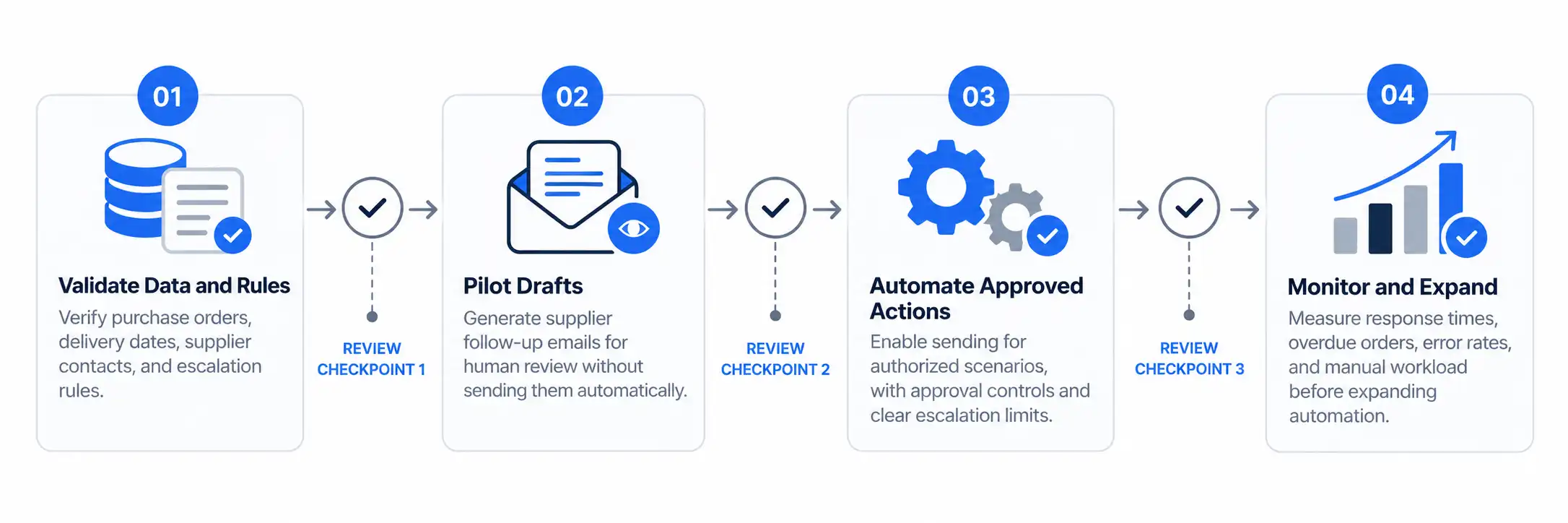
A successful deployment should begin with a narrowly defined process and expand only after the system demonstrates acceptable performance.
Step 1: Select one measurable use case
Start with a workflow that has a clear trigger, a known business owner, and an observable outcome.
Unconfirmed purchase orders are often a suitable starting point because the required confirmation status and follow-up deadline can usually be defined explicitly.
Late delivery alerts can also be a good starting point when confirmed delivery dates and goods-receipt data are reliable.
Avoid automating supplier disputes, purchase order cancellations, and complex sourcing decisions in the first phase.
Step 2: Establish reliable source data
Before introducing AI, check whether purchase order records contain the fields needed for the workflow.
At minimum, validate supplier identifiers, purchase order numbers, order-line identifiers, confirmation status, delivery dates, outstanding quantities, and receipt status.
Define which system is authoritative for each field. A supplier email, shipment feed, and ERP record may contain different dates because they represent different events.
For organizations exchanging standardized supply chain visibility events, GS1's EPCIS standard provides a framework for sharing information about what happened to an item, where and when it happened, and the relevant business context. It can help support visibility architectures, although it does not itself provide an AI agent or guarantee complete tracking data.
Step 3: Define the business rules
Write down exactly what constitutes an exception.
Examples include:
An order remains unconfirmed after the configured deadline.
A confirmed delivery date has passed and the required receipt has not occurred.
A supplier proposes a new date that needs approval.
A critical item is delayed and inventory coverage falls below the defined threshold.
A supplier has not responded after the permitted reminder sequence.
Also define when the workflow should stop. A confirmed receipt, a canceled order, a closed purchase order, or a valid supplier response may make further reminders unnecessary.
Step 4: Connect the required systems
The agent may need access to an ERP or procurement platform, email, shipment tracking, inventory data, and a workflow or notification system.
Integrations should use appropriate authentication, scoped permissions, input validation, and error handling. If the workflow cannot retrieve the correct order or supplier identity, it should stop or request review rather than guess.
Step 5: Start with draft-only communications
Initially, allow the agent to identify exceptions and prepare draft emails without sending them automatically.
Procurement staff should review whether the correct order was identified, whether the proposed message is accurate, and whether the requested action is appropriate.
Record corrections and recurring failure patterns. These provide evidence for deciding which scenarios are safe enough to automate further.
Step 6: Add controlled automation
Once draft quality and exception detection meet the organization's requirements, consider allowing automatic sending for a narrow set of low-risk scenarios.
Keep approval gates for high-value purchases, contractual commitments, disputed orders, and critical supplier relationships.
Separate the permission to read supplier communications from the permission to change purchase order records. Separate both from the permission to send messages or make financial commitments.
Step 7: Test unusual cases before expanding
Test missing fields, duplicate emails, conflicting delivery dates, multiple purchase orders in one message, supplier name variations, late-arriving shipment events, and failed integrations.
Include cases where the correct action is to do nothing. An agent that repeatedly emails a supplier after a valid confirmation has arrived can create more work than it removes.
Step 8: Monitor and improve
Review the system's behavior after deployment, including false alerts, missed exceptions, incorrect order matching, inaccurate date extraction, duplicate reminders, and failed updates.
Define an owner for investigating problems and a process for disabling an unreliable workflow.
The NIST AI Risk Management Framework and its Generative AI Profile offer useful guidance for identifying and managing AI-related risks. They are risk-management resources, not procurement-specific implementation instructions.
How to Measure the Business Impact
AI procurement automation should be evaluated against the operational problem it is intended to solve.
Counting the number of generated emails is not enough. A system can produce many messages without improving delivery reliability, reducing buyer workload, or helping the business respond to shortages.
Measure a baseline before deployment and compare it with performance during the pilot.
Metric | What it measures |
|---|---|
Supplier confirmation time | Time between purchase order submission and recorded confirmation |
Follow-up workload | Staff time spent identifying exceptions and preparing supplier communications |
Late-order detection time | Time between an exception becoming detectable and the system flagging it |
Alert precision | Proportion of alerts that represent genuine exceptions under the defined rules |
Missed exception rate | Proportion of relevant exceptions that the system fails to flag |
Supplier response time | Time between follow-up and a usable supplier response |
Delivery commitment accuracy | How often extracted or recorded dates match validated supplier commitments |
Duplicate follow-up rate | Frequency of unnecessary or repeated messages |
Escalation resolution time | Time taken to resolve an exception after escalation |
Define each metric carefully. For example, supplier response time should specify whether it measures the first response or a response that actually confirms the delivery status.
Where possible, compare similar suppliers, order types, or time periods. Account for changes in order volume, supplier performance, seasonality, and staffing before attributing improvements to AI.
How to estimate potential cost savings
A simple model can estimate whether a pilot may be worthwhile.
Illustrative assumptions, not industry benchmarks:
2,000 purchase orders require follow-up each month.
Manual identification and preparation take an average of 4 minutes per order.
An automated workflow reduces that effort by 50%.
The loaded labor cost is $30 per hour.
The current monthly effort would be:
2,000 × 4 minutes = 8,000 minutes, or approximately 133.3 hours.
At a 50% reduction, the workflow would save approximately 66.7 hours per month.
At $30 per hour, that represents approximately $2,000 in monthly labor capacity.
This is not a guaranteed cash saving. It assumes the stated volume, time, reduction, and labor cost, and excludes implementation, licensing, integration, review, and maintenance expenses. The benefit may appear as additional capacity rather than a reduction in payroll.
The calculation also excludes the possible value of earlier delay detection. That benefit should be assessed separately using the organization's actual costs of stockouts, production interruptions, expedited freight, or missed customer commitments.
Risks and Limitations of AI Supplier Follow-Up
AI agents can improve procurement workflows, but their usefulness depends on the quality of their inputs and the controls around their actions.
Incorrect purchase order matching
An email may mention multiple orders, similar product names, or an incomplete reference. A mistaken match can result in an inaccurate reminder or an incorrect record update.
Use validated identifiers and require review when the order match is ambiguous.
Misinterpreted delivery dates
Natural-language phrases may describe estimates, dispatch dates, arrival dates, or conditional commitments. Treating them as interchangeable can create incorrect expectations.
Store the meaning and status of a date, not just the date value. Where the supplier's intent is unclear, request clarification.
Incomplete shipment visibility
A late alert may be caused by a missing receipt update rather than a physically late shipment. Conversely, a shipment may be delayed even when the last recorded milestone appears normal.
Use timestamps, event sources, and status definitions to distinguish confirmed delays from missing information.
Unwanted or inaccurate supplier messages
AI-generated emails may contain unsupported assumptions, inappropriate urgency, or statements that conflict with contract terms.
Use approved templates, factual grounding, restricted actions, and review requirements for sensitive communications.
Excessive reminders and alert fatigue
Poorly designed rules can create duplicate emails and repeated notifications. Teams may then ignore alerts that genuinely need action.
Use deduplication, communication history, clear stop conditions, and escalation policies.
Data security and access control
Supplier correspondence can contain confidential pricing, commercial terms, delivery plans, and personal information.
Evaluate where data is processed, how it is retained, which services can access it, and whether the vendor's contractual terms meet organizational requirements. Apply least-privilege access and maintain audit records.
Overreliance on AI-generated recommendations
A supplier follow-up agent should not be assumed to understand every contractual, commercial, or operational consequence.
Keep human authorization for consequential decisions and provide a clear fallback when the agent lacks sufficient information.
When Should a Business Use AI Agents for Supplier Follow-Up?
AI agents are worth evaluating when procurement teams repeatedly spend time finding unconfirmed orders, interpreting supplier emails, preparing reminders, and coordinating responses across systems.
They are especially promising when the relevant data is accessible, supplier communications contain meaningful unstructured information, and the business can define clear rules for escalation and authorization.
Traditional automation may be sufficient when the process consists almost entirely of straightforward date checks and standard notifications. A custom agent may be justified when multiple systems and complex communications require coordinated interpretation, but it adds integration and governance responsibilities.
A practical starting point is to choose one workflow, measure its current workload and error rate, run a draft-only pilot, and expand only when the results justify additional autonomy.
The objective is not to remove procurement professionals from supplier management. It is to reduce repetitive administrative work and give them more time to resolve exceptions, negotiate commitments, and protect supply continuity.
Frequently Asked Questions
1. What are AI agents for supplier follow-up?
AI agents for supplier follow-up use AI and connected business systems to identify purchase orders needing attention, interpret supplier messages, prepare follow-up emails, and support exception management. Depending on the implementation, they may also track responses, route approvals, or update authorized records. Their capabilities depend on available integrations, data quality, and permissions.
2. Can AI agents automatically email suppliers about late deliveries?
Yes, some implementations can send supplier follow-up emails automatically, while others generate drafts for human review. Microsoft documents both draft-review and automatic-sending options within its Procurement Agent capabilities, subject to the product's applicable configuration and availability. Businesses should test accuracy, duplication controls, and authorization rules before enabling automatic sending.
3. How do AI agents detect late purchase orders?
A common approach is to compare the confirmed delivery date with the current date and check whether the required shipment or receipt event has occurred. The agent can then combine the result with supplier messages and other available information to recommend a follow-up. Missing or delayed system updates should be distinguished from confirmed physical delivery delays.
4. Can AI agents read supplier emails and update an ERP?
Some systems can classify supplier emails, identify related purchase orders, and extract relevant information. Updating the ERP requires an appropriate integration, validated data, and permission to change the relevant record. A prudent implementation sends ambiguous or consequential updates for review rather than treating every extracted statement as authoritative.
5. What is the difference between AI agents and procurement workflow automation?
Traditional workflow automation executes predefined rules and actions. AI agents can additionally interpret unstructured information, such as supplier emails, and recommend context-specific actions. Many effective procurement solutions combine both approaches: deterministic rules handle dates and permissions, while AI assists with message interpretation and communication drafting.
6. Which AI supplier follow-up tool should a business choose?
Start with the procurement or ERP platform already in use and assess whether it supports the required follow-up workflow. Microsoft Dynamics 365 Procurement Agent is one documented example, while Power Automate can support connected workflows and approvals. Compare integration coverage, current availability, message accuracy, auditability, access controls, and total implementation cost before selecting a solution.
7. What data is required for supplier follow-up automation?
The core data usually includes purchase order and line identifiers, supplier contact details, order confirmation status, delivery commitments, outstanding quantities, and shipment or goods-receipt status. Supplier communication history improves the quality of contextual follow-up. Inventory and production data can help prioritize delays, but only when those records are sufficiently accurate and accessible.
8. How should businesses measure the ROI of AI procurement agents?
Measure baseline staff effort, supplier confirmation time, late-order detection time, alert precision, missed exceptions, duplicate messages, and resolution time. Compare the results after implementation and include software, integration, monitoring, and review costs. Potential savings from avoided stockouts or expedited shipping should be calculated separately using actual operational data rather than assumed.
Conclusion
AI agents for supplier follow-up are most useful when they connect reliable purchase order data with supplier communications and clearly defined procurement workflows. They can help identify unconfirmed orders, prepare context-aware reminders, interpret revised commitments, and bring high-impact delivery exceptions to the attention of the right people.
The important buying decision is not whether a product claims to be autonomous. It is whether the system can identify the correct order, interpret supplier information accurately, execute only authorized actions, and provide a traceable record of what happened.
Start with a measurable use case, test it against real exceptions, and retain human oversight for consequential decisions. That approach provides a more defensible path to procurement automation than attempting to automate every supplier interaction at once.
Comments (0)
No comments yet. Be the first to share your thoughts!