How to Automate CRM Data Enrichment with AI: Tools, Workflows, and Best Practices

Author
Ravi Prajapati

Learn how to automate CRM data enrichment with AI, compare tools, build reliable workflows, and improve lead quality while protecting data accuracy.
AI CRM data enrichment automation helps businesses improve incomplete, outdated, or inconsistent customer relationship management records by combining existing CRM information with external data sources, validation rules, and AI-assisted processing. Instead of manually researching every lead or company, teams can automate data collection, field standardization, record matching, classification, and updates.
However, automation alone does not guarantee accurate data. The strongest systems combine reliable enrichment sources with deterministic validation, controlled CRM updates, and human review for uncertain matches.
For B2B companies, the practical objective is to give sales representatives better account context, improve lead routing, reduce repetitive research, and maintain a more dependable CRM database without introducing unnecessary data or compliance risks.
This guide explains how AI CRM data enrichment automation works, which tools and approaches to evaluate, how to design a reliable workflow, and how to measure whether the investment is worthwhile.
What Is AI CRM Data Enrichment Automation?
AI CRM data enrichment automation is the process of automatically improving contact, lead, and company records using external data, existing business information, software integrations, and AI-assisted interpretation.
A basic enrichment workflow might append a company’s website, industry, employee range, or headquarters location to a CRM record. An AI-assisted workflow can go further by extracting structured information from company descriptions, categorizing accounts against an ideal customer profile, identifying inconsistencies, and generating a concise account summary from approved sources.
For example, a sales representative might receive a lead with only a name, business email, and company domain. An enrichment workflow can attempt to identify the company, retrieve relevant firmographic information, standardize the industry field, and assign the lead to the appropriate sales territory.
The system should distinguish between information it has verified, information supplied by a third-party provider, and conclusions inferred by an AI model.
What data can an AI enrichment workflow add?
Data category | Examples | Business use |
|---|---|---|
Contact information | Name, business email, professional role | Lead identification and communication |
Firmographic data | Company name, industry, employee range, headquarters | Account segmentation |
Organizational data | Department, seniority, reporting relationships | Buying-group research |
Technology data | Reported technology usage or software categories | Account qualification |
Geographic data | Country, region, business location | Territory assignment |
CRM hygiene fields | Normalized names, country codes, standardized industries | Reporting and data consistency |
Account context | Company description, stated business priorities, public announcements | Sales preparation |
Qualification attributes | ICP fit category, relevant industry segment, review status | Lead routing and prioritization |
Availability varies by provider, geography, source, and subscription. Not every contact can be matched, and not every field will have a reliable value.
An AI model can also extract structured attributes from an approved source, but extraction should not be confused with independent verification. A correctly formatted answer can still contain incorrect information.
Why Automate CRM Data Enrichment?
Manual enrichment requires people to research companies, check contact details, update fields, and maintain consistent formatting. This work becomes harder when records arrive from multiple lead-generation campaigns, forms, imports, sales representatives, and third-party systems.
Automation can reduce repetitive work, but its business value depends on the quality of the data and the decisions that use it.
1. Reduce repetitive research
Sales representatives often need basic account information before contacting a prospect. A workflow can retrieve available company attributes and attach them to a CRM record before the representative opens it.
This does not eliminate sales research. It shifts routine information gathering into a repeatable process so representatives can focus on context, qualification, and conversations.
2. Improve lead qualification
Enriched fields can help a company compare incoming leads with its ideal customer profile (ICP).
For example, a software vendor may prioritize businesses in a particular industry, within a defined employee range, and operating in supported regions. Enrichment can populate the fields used by its qualification rules.
AI can help classify unstructured company descriptions, but final qualification rules should remain explicit and testable. A model should not silently invent company size, budget, purchasing authority, or intent.
3. Improve lead routing
A CRM workflow can use validated industry, geography, company size, or account ownership data to assign records to the appropriate team.
For instance, a business may route enterprise accounts to an enterprise sales team and smaller organizations to a commercial team. If a required field is missing or conflicting, the record should enter an exception queue rather than being assigned based on a guess.
4. Standardize CRM data
Different sources may represent the same value in different ways. An industry might appear as “Information Technology,” “IT Services,” or “Technology Services.”
AI-assisted classification can suggest a normalized category, while deterministic mapping rules ensure the final value matches the CRM's approved list.
Standardization improves segmentation, dashboards, reporting, and downstream automation.
5. Maintain data freshness
Company details and professional roles can change. A useful enrichment process should therefore support more than initial data collection.
Depending on the provider, the workflow may support periodic refreshes, event-triggered updates, or manually initiated re-enrichment. Refresh frequency should reflect how quickly a particular field changes and how important it is to business decisions.
How Does AI CRM Data Enrichment Automation Work?
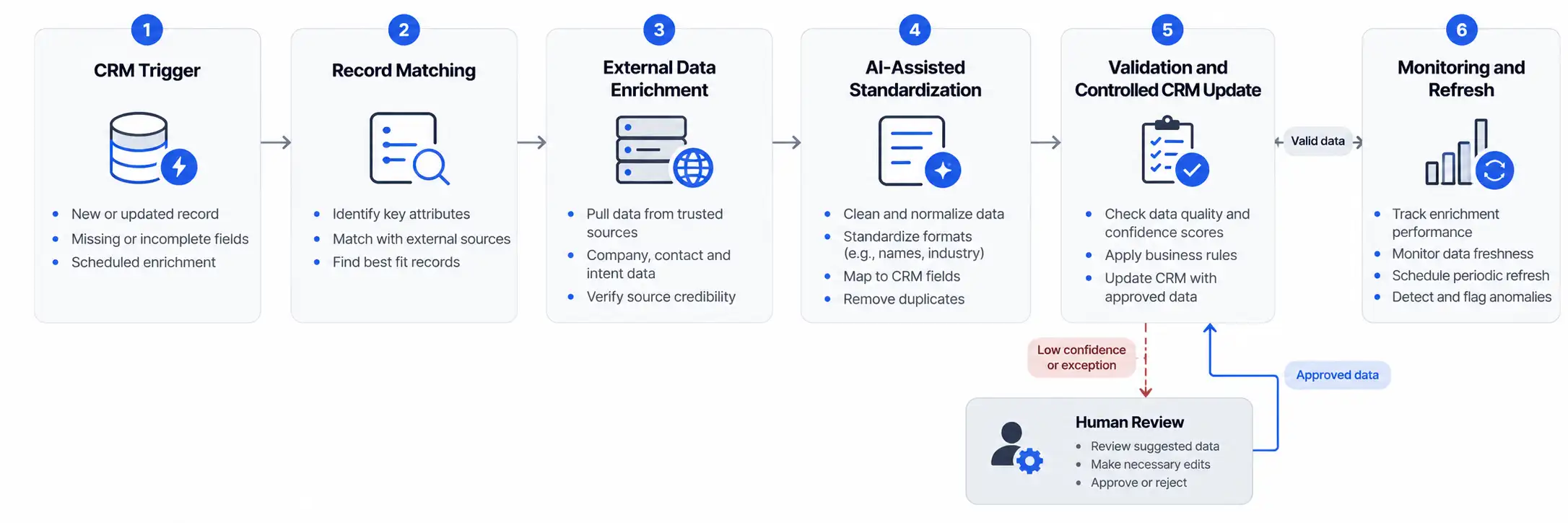
A reliable system typically combines a CRM, an enrichment provider, an orchestration layer, validation rules, and optional AI services.
The CRM stores the business record. The enrichment provider supplies available external attributes. The orchestration layer decides when the process runs. Validation checks the returned information, and the CRM update layer writes approved values into the correct fields.
The six-stage workflow
Stage 1: Trigger the workflow
A new contact is created, an account is imported, a required field is missing, or a scheduled refresh becomes due.
Stage 2: Match the record. The system uses suitable identifiers, such as a verified business email or company domain, to find a likely match. Ambiguous matches require additional checks.
Stage 3: Retrieve enrichment data. The connected provider returns available attributes. If a field is unavailable, the system should preserve the distinction between missing information and a confirmed negative result.
Stage 4: Standardize and validate. Rules normalize formats, check required fields, compare values, and reject incompatible data. AI can classify text or extract structured attributes from approved sources.
Stage 5: Update the CRM. The workflow writes approved values to designated fields, records the source and update time, and avoids overwriting authoritative existing information without permission.
Stage 6: Monitor and refresh. Logs capture successes, failures, skipped records, and uncertain matches. Scheduled or event-based processes refresh selected fields when justified.
Best Tools for AI CRM Data Enrichment Automation
There is no single best tool for every business. The right choice depends on the CRM already in use, the type of data required, coverage in target markets, integration options, update controls, and total cost.
A practical evaluation should separate three capabilities that vendors sometimes combine in one product:
Data provision: Finding or supplying company and contact attributes.
Workflow automation: Triggering enrichment, routing records, handling retries, and updating systems.
AI-assisted processing: Extracting, classifying, summarizing, or interpreting information that does not arrive in a ready-to-use structured format.
Some platforms provide several of these capabilities. Others require integrations.
1. HubSpot with Clearbit enrichment
Best for: Teams using HubSpot that need B2B contact and company enrichment.
Clearbit is now part of HubSpot. HubSpot's product information describes enrichment for contact and company records, including attributes such as industry, employee count, revenue, location, and technology usage.
The official HubSpot Clearbit product page describes these enrichment capabilities. Clearbit's integration setup documentation explains field mappings and enrichment configuration.
Potential advantages
Contact and company enrichment within a HubSpot-oriented workflow.
Configurable mapping between provider attributes and CRM properties.
Support for enriching selected records and newly created records, subject to the applicable product configuration.
Limitations to evaluate
Available functionality depends on the customer's product and subscription configuration.
Data coverage and match rates must be tested against the company's actual target audience.
Field overwrite behavior requires careful configuration.
A particularly important detail is that Clearbit's newer HubSpot-specific setup documentation warns that its enrichment mapping can overwrite existing values. Test field mappings and consider dedicated enrichment fields before activating production updates.
2. Salesforce-native automation and enrichment integrations
Best for: Organizations that already use Salesforce and want to retain governance within their CRM environment.
Salesforce-based teams can evaluate native CRM automation, approved AppExchange integrations, and external enrichment providers that connect to Salesforce. The precise architecture depends on the Salesforce products and services the organization has licensed.
A typical design uses Salesforce automation to detect records requiring enrichment, calls an approved integration, validates returned attributes, and updates permitted fields.
Potential advantages
CRM-centered permissions and record ownership.
Existing automation and reporting can support enrichment operations.
Field-level rules can be aligned with the sales process.
Limitations to evaluate
Not every Salesforce edition or integration offers the same capabilities.
External data coverage depends on the selected provider.
API usage, automation limits, integration licensing, and maintenance can affect the total cost.
Do not assume that using Salesforce automatically provides comprehensive external contact data. Evaluate the data source separately from the workflow engine.
3. Dedicated B2B enrichment providers
Best for: Businesses that need external firmographic or contact information at scale.
A dedicated provider supplies attributes that can be mapped into the CRM. Depending on the service, it may support real-time enrichment, batch processing, periodic refreshes, or APIs.
For example, Clearbit's official enrichment documentation describes real-time updates and configurable field mappings for its documented HubSpot integration.
When evaluating any provider, check:
Coverage for the countries and industries that matter to your business.
Match rates on your own records.
Field-level accuracy and freshness.
Source transparency and data provenance.
API limits, usage credits, and failure handling.
Integration support and overwrite controls.
Vendor-published coverage claims should be treated as provider claims until verified against a representative sample of your CRM records.
4. Workflow automation platforms
Best for: Businesses connecting a CRM with multiple data sources and internal systems.
Workflow automation tools can coordinate triggers, API requests, conditional logic, and CRM updates. They are particularly useful when the enrichment provider does not offer the exact workflow a company needs.
A workflow may receive a new CRM record, call an enrichment API, normalize selected values, validate the response, and write approved fields back to the CRM.
The workflow engine does not necessarily provide the underlying contact data. Data availability depends on the connected provider or source.
5. LLMs for unstructured data enrichment
Best for: Extracting structured information from approved company descriptions, public documents, reports, and other unstructured sources.
A large language model (LLM) can transform unstructured text into fields such as company description, stated product category, reported geographic markets, or a summary of publicly stated business priorities.
For example, a model could extract a company's explicitly stated target market from an approved source and return a structured JSON object for downstream validation.
However, an LLM is not automatically a verified contact database. It may misinterpret text, confuse similarly named organizations, or produce plausible but unsupported information. Use source references, confidence thresholds, schema validation, and human review for consequential decisions.
Tool comparison at a glance
Approach | Main strength | Main limitation | Best starting point |
|---|---|---|---|
HubSpot with Clearbit | B2B enrichment in a HubSpot-oriented setup | Product configuration and field-overwrite behavior need checking | HubSpot-based sales teams |
Salesforce plus integrations | CRM-centered workflow control | External data depends on the provider and integration | Salesforce-based organizations |
Dedicated enrichment provider | External company and contact attributes | Coverage and freshness vary by market and field | Teams needing richer B2B records |
Workflow automation platform | Connects multiple systems and controls process steps | Does not inherently guarantee access to quality data | Businesses with multi-system workflows |
LLM-based extraction | Converts approved unstructured text into structured fields | Can produce unsupported or incorrect outputs | Teams processing text-heavy business information |
Practical recommendation: Start with the enrichment functionality already available in your CRM environment if it meets your data requirements. Add a dedicated provider when coverage is insufficient, and introduce an LLM only when unstructured information or nuanced classification creates a specific need.
How to choose an enrichment tool
Score candidate solutions using the same test dataset and requirements.
Evaluation criterion | Questions to ask |
|---|---|
Data coverage | What proportion of eligible records receives the required fields? |
Accuracy | How many returned values are correct when independently checked? |
Freshness | When was each field last verified or updated? |
Integration | Does the tool support the required CRM objects and field types? |
Governance | Can you restrict overwrites, retain provenance, and review changes? |
Security | Are access controls, data retention, and contractual protections adequate? |
Operational reliability | Are failures logged, retried safely, and made visible? |
Total cost | What are the subscription, usage, implementation, and maintenance costs? |
A short proof of concept using a representative sample is more useful than choosing a provider based on a long feature list.
Best Tools for AI CRM Data Enrichment Automation
There is no single best tool for every business. The right choice depends on the CRM already in use, the type of data required, coverage in target markets, integration options, update controls, and total cost.
A practical evaluation should separate three capabilities that vendors sometimes combine in one product:
Data provision: Finding or supplying company and contact attributes.
Workflow automation: Triggering enrichment, routing records, handling retries, and updating systems.
AI-assisted processing: Extracting, classifying, summarizing, or interpreting information that does not arrive in a ready-to-use structured format.
Some platforms provide several of these capabilities. Others require integrations.
1. HubSpot with Clearbit enrichment
Best for: Teams using HubSpot that need B2B contact and company enrichment.
Clearbit is now part of HubSpot. HubSpot's product information describes enrichment for contact and company records, including attributes such as industry, employee count, revenue, location, and technology usage.
The official HubSpot Clearbit product page describes these enrichment capabilities. Clearbit's integration setup documentation explains field mappings and enrichment configuration.
Potential advantages
Contact and company enrichment within a HubSpot-oriented workflow.
Configurable mapping between provider attributes and CRM properties.
Support for enriching selected records and newly created records, subject to the applicable product configuration.
Limitations to evaluate
Available functionality depends on the customer's product and subscription configuration.
Data coverage and match rates must be tested against the company's actual target audience.
Field overwrite behavior requires careful configuration.
A particularly important detail is that Clearbit's newer HubSpot-specific setup documentation warns that its enrichment mapping can overwrite existing values. Test field mappings and consider dedicated enrichment fields before activating production updates.
2. Salesforce-native automation and enrichment integrations
Best for: Organizations that already use Salesforce and want to retain governance within their CRM environment.
Salesforce-based teams can evaluate native CRM automation, approved AppExchange integrations, and external enrichment providers that connect to Salesforce. The precise architecture depends on the Salesforce products and services the organization has licensed.
A typical design uses Salesforce automation to detect records requiring enrichment, calls an approved integration, validates returned attributes, and updates permitted fields.
Potential advantages
CRM-centered permissions and record ownership.
Existing automation and reporting can support enrichment operations.
Field-level rules can be aligned with the sales process.
Limitations to evaluate
Not every Salesforce edition or integration offers the same capabilities.
External data coverage depends on the selected provider.
API usage, automation limits, integration licensing, and maintenance can affect the total cost.
Do not assume that using Salesforce automatically provides comprehensive external contact data. Evaluate the data source separately from the workflow engine.
3. Dedicated B2B enrichment providers
Best for: Businesses that need external firmographic or contact information at scale.
A dedicated provider supplies attributes that can be mapped into the CRM. Depending on the service, it may support real-time enrichment, batch processing, periodic refreshes, or APIs.
For example, Clearbit's official enrichment documentation describes real-time updates and configurable field mappings for its documented HubSpot integration.
When evaluating any provider, check:
Coverage for the countries and industries that matter to your business.
Match rates on your own records.
Field-level accuracy and freshness.
Source transparency and data provenance.
API limits, usage credits, and failure handling.
Integration support and overwrite controls.
Vendor-published coverage claims should be treated as provider claims until verified against a representative sample of your CRM records.
4. Workflow automation platforms
Best for: Businesses connecting a CRM with multiple data sources and internal systems.
Workflow automation tools can coordinate triggers, API requests, conditional logic, and CRM updates. They are particularly useful when the enrichment provider does not offer the exact workflow a company needs.
A workflow may receive a new CRM record, call an enrichment API, normalize selected values, validate the response, and write approved fields back to the CRM.
The workflow engine does not necessarily provide the underlying contact data. Data availability depends on the connected provider or source.
5. LLMs for unstructured data enrichment
Best for: Extracting structured information from approved company descriptions, public documents, reports, and other unstructured sources.
A large language model (LLM) can transform unstructured text into fields such as company description, stated product category, reported geographic markets, or a summary of publicly stated business priorities.
For example, a model could extract a company's explicitly stated target market from an approved source and return a structured JSON object for downstream validation.
However, an LLM is not automatically a verified contact database. It may misinterpret text, confuse similarly named organizations, or produce plausible but unsupported information. Use source references, confidence thresholds, schema validation, and human review for consequential decisions.
Tool comparison at a glance
Approach | Main strength | Main limitation | Best starting point |
|---|---|---|---|
HubSpot with Clearbit | B2B enrichment in a HubSpot-oriented setup | Product configuration and field-overwrite behavior need checking | HubSpot-based sales teams |
Salesforce plus integrations | CRM-centered workflow control | External data depends on the provider and integration | Salesforce-based organizations |
Dedicated enrichment provider | External company and contact attributes | Coverage and freshness vary by market and field | Teams needing richer B2B records |
Workflow automation platform | Connects multiple systems and controls process steps | Does not inherently guarantee access to quality data | Businesses with multi-system workflows |
LLM-based extraction | Converts approved unstructured text into structured fields | Can produce unsupported or incorrect outputs | Teams processing text-heavy business information |
Practical recommendation: Start with the enrichment functionality already available in your CRM environment if it meets your data requirements. Add a dedicated provider when coverage is insufficient, and introduce an LLM only when unstructured information or nuanced classification creates a specific need.
How to choose an enrichment tool
Score candidate solutions using the same test dataset and requirements.
Evaluation criterion | Questions to ask |
|---|---|
Data coverage | What proportion of eligible records receives the required fields? |
Accuracy | How many returned values are correct when independently checked? |
Freshness | When was each field last verified or updated? |
Integration | Does the tool support the required CRM objects and field types? |
Governance | Can you restrict overwrites, retain provenance, and review changes? |
Security | Are access controls, data retention, and contractual protections adequate? |
Operational reliability | Are failures logged, retried safely, and made visible? |
Total cost | What are the subscription, usage, implementation, and maintenance costs? |
A short proof of concept using a representative sample is more useful than choosing a provider based on a long feature list.
How to Build an AI CRM Data Enrichment Workflow
The following implementation approach is suitable for teams using a CRM with automation capabilities and one or more approved enrichment sources.
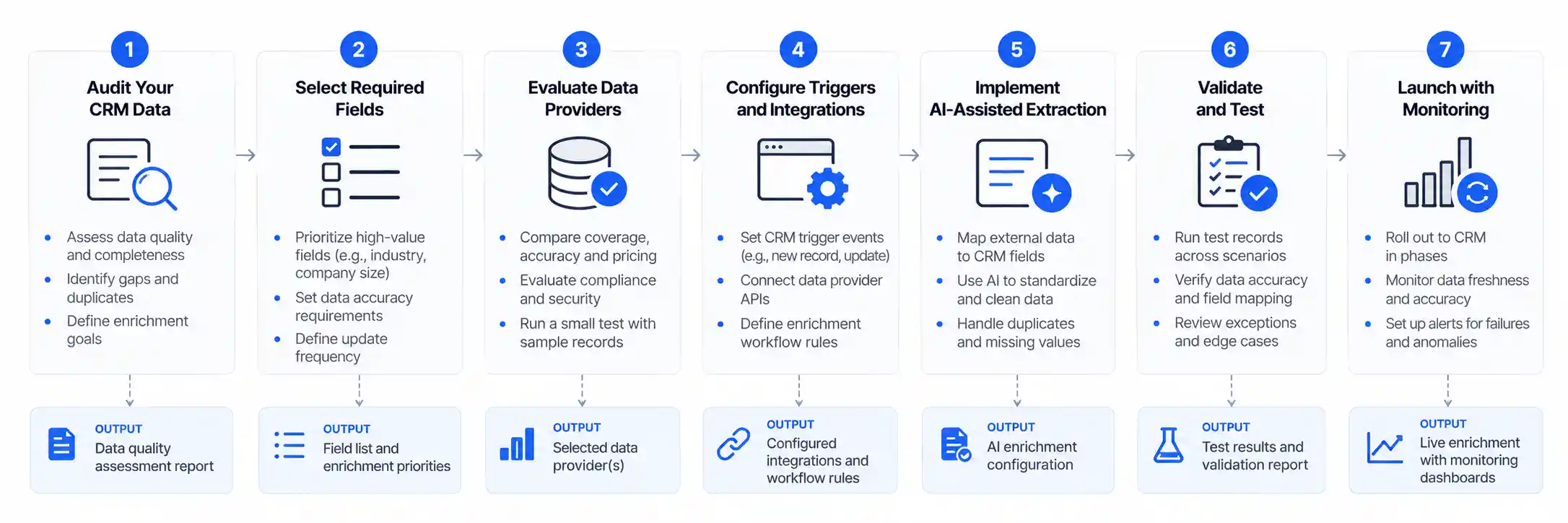
Step 1: Audit existing CRM data
Before buying another tool, identify the records and fields that create the most operational problems.
Examine:
Missing company domains and industry classifications.
Duplicate contacts and company records.
Outdated professional roles.
Inconsistent country, region, and industry values.
Unverified email addresses.
Conflicting information across marketing, sales, and customer systems.
Separate contact-level problems from company-level problems. A company domain may help match an account, while a professional email or another approved identifier may help match a contact.
Do not assume that a missing field always requires external enrichment. Some problems are better solved by correcting an import, updating a form, or enforcing a CRM validation rule.
Step 2: Define the fields that matter
Choose a limited set of enrichment fields linked to an actual business decision.
For example, a B2B software company may initially prioritize:
Company industry.
Employee range.
Headquarters country.
Company website.
Contact's current professional role.
Record source and last enrichment date.
Define the accepted values, required formats, source preferences, and overwrite permissions for each field.
Avoid collecting additional personal information simply because a provider makes it available. Every field should have a documented business purpose.
Step 3: Select the enrichment source
Map each required field to an authoritative or suitably reliable source.
A dedicated provider may be suitable for firmographic information. A company's official website may be more appropriate for its published product description. A CRM-owned field may be the preferred source for account ownership.
Where sources conflict, define which source takes precedence and how the conflict is recorded.
The workflow should not treat all returned fields as equally reliable. A current, explicitly sourced company website may support a different confidence level from an old third-party estimate.
Step 4: Build the trigger and matching logic
Choose when enrichment should run:
When a new lead is created.
When a company record is missing required fields.
After an approved data import.
When a record becomes eligible for a refresh.
When a sales representative requests enrichment.
Use stable identifiers where possible. Names alone are often insufficient because organizations and individuals can share similar names.
If the system cannot establish a reliable match, it should stop automatic updates and send the record for review.
Step 5: Add AI only where it improves the process
AI is useful when a field requires interpretation rather than simple retrieval.
Examples include:
Categorizing a company description into an approved industry taxonomy.
Extracting stated products and markets from a source document.
Summarizing relevant company information for a sales representative.
Suggesting a normalized category when source terminology is inconsistent.
For each AI task, define the permitted input, expected output schema, acceptable sources, and behavior when evidence is insufficient.
Require the model to return an explicit unknown or review status rather than inventing a value to fill every field.
Step 6: Validate every proposed update
Before writing data into the CRM, check:
The record match is sufficiently reliable.
Returned values have the expected format and type.
Controlled fields use approved values.
The source is permitted for the intended use.
Existing authoritative information will not be overwritten improperly.
Required provenance and timestamps are recorded.
Low-confidence or conflicting results enter a review queue.
For example, an AI model may propose that a company belongs to the healthcare industry. A validation step should check whether the value is permitted by the CRM taxonomy and whether the source supports that classification.
Step 7: Test, monitor, and improve
Begin with a limited set of records. Compare enriched values against independently verified information, measure failures, and inspect changes before expanding the workflow.
Track the number of records processed, successful matches, correct values, failed updates, exceptions, and cost per usable enriched record.
Monitor these metrics after launch. Data quality can deteriorate as source coverage, business needs, CRM schemas, or provider behavior changes.
A Practical Example: Automating Lead Enrichment for a B2B SaaS Company
Consider a hypothetical B2B SaaS company that receives leads through demo requests, webinars, and downloadable resources. Its CRM captures names, business email addresses, and sometimes company names, but industry and company size are frequently missing.
The sales operations team wants to enrich these records before routing them to sales representatives.
Before automation
The team has to research company websites, find relevant business information, update CRM fields, and determine whether each lead fits the company's target market. Inconsistent terminology also creates problems for reporting.
After automation
The team configures the following workflow:
A new lead enters the CRM.
The system checks whether the lead already exists and attempts a reliable match.
An enrichment provider supplies available company attributes.
Validation rules standardize industry, geography, and employee-range values.
An AI model summarizes approved company information where that summary helps sales preparation.
The workflow updates permitted fields and records the source and timestamp.
Records with conflicting company identities or uncertain values enter a review queue.
The CRM routes eligible leads according to explicit qualification rules.
This is a hypothetical implementation example, not a claim about measured results at a real company.
The important design decision is that the model does not independently decide every field. External sources supply available data, deterministic rules enforce consistency, and AI handles the narrow tasks that require language interpretation.
What should the business measure?
The company should compare the automated workflow with its previous process using a representative dataset.
Useful measurements include:
The proportion of eligible records successfully matched.
Accuracy of enriched fields against independent checks.
Percentage of records requiring human review.
Time spent on manual enrichment before and after deployment.
Cost per usable enriched record.
Percentage of updates rejected or rolled back.
Lead-routing error rate before and after implementation.
The business should establish a baseline before deployment. It should not assume that enrichment automatically increases conversion rates or revenue without measuring the effect.
How to Measure the ROI of AI CRM Data Enrichment
The financial case depends on whether enrichment creates enough useful data to offset provider fees, implementation costs, maintenance, and review work.
A straightforward model is:
Net monthly benefit = labor savings + other verified operational benefits − total monthly enrichment costs
ROI = (monthly benefits − monthly costs) ÷ monthly costs × 100%
For example, suppose a company estimates that automation saves 40 hours of manual research each month and values that time at $30 per hour. Its estimated monthly labor benefit is $1,200.
If provider fees, platform costs, and ongoing maintenance total $800 per month, the estimated net monthly benefit is $400, and the monthly ROI on those costs is 50%.
These numbers are illustrative assumptions, not industry benchmarks. The calculation also assumes that the saved time creates usable capacity or avoids actual expenditure.
A more complete model should include implementation expenses, review effort, failed matches, and the cost of incorrect updates.
Calculate cost per usable enriched record
A low price per API request does not necessarily mean a low cost per useful record.
Use this formula:
Cost per usable enriched record = total enrichment costs ÷ number of records meeting your quality criteria
The numerator should include provider fees, allocated platform costs, and relevant operating expenses. The denominator should count records that meet predefined quality requirements, not merely records for which an API returned a response.
This metric helps compare vendors with different coverage, pricing structures, and field accuracy.
Risks and Limitations of AI CRM Data Enrichment
Automation can improve data consistency, but it can also scale errors. The appropriate controls depend on the type of information, the consequences of an incorrect update, and the sensitivity of the data.
Incorrect matches and hallucinated values
A company name may refer to several organizations, while a person's role may have changed since the source was updated. An LLM may also produce plausible information that is not supported by its input.
Control: Require reliable identifiers, validate returned values, preserve source information, and send ambiguous matches for human review.
Overwriting trusted CRM data
A provider may return a different value from the one a customer or sales representative supplied. Automatically replacing the existing value can destroy useful information.
Control: Establish field-level overwrite policies. Store external values in separate enrichment fields when appropriate, and promote them into authoritative fields only under defined rules.
Stale data
An enrichment result may be accurate when collected but outdated when used. Refreshing every field at the same frequency can also waste credits and processing capacity.
Control: Record update timestamps, prioritize fields that materially affect decisions, and set refresh intervals based on business need and available source information.
Privacy and compliance
Personal data collected or inferred for CRM enrichment may be subject to privacy and marketing rules that vary by jurisdiction and use case.
The European Commission's explanation of the GDPR data protection principles covers lawfulness, purpose limitation, data minimization, accuracy, storage limitation, security, and accountability.
Businesses processing personal data within the GDPR's scope should assess their lawful basis, transparency obligations, retention practices, and applicable data-subject rights. Other jurisdictions may impose different or additional requirements.
Control: Document the purpose of each field, assess the source and permitted use of the data, restrict access, define retention rules, and involve privacy or legal specialists when needed.
Security and third-party access
Enrichment often requires sending identifiers or CRM fields to external services. This creates questions about access, retention, subprocessors, and data handling.
Control: Review vendor security documentation and contractual terms, grant only necessary permissions, avoid sending unnecessary fields, and test access controls before deployment.
Hidden operating costs
An apparently simple workflow may require integration development, API usage, error handling, monitoring, and ongoing maintenance.
Control: Evaluate the full cost of ownership and run a limited proof of concept before committing to a broad rollout.
Data Governance Best Practices for AI-Powered CRM Enrichment
Reliable enrichment requires explicit ownership and rules, not just an integration.
A practical governance policy should define the following:
Governance area | Recommended control |
|---|---|
Data ownership | Assign an owner for each critical CRM field |
Approved sources | Define permitted providers and source types by field |
Data provenance | Store source identifiers or URLs where appropriate, provider, and enrichment timestamp |
Update authority | Specify which sources may overwrite existing values |
AI-generated content | Label inferred or summarized fields and retain supporting evidence |
Validation | Use format checks, approved taxonomies, and confidence thresholds |
Access | Apply least-privilege permissions to integrations and users |
Retention | Define how long enriched data and supporting records should be retained |
Monitoring | Track failures, stale data, overrides, and review outcomes |
Accountability | Maintain logs and a process for correcting or rolling back bad updates |
The NIST AI Risk Management Framework provides a voluntary framework for managing AI risks and incorporating trustworthiness considerations into the design, development, use, and evaluation of AI systems.
For CRM enrichment, its broader risk-management approach can inform ownership, evaluation, monitoring, and documentation. It does not certify a vendor or automatically establish legal compliance.
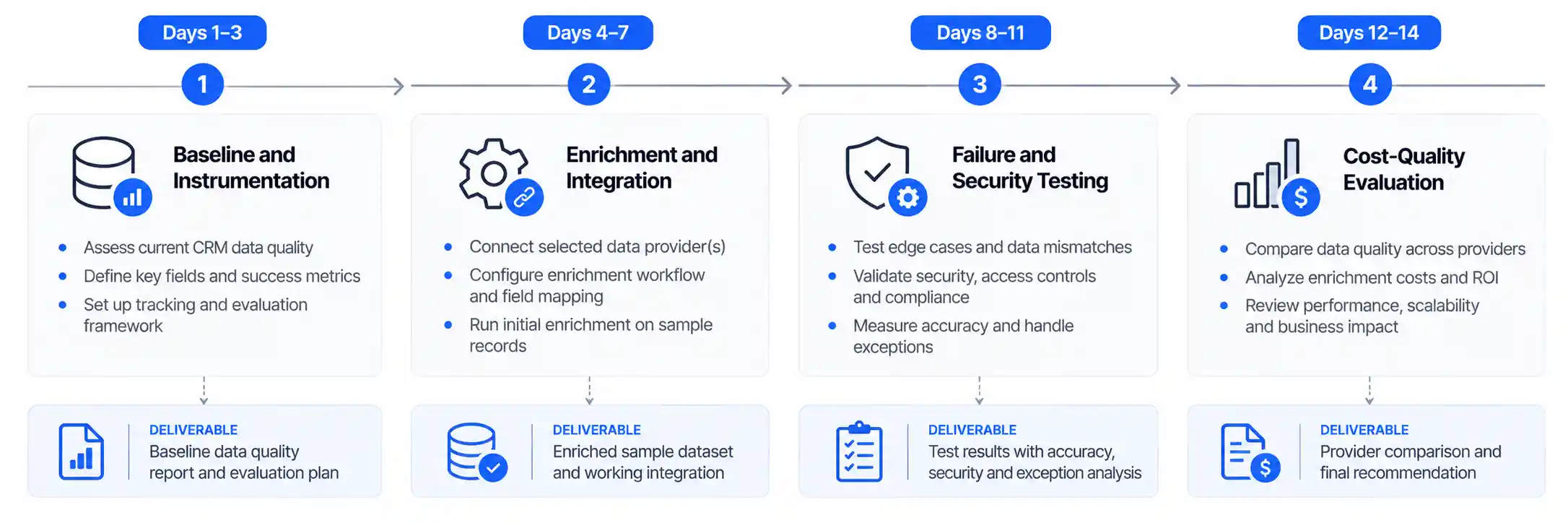
A Two-Week Proof of Concept for CRM Enrichment
A small, controlled pilot helps a business test data quality and operational fit before scaling.
The schedule below is a suggested project plan, not a vendor guarantee.
Period | Activities | Deliverable |
|---|---|---|
Days 1–2 | Audit CRM data and identify high-value fields | Baseline and field requirements |
Days 3–4 | Select a representative sample and shortlist providers | Evaluation dataset and shortlist |
Days 5–7 | Configure integration, matching, and field mappings | Working test workflow |
Days 8–9 | Test accuracy, duplicates, missing fields, and overwrites | Quality and exception report |
Days 10–11 | Review privacy, permissions, logging, and failure handling | Governance sign-off or issue list |
Days 12–14 | Compare cost, quality, and time saved; decide next steps | Go, revise, or stop recommendation |
The pilot should include difficult records, not just easy matches. Include duplicate company names, missing domains, conflicting attributes, unsupported industries, and records from each important target market.
Before testing begins, establish minimum acceptable thresholds for field accuracy, match rate, review volume, and cost per usable record. The team should agree on these thresholds before seeing the results to avoid selecting a provider based on favorable but incomplete outcomes.
Frequently Asked Questions
1. What is AI CRM data enrichment automation?
AI CRM data enrichment automation uses external data sources, CRM integrations, validation rules, and sometimes AI models to improve incomplete or outdated CRM records. It can automate company-data retrieval, field standardization, text extraction, classification, and controlled updates. The accuracy of the result depends on source quality, record matching, and validation rather than on AI alone.
2. Can AI automatically enrich CRM leads?
Yes. A configured workflow can enrich eligible leads when they are created or when selected fields need refreshing. It can retrieve available data, standardize fields, and update approved CRM properties. However, missing matches, conflicting information, and uncertain AI-generated values should be handled through exception rules or human review.
3. What is the difference between CRM data enrichment and data cleansing?
Data enrichment adds information that is missing from a record, often using an external source. Data cleansing improves existing information by correcting formatting, resolving duplicates, standardizing values, or identifying errors. The two processes complement each other. A robust CRM data-quality program often needs both.
4. Which CRM enrichment tool is best for B2B companies?
The best option depends on the CRM, target geography, required attributes, budget, and governance needs. HubSpot users may evaluate Clearbit enrichment, while Salesforce users may consider CRM-native automation with approved enrichment integrations. Companies should test competing solutions on the same representative dataset and compare accuracy, coverage, cost, integration behavior, and data controls.
5. Can ChatGPT or another LLM enrich CRM records?
An LLM can extract or classify information from approved text sources and produce structured output for a CRM workflow. It is not automatically a verified contact-data provider. Use explicit source requirements, output schemas, deterministic checks, and review thresholds. Avoid treating unsupported model-generated statements as confirmed facts.
6. How often should CRM records be enriched?
The right frequency depends on the field and how quickly it changes. Company industry may need less frequent review than a contact's current professional role. Refresh high-value fields when a meaningful event occurs or at a defined interval, while avoiding unnecessary API usage and repeated processing of unchanged data.
7. Is automated CRM data enrichment compliant with privacy laws?
It can be designed to support compliance, but automation itself does not guarantee compliance. Businesses must assess the applicable jurisdiction, data source, purpose, lawful basis where required, transparency obligations, retention, security, and individual rights. Legal and privacy requirements should be reviewed before processing personal information at scale.
8. How do you measure the ROI of CRM data enrichment?
Measure labor saved, verified operational benefits, provider and platform fees, implementation and maintenance costs, and the cost of reviewing or correcting errors. Track cost per usable enriched record alongside match rate and field accuracy. Compare results against a documented baseline rather than assuming that more populated fields automatically produce more revenue.
Conclusion: Automate Repetitive Enrichment, Not Trust
AI CRM data enrichment automation works best when it combines dependable external data with clear matching logic, field-level controls, and measurable quality checks.
Start with the CRM fields that have a direct impact on qualification, routing, reporting, or sales preparation. Test an enrichment provider on representative records, define how conflicting values are handled, and introduce AI only where interpretation or unstructured-data extraction provides a clear advantage.
The most important success measure is not the number of fields filled automatically. It is the number of records that become more useful and accurate at a sustainable cost.
A controlled pilot, supported by provenance, validation, privacy safeguards, and ongoing monitoring, gives businesses a sound basis for deciding whether to expand the workflow.
Comments (0)
No comments yet. Be the first to share your thoughts!