AI Invoice Processing Tools Compared on Duplicate and Exception Detection

Author
Ravi Prajapati
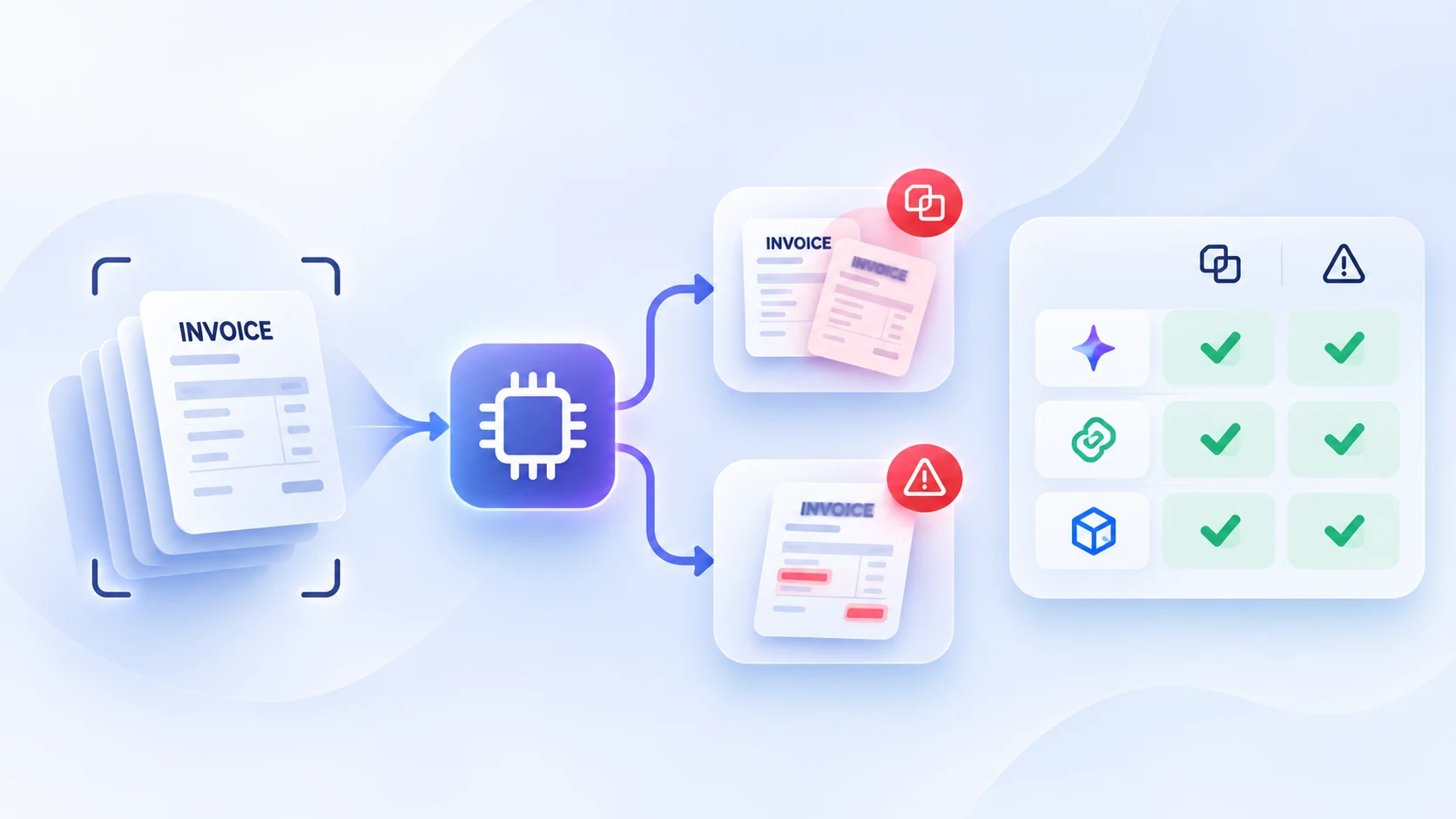
Compare AI invoice processing tools for duplicate detection and exception handling. Learn benchmark criteria, accuracy metrics, risks, and how to choose.
AI invoice processing tools help finance teams extract invoice information, validate documents, identify potential duplicate invoices, match bills against purchase orders and receipts, and route exceptions for review. However, not every tool detects the same types of duplicates or handles invoice exceptions in the same way.
A tool that recognizes an identical PDF may miss a duplicate invoice with a changed invoice number. A system that flags every invoice with a similar amount may catch more suspicious transactions but also create unnecessary reviews. For accounts payable teams, the real question is not simply whether a tool uses AI. It is whether the tool can identify risky invoices accurately, explain why it flagged them, and support a controlled resolution before payment.
There is no single, universally accepted public benchmark that ranks all invoice processing tools on duplicate detection and exception handling using the same dataset, test conditions, and scoring rules. Vendor claims and feature descriptions are useful starting points, but they do not establish comparative accuracy.
This article compares the approaches documented by selected platforms and explains how finance teams can run a meaningful benchmark using their own invoice data.
Key Takeaways
Duplicate invoice detection should be tested using both exact duplicates and near-duplicates.
Exception handling includes more than flagging mismatched invoice fields. It also involves assigning ownership, explaining discrepancies, managing approvals, and recording resolution.
OCR or invoice extraction accuracy is not the same as duplicate detection accuracy.
Vendor-reported AI capabilities should not be treated as independently verified benchmark scores.
A useful benchmark should measure precision, recall, false positives, false negatives, exception resolution time, and auditability.
Human review remains important for ambiguous duplicate candidates, legitimate invoice revisions, credit notes, and unusual transactions.
The best tool depends on invoice volume, ERP integration, supplier complexity, legal entities, control requirements, and the finance team's workflow.
What Is AI Invoice Processing?
AI invoice processing is the use of artificial intelligence, machine learning, document recognition, and workflow automation to handle invoice data and accounts payable activities.
A typical invoice automation workflow includes:
Invoice intake: Receive invoices through email, supplier portals, uploads, electronic invoicing, or other channels.
Data extraction: Capture fields such as supplier name, invoice number, invoice date, due date, currency, tax, total amount, and line items.
Data validation: Check whether the extracted information is complete and consistent.
Duplicate detection: Compare the invoice with existing invoice records to identify possible repeat submissions.
Invoice matching: Compare invoice data with purchase orders and goods receipt records.
Exception handling: Route mismatches, missing information, and suspicious records for review.
Approval and posting: Obtain the required approval and submit the invoice to the accounting or ERP system.
Payment controls: Apply payment checks and reconciliation processes.
IBM describes automated invoice processing as a workflow involving extraction, validation, matching, and exception handling. Low-confidence fields may be routed for human review rather than treated as reliable automatically. IBM's overview of automated invoice processing provides further context.
Why Duplicate Detection and Exception Handling Need Separate Evaluation
Duplicate detection and exception handling are related, but they measure different capabilities.
Duplicate detection answers:
Does this invoice appear to represent a transaction that has already been submitted or recorded?
Exception handling answers:
What should happen when the invoice does not satisfy the company's processing rules?
For example, an invoice might be flagged as a duplicate because its supplier, invoice number, amount, and date resemble a previously submitted bill. The exception workflow must then show the suspected match, assign the case to a reviewer, allow the reviewer to confirm or reject the duplicate, and preserve the resolution.
A platform may perform well at identifying duplicate documents but offer limited workflow flexibility. Another may provide sophisticated exception routing while relying on relatively strict duplicate matching rules.
These capabilities should therefore be evaluated independently before assessing the complete AP automation process.
What Is a Duplicate Invoice?
A duplicate invoice is a second invoice submission or record that represents the same underlying payable transaction as an existing invoice.
Duplicate invoices can occur because:
A supplier sends the same invoice more than once.
An invoice arrives through email and a supplier portal.
A scanned document is uploaded again.
A supplier resends an invoice with a slightly changed reference number.
Two legal entities receive the same invoice.
A supplier has multiple records in the vendor master.
An invoice is entered manually after the original was processed electronically.
The most obvious duplicate is an identical document. More difficult cases involve differences in invoice number, supplier naming, amount, date, or document format.
Exact Duplicates vs. Near-Duplicates
Duplicate Type | Example | Detection Challenge |
|---|---|---|
Identical document | Same invoice PDF uploaded twice | File or document-level comparison |
Same invoice number and supplier | Supplier ABC, invoice INV-105, $2,400 | Exact field matching |
Invoice number variation | INV-105 vs. INV105 | Normalization |
Minor invoice number typo | INV-105 vs. INV-10S | Fuzzy matching |
Supplier name variation | ABC Services Ltd vs. ABC Services | Vendor identity resolution |
Same transaction, different amount format | $2,400.00 vs. 2400 | Numeric normalization |
Same transaction, changed invoice date | Original date vs. resend date | Multi-field matching |
Cross-channel duplicate | Email copy and portal copy | Shared invoice history |
Cross-entity duplicate | Invoice appears in two company entities | Cross-entity comparison |
The important distinction is that a near-duplicate is a candidate, not automatically a confirmed duplicate. Two invoices from the same supplier with similar values can be legitimate recurring purchases.
Research on AI and machine learning in accounts payable discusses the use of invoice number, supplier information, amount, and date as signals for duplicate detection, including fuzzy matching for invoice-number variations. The MDPI research article provides an academic discussion of these techniques.
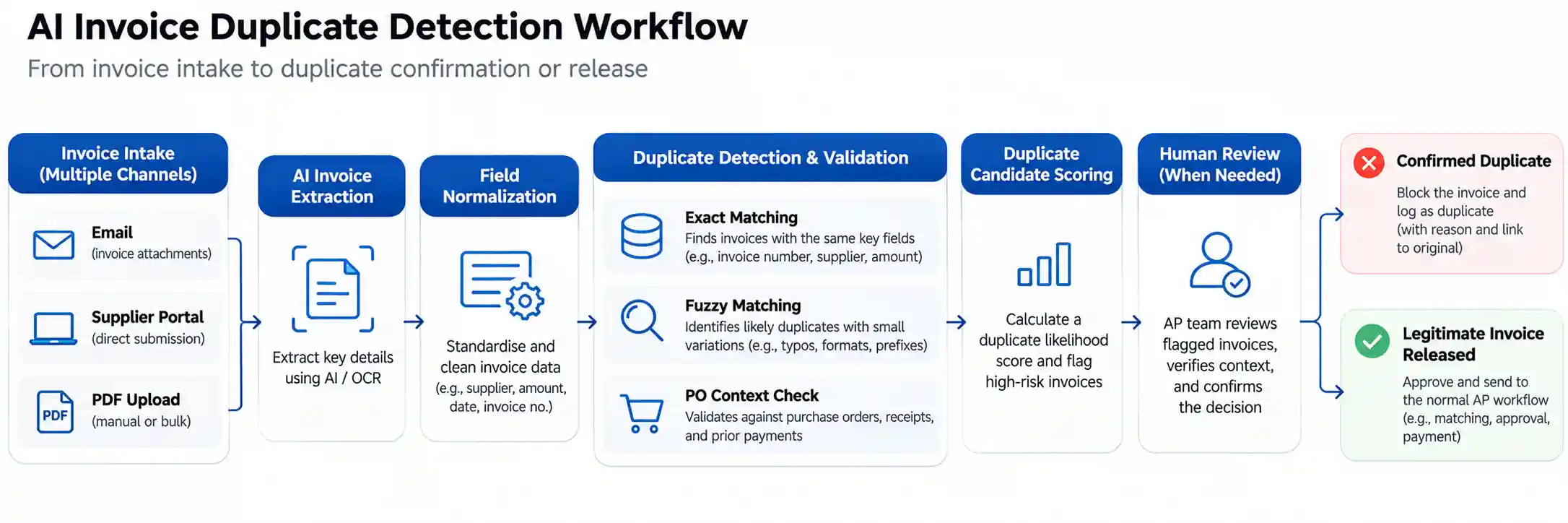
How AI Invoice Processing Tools Detect Duplicates
Invoice duplicate detection typically combines document comparison, structured field matching, business rules, and sometimes machine learning.
1. Document-Level Matching
The system compares the incoming file with documents already processed.
Possible signals include:
Identical file content
Same document image
Matching file characteristics
Repeated document submission
This is useful for detecting an invoice PDF uploaded twice. It is less effective when a supplier changes the document layout, converts the invoice to another file format, or sends the same invoice through a different channel.
Rossum's documentation states that its standard duplicate detection can identify completely identical documents. Its separate duplicate-handling extension supports configurable detection using extracted fields and document attributes. Rossum duplicate detection documentation explains the identical-document approach.
2. Exact Field Matching
Exact matching compares structured invoice fields such as:
Supplier ID
Invoice number
Invoice amount
Invoice date
Purchase order number
For example:
Field | Existing Invoice | Incoming Invoice |
|---|---|---|
Supplier | ABC Services | ABC Services |
Invoice Number | INV-105 | INV-105 |
Amount | $2,400 | $2,400 |
Invoice Date | 12 October | 12 October |
If the relevant fields match, the system can flag a likely duplicate.
Exact matching is useful for clear cases, but it may miss duplicates with altered invoice numbers, inconsistent supplier names, or different formatting.
3. Normalization
Normalization converts invoice fields into a consistent format before comparison.
Examples include:
Removing unnecessary spaces and separators from invoice numbers
Standardizing supplier names
Converting amounts into numeric values
Standardizing date formats
Normalizing currency representations where appropriate
For instance, INV-105, INV 105, and INV105 could be treated as equivalent references after normalization.
Normalization can improve matching, but it should be designed carefully. Removing meaningful characters or ignoring invoice-number prefixes can cause legitimate invoices to be flagged.
4. Fuzzy Matching
Fuzzy matching identifies records that are similar but not identical.
A system may compare:
Invoice-number similarity
Supplier-name similarity
Amount similarity
Date proximity
Purchase order information
A hypothetical example:
Field | Existing Invoice | Incoming Invoice |
|---|---|---|
Supplier | ABC Services Ltd | ABC Services |
Invoice Number | INV-105 | INV-10S |
Amount | $2,400 | $2,400 |
Invoice Date | 12 October | 13 October |
The system may flag the second invoice as a possible duplicate because several fields are closely aligned.
However, fuzzy matching introduces false positives. For example, two separate monthly invoices from the same supplier may have the same amount and similar invoice numbers.
A good system should provide a match explanation and route uncertain cases to review rather than automatically blocking all similar invoices.
5. Business Rules and Contextual Validation
Duplicate detection becomes more useful when the system considers business context.
Relevant rules may include:
Is the invoice associated with the same purchase order?
Is the supplier active and valid?
Is the amount within a configured tolerance?
Is the invoice a credit note or corrected invoice?
Has the original invoice already been paid?
Does the invoice belong to the same or another legal entity?
Is the transaction already recorded in the ERP?
SAP's duplicate invoice detection content uses defined accounting and purchase-order conditions. This illustrates why duplicate checks may be rule-based and dependent on system configuration rather than a universal AI algorithm. SAP duplicate invoice detection documentation.
What Are Invoice Exceptions?
An invoice exception is a condition that prevents an invoice from progressing through the normal processing or approval workflow.
Examples include:
Exception Type | Example | Potential Resolution |
|---|---|---|
Missing information | Invoice has no invoice number | Request clarification or correct the data |
PO mismatch | Invoice references a different PO | Verify the PO and supplier |
Price variance | Invoice price exceeds PO price | Review tolerance and approve or dispute |
Quantity mismatch | Invoice quantity differs from received quantity | Confirm delivery records |
Duplicate candidate | Invoice resembles an existing invoice | Review suspected duplicate |
Tax discrepancy | Tax calculation does not match expected values | Validate tax treatment |
Vendor mismatch | Supplier identity does not match the vendor master | Verify supplier record |
Approval exception | Required approver is unavailable | Reassign or escalate |
Low-confidence extraction | AI cannot confidently read a field | Human validation |
ERP posting failure | Invoice cannot be posted to the accounting system | Correct the mapping or technical error |
SAP documents invoice exception types and conditions, including tolerance calculations and exception ranking. SAP's invoice exception documentation describes how configured conditions determine exceptions.
What Good Exception Handling Should Include
A capable invoice processing platform should ideally:
Detect the discrepancy.
Explain which fields or rules triggered the exception.
Show supporting documents and related records.
Assign the case to an appropriate reviewer.
Support escalation or reassignment.
Allow an authorized person to approve, reject, correct, or hold the invoice.
Record the action and reason.
Preserve the history for audit and reporting.
An exception that is detected but not assigned or resolved does not deliver the full operational value of automation.
AI Invoice Processing Tools Compared
The following comparison is based on publicly documented product features and workflows. It is not a laboratory benchmark, and the table does not rank products by measured detection accuracy.
Vendor documentation reviewed for this comparison: November 2026.
1. Stampli
Focus: AP automation, invoice workflow, AI-assisted processing
Stampli provides an accounts payable automation platform with AI-assisted invoice capture, coding, approval routing, and duplicate detection.
Its documentation describes duplicate checks at multiple points in the invoice lifecycle, including upload, registration, and export to a financial system. It also describes comparisons involving invoice number, supplier name, invoice date, and total amount. Stampli's duplicate invoice detection guide and AP automation overview explain these features.
What to evaluate:
Whether duplicate checks span all intake channels.
How it handles changed invoice numbers and supplier aliases.
Whether reviewers can see the matched invoice and the reason for the alert.
How duplicate controls interact with ERP posting and payment workflows.
Potential fit: Organizations that want duplicate checks integrated into an end-to-end AP workflow.
Benchmark limitation: Public product descriptions do not establish independently measured precision or recall across a common invoice dataset.
2. Rossum
Focus: Intelligent document processing and invoice data extraction
Rossum provides AI-based document processing capabilities. Its duplicate detection documentation distinguishes identical-document detection from configurable duplicate handling based on extracted fields.
The standard duplicate detection feature recognizes completely identical documents. Its duplicate-handling extension can be configured with fields such as invoice ID and sender name, including scope and workflow actions. Rossum's duplicate detection documentation and duplicate-handling extension detail these approaches.
What to evaluate:
Exact document duplicate detection.
Configurable field-based detection.
Duplicate checks across queues or workspaces.
Integration with the downstream AP exception workflow.
Performance on scanned, low-quality, and altered invoice documents.
Potential fit: Businesses that need configurable document processing and invoice data capture, particularly where incoming document formats vary.
Benchmark limitation: Document-level detection and field-based duplicate detection should be measured separately.
3. Ramp Bill Pay
Focus: Bill payment, AP workflow, AI-assisted coding and review
Ramp Bill Pay documents AI-powered capabilities for coding bills, checking for duplicates and fraud, reviewing bills against company policy, and optimizing payment workflows. Its AP inbox automation also describes filtering duplicate or policy-ineligible emails before creating draft bills. Some inbox capabilities are identified as beta and plan-dependent in its documentation. Ramp's AP Agents documentation.
What to evaluate:
Duplicate filtering at invoice intake.
Policy-based invoice review.
Detection of suspected fraud versus duplicate transactions.
Review and approval controls.
Availability of relevant features under the selected plan.
Potential fit: Businesses seeking bill payment and AP automation in a connected workflow.
Benchmark limitation: Public feature descriptions do not provide standardized duplicate detection benchmark scores.
4. Tipalti
Focus: Global AP automation, invoice processing, supplier management and payments
Tipalti describes invoice capture, automated GL coding, two-way and three-way PO matching, approvals, ERP reconciliation, and AI-powered workflows. Its invoice processing documentation also discusses exception scenarios such as mismatched purchase orders, incomplete invoices, and receiving-report discrepancies. Tipalti's invoice processing guide explains these capabilities.
What to evaluate:
Duplicate detection across invoice and payment workflows.
PO and receipt matching.
Exception handling for incomplete invoices and mismatches.
Supplier and multi-entity requirements.
Payment controls and ERP integration.
Potential fit: Organizations with international suppliers, complex AP processes, and global payment requirements.
Benchmark limitation: Published product features do not by themselves establish detection accuracy for a buyer's own invoice population.
5. SAP Invoice Processing
Focus: Enterprise procurement and ERP-connected invoice workflows
SAP provides invoice processing and risk-management capabilities with configurable validation and duplicate detection. SAP's documentation describes rule-based duplicate invoice detection and invoice exception conditions. SAP Ariba Invoicing also documents an optional Fusion AI invoice data extraction feature that integrates advanced language models into invoice capture. SAP duplicate detection documentation and SAP Fusion AI invoice data extraction documentation provide details.
What to evaluate:
Configuration of duplicate rules.
Coverage across SAP entities and invoice sources.
Purchase-order and receipt matching.
Exception ranking and tolerance rules.
Integration with existing SAP finance processes.
Potential fit: Organizations already operating SAP finance or procurement systems.
Benchmark limitation: SAP's configured rules should be tested against the organization's actual invoice records. The result depends on implementation and business rules.
6. Microsoft Power Platform and Dynamics 365-Based Workflows
Focus: Customizable workflow automation and Microsoft ecosystem integration
Microsoft documents an invoice integration architecture using Power Automate and AI Builder. The architecture includes idempotent duplicate detection using invoice number and vendor information, fallback mechanisms, logging, and error-handling workflows. Microsoft Learn's vendor invoice integration reference architecture provides implementation details.
Microsoft also documents an invoice exception agent scenario that extracts invoice data, matches purchase orders and receipts, flags discrepancies and duplicate payments, and recommends corrective actions. Microsoft's invoice exception agent scenario describes this workflow.
What to evaluate:
Invoice extraction accuracy using AI Builder.
Duplicate checks based on vendor and invoice number.
Customization of rules and exception routing.
Integration with Dynamics 365 or other ERP systems.
Logging, retry policies, and error recovery.
Potential fit: Organizations that need configurable invoice automation integrated with Microsoft business applications.
Benchmark limitation: Custom workflows may differ substantially. Evaluate the actual configured solution rather than treating the platform as a single standardized product.
Comparison Table: Documented Approaches
Tool | Documented Duplicate Detection Approach | Exception Handling Focus | Important Evaluation Point |
|---|---|---|---|
Stampli | Multi-stage invoice checks using invoice data | AP workflow and review | Detection coverage across lifecycle |
Rossum | Identical-document detection and configurable field-based handling | Document processing queues | Exact versus field-based matching |
Ramp Bill Pay | AI-powered duplicate and policy checks | Bill review and payment workflow | Plan availability and intake controls |
Tipalti | AP automation with invoice validation and matching | PO, receipt, and incomplete-invoice exceptions | Global supplier and payment complexity |
SAP | Configurable rules and accounting conditions | Tolerance and exception conditions | Configuration and ERP scope |
Microsoft Power Platform | Custom duplicate logic and workflow controls | Configurable validation, logging, and routing | Custom implementation quality |
Important: This is a feature-based comparison, not a numerical performance ranking. A tool's published capabilities may change by product version, region, subscription plan, or configuration.
Why There Is No Universal AI Invoice Duplicate Detection Benchmark
A benchmark needs a common test dataset, a consistent definition of a duplicate, a standardized evaluation procedure, and comparable results.
Public vendor documentation often describes how a product works, but does not disclose all of the following:
A representative labeled invoice dataset.
The number of duplicate and non-duplicate records tested.
The proportion of exact duplicates versus near-duplicates.
The types of invoice-number alterations included.
The treatment of supplier aliases and duplicate vendor records.
The false-positive and false-negative rates.
The test environment and configuration.
Independent validation of the results.
Without these details, a claim such as "high duplicate detection accuracy" cannot be compared reliably across products.
A vendor may be effective at identifying identical invoice PDFs, while another may detect invoice-number variations and cross-channel submissions. These are different tasks. A single accuracy figure would hide the distinction.
Invoice Extraction Accuracy Is Not Duplicate Detection Accuracy
This distinction is essential during software selection.
Metric or Capability | What It Measures | What It Does Not Prove |
|---|---|---|
OCR accuracy | How accurately text is read from a document | That duplicates are identified |
Field extraction accuracy | Correct capture of supplier, amount, invoice number, etc. | That a repeated invoice is detected |
Duplicate detection precision | How many duplicate alerts are correct | That all duplicates are found |
Duplicate detection recall | How many actual duplicates are identified | That alerts are always correct |
Exception classification accuracy | How accurately exceptions are categorized | That exceptions are resolved efficiently |
Workflow automation rate | How many invoices progress without manual intervention | That controls are sufficient or error-free |
A system can extract invoice fields accurately and still miss duplicate invoices if its matching logic is too restrictive.
Likewise, a system may flag many duplicate candidates but create excessive false positives. The AP team then spends time reviewing invoices that are legitimate.
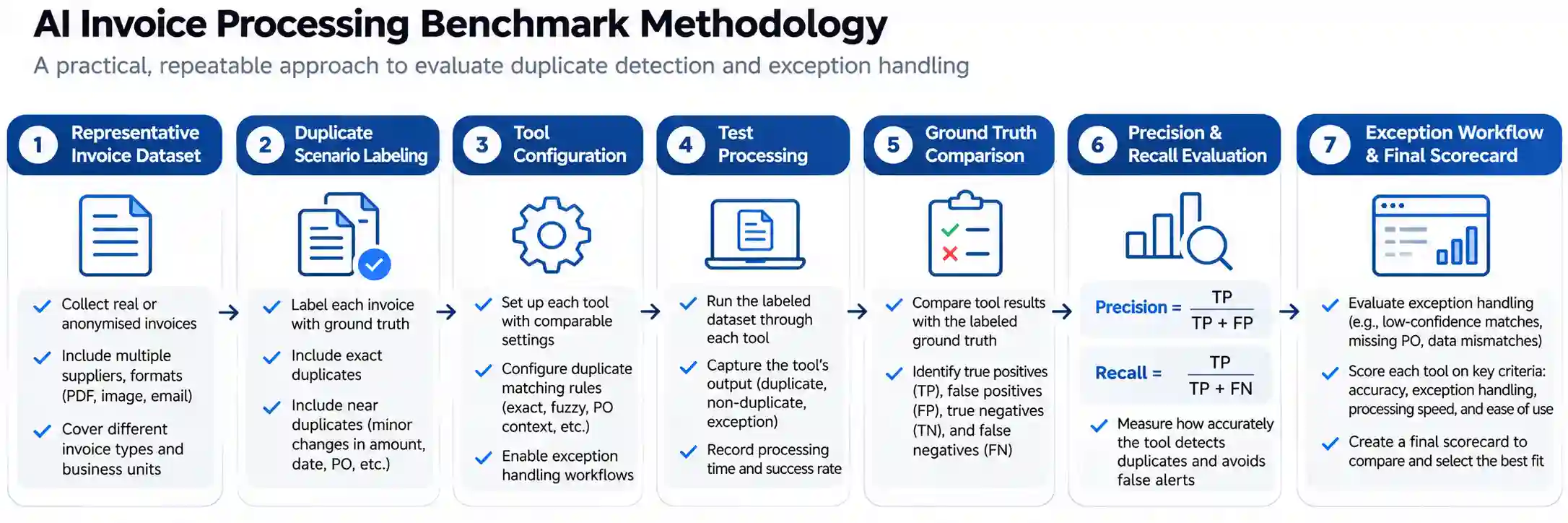
How to Benchmark AI Invoice Processing Tools for Duplicate Detection
Finance teams should evaluate AI invoice processing tools using a representative dataset from their own AP operations. This provides a more meaningful result than relying only on vendor demonstrations.
The benchmark should answer four questions:
Can the system detect actual duplicate invoices?
Can it avoid flagging legitimate invoices?
Can it identify and explain invoice exceptions?
Can the AP team resolve flagged invoices efficiently and safely?
Step 1: Build a Representative Invoice Test Dataset
Use a controlled dataset that includes both duplicate and non-duplicate invoices.
The dataset should represent the organization's real invoice population, including:
Different suppliers.
Different invoice layouts.
PDF, scanned, and electronic invoices.
PO and non-PO invoices.
Multiple currencies, if relevant.
Recurring invoices.
Credit notes and corrected invoices.
Invoices from multiple intake channels.
Invoices across multiple legal entities, where relevant.
The benchmark should include known duplicate cases and legitimate transactions that resemble duplicates.
For example, a dataset containing only exact duplicate PDFs would not adequately test near-duplicate detection.
Step 2: Define Duplicate Scenarios
Create a test matrix before evaluating the products.
Test Case | Scenario | Expected System Behavior |
|---|---|---|
D01 | Identical PDF uploaded twice | Flag as duplicate |
D02 | Same supplier and invoice number, same amount | Flag as likely duplicate |
D03 | Invoice number differs only by spaces or hyphens | Detect after normalization |
D04 | Invoice number contains a minor typo | Flag as a candidate |
D05 | Same invoice received by email and portal | Detect across intake channels |
D06 | Supplier name includes a legal suffix variation | Identify possible supplier match |
D07 | Same invoice appears across two legal entities | Flag according to configured policy |
D08 | Same supplier, same amount, different legitimate invoice | Do not incorrectly block |
D09 | Similar invoice number, different purchase order | Evaluate transaction context |
D10 | Credit note and original invoice | Distinguish document types |
D11 | Corrected invoice replaces a cancelled invoice | Identify revision relationship |
D12 | Duplicate invoice has a different file format | Detect based on document or field data |
These scenarios test different detection methods. Exact matching, fuzzy matching, document comparison, and business-rule validation should not be treated as interchangeable.
Step 3: Measure Duplicate Detection Precision and Recall
Two important metrics are precision and recall.
Precision measures how many duplicate alerts are actually duplicates.

Recall measures how many actual duplicates the system identifies.

Where:
TP = True Positives: actual duplicates correctly flagged.
FP = False Positives: legitimate invoices incorrectly flagged as duplicates.
FN = False Negatives: actual duplicates missed by the system.
TN = True Negatives: legitimate invoices correctly not flagged.
For example, consider a hypothetical test:
100 known duplicate cases.
90 actual duplicates identified.
10 duplicates missed.
15 legitimate invoices incorrectly flagged.
Then:
Recall = 90 / 100 = 90%.
Precision = 90 / (90 + 15) = approximately 85.7%.
These figures are illustrative calculations, not performance results for any vendor.
A high recall means fewer duplicates are missed. A high precision means the AP team spends less time investigating incorrect alerts.
Both are important.
Step 4: Evaluate Exception Handling
Duplicate detection is only one part of the benchmark. The exception workflow should be tested separately.
Benchmark Area | Evaluation Question | Suggested Measurement |
|---|---|---|
Exception detection | Does the system identify the configured mismatch? | Exception classification precision and recall |
Exception explanation | Does it show which fields caused the alert? | Reviewer-rated explanation quality |
Assignment | Does the exception reach the right owner? | Correct assignment rate |
Resolution | Can reviewers resolve the case efficiently? | Median resolution time |
Escalation | Does the system escalate overdue or high-risk cases? | Escalation rule compliance |
Audit trail | Are actions and reasons recorded? | Audit completeness |
Integration | Does the resolved invoice update the ERP correctly? | Posting success rate |
Reprocessing | Can corrected invoices be reprocessed safely? | Successful recovery rate |
Step 5: Test Human Review and False Positive Management
A good duplicate detection workflow should not simply stop every invoice that appears similar.
Reviewers should be able to:
Compare the incoming invoice with the suspected original.
See the fields that match and differ.
Review the purchase order and supplier records.
Confirm a duplicate.
Release a legitimate invoice.
Mark a corrected invoice or credit note appropriately.
Record the reason for the decision.
The benchmark should measure whether the system supports these decisions clearly and efficiently.
Step 6: Test ERP Integration and Payment Controls
An invoice automation platform must work with the organization's finance systems.
Test:
Invoice submission and posting.
Supplier master data synchronization.
Purchase order and goods receipt matching.
Duplicate status synchronization.
Invoice hold and release behavior.
Payment-run controls.
Error handling when the ERP is unavailable.
Retry behavior without creating duplicate records.
Microsoft's vendor invoice integration architecture specifically discusses idempotent duplicate detection, fallback mechanisms, logging, and retry policies. Microsoft Learn reference architecture.
Step 7: Run the Benchmark in a Controlled Environment
A practical benchmark process can follow this sequence:
Select the invoice dataset.
Label duplicate and non-duplicate records.
Define the matching rules and exception categories.
Configure each product using comparable conditions.
Process the test dataset.
Record all duplicate alerts and exception outcomes.
Compare alerts against the labeled ground truth.
Calculate precision, recall, and false-positive rates.
Measure reviewer time and workflow completion.
Document the configurations, limitations, and results.
Where products require different configurations, record those differences. A highly customized implementation should not be presented as equivalent to a default out-of-the-box configuration.
### Recommended Benchmark Scorecard
A finance team can use the following scorecard to compare products. The weights are a suggested starting point, not an industry standard.
Evaluation Category | Suggested Weight |
|---|---|
Duplicate detection recall | 20% |
Duplicate detection precision | 15% |
Exception detection and classification | 15% |
Human review and resolution workflow | 15% |
ERP integration and posting controls | 15% |
Audit trail and explainability | 10% |
Implementation effort and maintainability | 5% |
User experience and reviewer efficiency | 5% |
Total | 100% |
Organizations with strict financial control requirements may assign more weight to auditability and payment controls. Businesses with high invoice volume may prioritize recall, processing speed, and reviewer efficiency.
Do not combine the scores into a final ranking until the business has agreed on the importance of each category.
How to Choose the Right AI Invoice Processing Tool
The right tool depends on the organization's finance operations, not just its AI features.
For Small and Mid-Sized Businesses
Consider tools that provide:
Straightforward invoice intake.
Supplier and invoice-number duplicate checks.
Simple approval workflows.
Accounting system integrations.
Clear exception notifications.
Easy configuration and maintenance.
For smaller teams, reducing manual work and avoiding unnecessary complexity may be more important than advanced multi-entity detection.
For Enterprise Finance Teams
Evaluate:
Cross-entity duplicate detection.
ERP and procurement integration.
Complex PO and receipt matching.
Configurable tolerance rules.
Audit trail and access controls.
Exception routing across departments.
Reporting and analytics.
Recovery from integration errors.
Enterprise AP operations may need duplicate detection across several systems and legal entities. A tool that only checks invoices within a single queue or entity may not meet this requirement.
For Businesses With High Invoice Volumes
Prioritize:
Automated intake across channels.
Fast duplicate checks.
High recall without excessive false positives.
Efficient exception prioritization.
Batch processing and scalability.
Reviewer workload management.
Reliable downstream posting.
For Businesses With Complex Supplier Networks
Evaluate:
Supplier identity resolution.
Vendor master data quality.
Invoice number normalization.
Multi-currency handling.
International invoice formats.
Credit notes and corrected invoices.
Supplier-specific processing rules.
Tool Selection Decision Matrix
Business Requirement | Evaluation Priority |
|---|---|
Identical PDF duplicates | Document-level matching |
Altered invoice references | Normalization and fuzzy matching |
Duplicate bills across email and portal | Shared invoice history |
Cross-entity duplicate invoices | Multi-entity detection scope |
PO and receipt discrepancies | Matching and tolerance rules |
High manual review workload | Exception routing and reviewer efficiency |
ERP-heavy environment | Integration and posting controls |
Financial audit requirements | Explainability and audit trail |
Global supplier operations | Multi-currency and supplier data handling |
Risks and Limitations of AI Invoice Processing
AI invoice processing can reduce manual work, but it does not remove all AP risks.
False Positives
A false positive occurs when a legitimate invoice is flagged as a duplicate.
This may happen when:
A supplier submits recurring invoices for the same amount.
Invoice numbers follow similar sequences.
A corrected invoice resembles the original.
A credit note resembles an invoice.
Two separate transactions share the same purchase order.
Excessive false positives increase reviewer workload and can delay legitimate payments.
False Negatives
A false negative occurs when an actual duplicate is not detected.
This may happen when:
The invoice number has changed.
Supplier records differ.
The invoice is submitted through another channel.
The original invoice exists in a different entity.
The system compares only a narrow set of fields.
A duplicate check that runs only during intake may also miss duplicates introduced later in the workflow.
Poor Data Quality
AI systems depend on the data available to them.
Incorrect supplier records, missing invoice numbers, inconsistent date formats, and inaccurate ERP information can weaken matching and exception detection.
Vendor master data management and invoice normalization should be part of the implementation plan.
Overreliance on Automation
A flagged invoice is not necessarily fraudulent. A non-flagged invoice is not necessarily safe.
Duplicate detection should be part of a wider financial control process that includes supplier validation, purchase order matching, approvals, payment controls, and reconciliation.
Limited Transparency
Some systems may not expose enough detail about why an invoice was flagged.
For finance teams, the explanation matters. Reviewers need to understand the match and make an informed decision, especially when the system proposes holding a payment.
Integration and Configuration Risks
A tool may work well during a demonstration but perform differently after integration with the ERP, supplier master, approval hierarchy, or payment process.
A benchmark should therefore include the configured production-like workflow, not just the isolated AI model.
Practical Example: Evaluating a Duplicate Invoice
Consider a hypothetical company that receives an invoice from ABC Services.
The original invoice:
Supplier: ABC Services Ltd
Invoice number: INV-105
Invoice date: 12 October
Amount: $2,400
Purchase order: PO-450
A second invoice arrives through a supplier portal:
Supplier: ABC Services
Invoice number: INV105
Invoice date: 13 October
Amount: $2,400
Purchase order: PO-450
The second invoice may be a duplicate even though the supplier name, invoice number format, and date differ slightly.
A strict exact-match system might not flag it. A system using normalization and multi-field matching may identify it as a candidate.
The reviewer should then compare the original and incoming invoice, check the PO and payment status, and confirm whether the second invoice is a duplicate or a legitimate corrected transaction.
This example is hypothetical. It illustrates why a benchmark should include field variations and business context rather than testing only identical documents.
FAQs About AI Invoice Processing Tools
What is the best AI invoice processing tool for duplicate detection?
There is no universally best tool based on publicly comparable benchmark scores. Stampli, Rossum, Ramp, Tipalti, SAP, and Microsoft-based solutions document different duplicate detection and invoice workflow capabilities. The best choice depends on the types of duplicates a business needs to detect, its ERP environment, and the quality of its exception workflow. A controlled test using the company's own invoice data is the most reliable way to compare them.
How do AI invoice processing tools detect duplicate invoices?
AI invoice processing tools may compare invoice documents and extracted fields such as supplier, invoice number, amount, date, and purchase order. Exact matching detects identical values, while normalization and fuzzy matching help identify variations. Business rules and transaction context can improve the result. Suspected duplicates should be reviewed when the system cannot confidently distinguish a duplicate from a legitimate invoice.
What is the difference between duplicate invoice detection and invoice exception handling?
Duplicate invoice detection identifies invoices that may represent an already recorded transaction. Invoice exception handling manages issues that prevent normal processing, such as duplicate candidates, PO mismatches, missing information, tax discrepancies, or approval problems. Duplicate detection is one type of exception detection, while exception handling also includes assignment, review, resolution, escalation, and audit history.
What metrics should be used to benchmark AI invoice processing tools?
Useful metrics include duplicate detection precision, recall, false-positive rate, false-negative rate, exception classification accuracy, reviewer resolution time, audit completeness, and ERP posting success rate. OCR accuracy and invoice field extraction accuracy should also be evaluated, but they should not be treated as direct measures of duplicate detection performance.
Can AI invoice processing tools detect near-duplicate invoices?
Some systems support field normalization, configurable matching, or fuzzy matching that can identify near-duplicate invoices. Capabilities vary by product and configuration. A near-duplicate alert should usually be treated as a candidate for review because similar supplier invoices can represent separate legitimate transactions.
Can AI invoice processing prevent duplicate payments?
Invoice automation can help prevent duplicate payments by detecting duplicate candidates, holding invoices for review, applying approval controls, and checking invoices during the payment workflow. However, prevention depends on system configuration, data quality, integration coverage, and payment controls. No duplicate detection system should be assumed to identify every duplicate transaction.
Is invoice extraction accuracy the same as duplicate detection accuracy?
No. Invoice extraction accuracy measures whether the system captures information such as supplier, invoice number, date, and amount correctly. Duplicate detection accuracy measures whether the system identifies repeated transactions correctly. Accurate extraction supports duplicate detection, but the matching logic and transaction context also determine the outcome.
How should a company evaluate AI invoice processing software before purchasing?
A company should create a representative labeled invoice dataset, define exact and near-duplicate scenarios, configure the shortlisted products, and compare the results against known records. The evaluation should measure precision, recall, false positives, false negatives, exception handling, review effort, auditability, and ERP integration. A controlled proof of concept is more reliable than selecting a tool based only on vendor feature claims.
Comments (0)
No comments yet. Be the first to share your thoughts!