10 Best AI Tools for Turning Blog Posts Into Videos

Author
Ravi Prajapati

Compare 10 AI tools that turn blog posts into videos, from Pictory to Synthesia. Pricing, URL-to-video workflows, and a scorecard to choose the right one.
Most content teams sit on a library of blog posts that took weeks to research and now earn traffic from one channel. Video is where much of the attention has moved, and the production gap is the reason most of that library never gets there. AI tools to turn blog posts into videos promise to close that gap by reading a URL, writing a script, and assembling scenes in minutes.
The promise is real, but the tools are not interchangeable. Some assemble stock footage around a summary. Some put an AI presenter on screen. Some generate new footage from scratch. Pick the wrong category and you get a video that is fast to make and slow to fix.
The demand side is not in question. Wyzowl's 2026 video marketing survey reports that 91% of businesses use video as a marketing tool, and 63% of video marketers have used AI video tools to create or edit marketing videos, up from 51% a year earlier. The same survey shows the share of marketers reporting good video ROI fell to 82% from 93%, which suggests that more video is not automatically better video.
This guide compares ten tools on the question that matters for a repurposing workflow: how faithfully and cheaply each one turns a specific article into a video you would publish under your brand.
Quick Answer: Which AI Tool Is Best for Turning Blog Posts Into Videos?
The best AI tool for turning blog posts into videos depends on the format you need. For stock-footage summary videos from a URL, Pictory and Lumen5 are the most mature options. For a presenter-led explainer, Synthesia or HeyGen. For voice-first social clips in many languages, Fliki. For teams already on Google Workspace, Google Vids now converts Docs and PDFs into narrated videos. Test any tool on your three hardest posts before committing.
If you need... | Start with |
|---|---|
Fast stock-footage summaries from a URL | Pictory, Lumen5, Visla |
An AI presenter explaining the article | Synthesia, HeyGen, Elai |
Narration-led social clips in many languages | Fliki |
Prompt-driven editing and generative scenes | InVideo AI |
Video inside your existing suite | Google Vids, VEED |
Pricing and features in this article were checked against vendor pages in October 2026. AI video pricing changes often, so confirm current plans before buying.
What Does a Blog-to-Video AI Tool Actually Do?
A blog-to-video AI tool extracts the text and images from an article, condenses them into a scene-by-scene script, and pairs each scene with visuals, narration, captions, and music. The output is an editable draft video, usually exportable in 16:9, 1:1, and 9:16. The quality of the result depends far more on the extraction and summarization step than on the visuals.
Under the hood, nearly every tool runs the same five-stage pipeline:
Extract. Fetch the URL and strip navigation, ads, and boilerplate to isolate the article body, headings, and images.
Condense. A language model rewrites a 2,000-word post into a 60 to 300 word narration script.
Segment. The script is split into scenes, typically one idea per scene.
Match. Each scene gets visuals: stock clips, images pulled from the page, an AI avatar, or generated footage.
Render. Voiceover, captions, music, and brand elements are layered and exported.
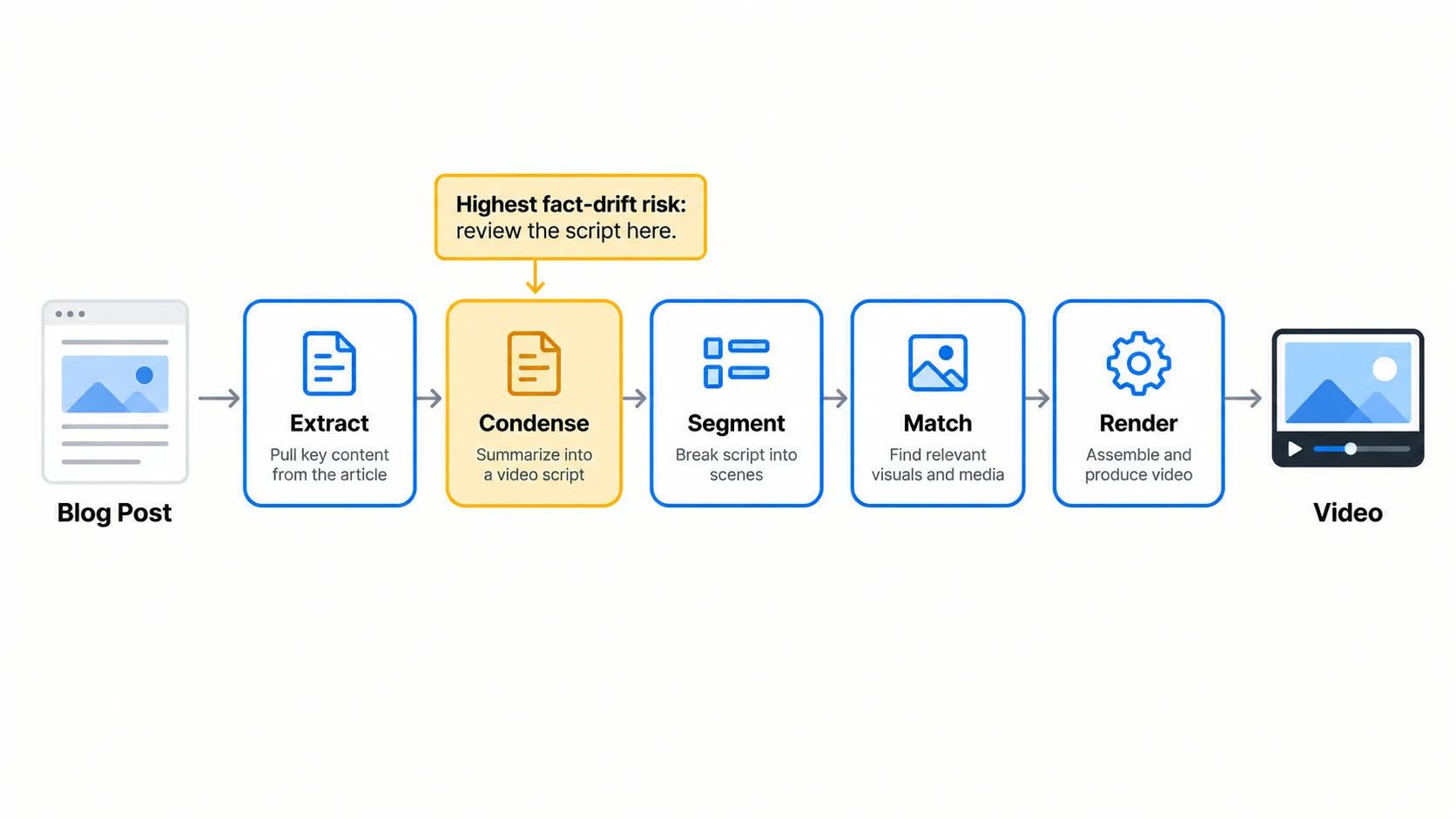
Stage 2 is where most problems start. Summarizing is a known weak point for language models. Vectara's hallucination leaderboard, which tests models on summarizing over 7,700 documents, shows even the best models introducing unsupported content in roughly 2% to 4% of summaries, with many widely used models between 10% and 15% as of its May 2026 update. A video tool that summarizes your post is subject to the same failure mode, and a wrong claim spoken aloud in your brand's video is harder to catch than a wrong sentence in a draft.
What Are the Three Types of Blog-to-Video Tools?
Blog-to-video tools fall into three main categories: stock-assembly tools that match stock footage to a summary, avatar-presenter tools that put a synthetic speaker on screen, and generative or agentic tools that create new footage and accept edits by prompt. A fourth group, suite-native tools, adds document-to-video inside software teams already use.
Category | How it builds the video | Best fit | Watch out for | Examples |
|---|---|---|---|---|
Stock assembly | Summary script + matched stock clips, captions, voiceover | Social teasers, listicles, news summaries | Generic or literal stock matches | Pictory, Lumen5, Visla, Fliki |
Avatar presenter | Script read by an AI avatar with lip-sync | Explainers, tutorials, B2B thought leadership, training | Uncanny delivery, disclosure expectations | Synthesia, HeyGen, Elai |
Generative / agentic | AI generates scenes; edits by text prompt | Concept-heavy topics with no good stock footage | Credit burn, visual inconsistency | InVideo AI |
Suite-native | Converts docs inside an existing platform | Internal comms, teams standardised on one suite | Fewer brand and template controls | Google Vids, VEED |
The categories overlap at the edges. Fliki and Pictory now offer avatars, and HeyGen's URL to Video builds full scene-by-scene videos rather than only talking heads. Classify a tool by what it does best, not by its longest feature list.
How Should You Evaluate a Blog-to-Video Tool? The FRAME Scorecard
Evaluate a blog-to-video tool on five weighted criteria: Fidelity to the source, Re-edit control, Asset relevance, Match to format, and Economics per publishable minute. Feature checklists favor the tool with the longest list. The FRAME scorecard favors the tool that produces a video you can publish with the least correction.
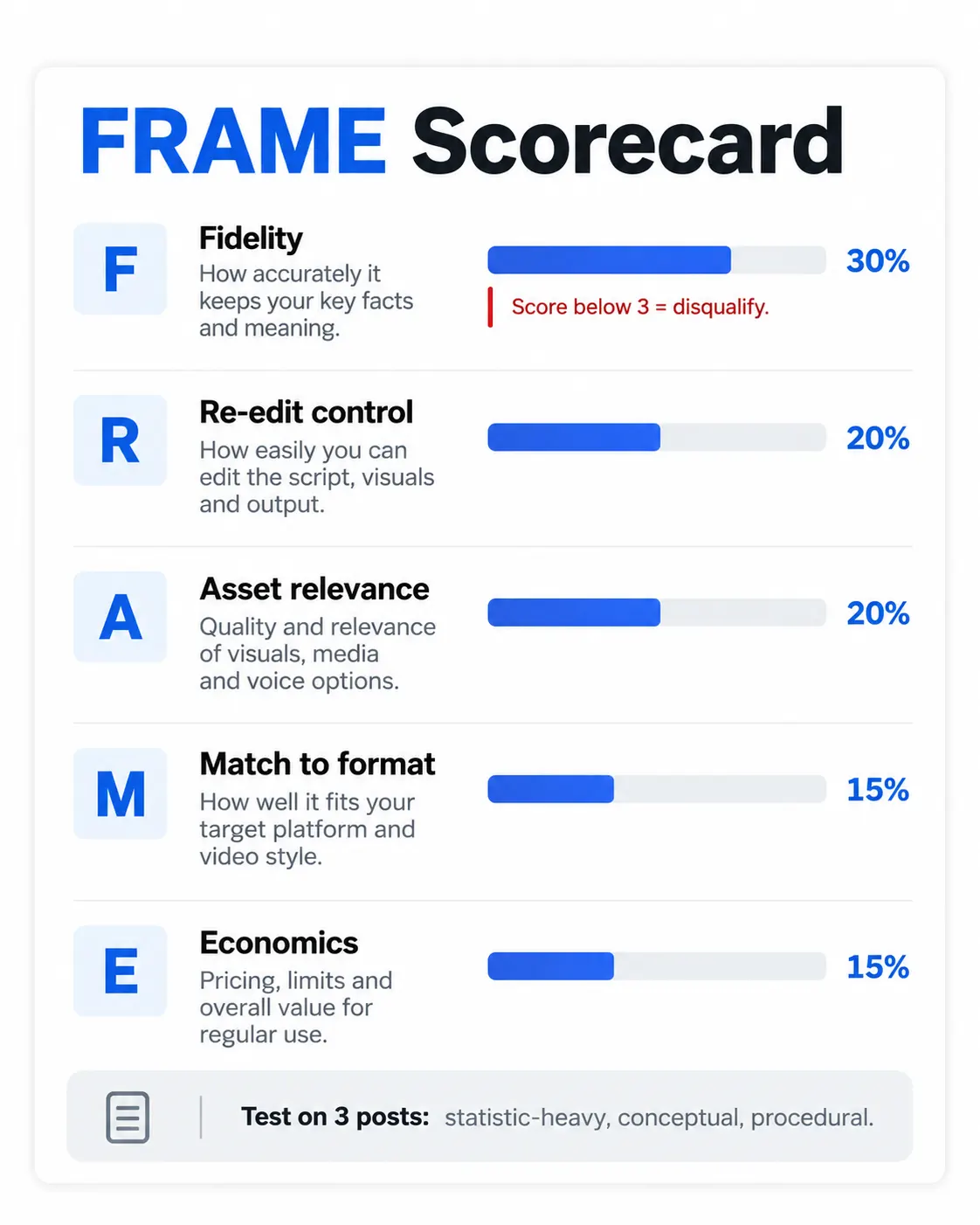
FRAME is an analytical planning model developed for this article, not a scientifically validated methodology. Adjust the weights to your own priorities.
Criterion | Weight | What to test | A 5/5 looks like |
|---|---|---|---|
Fidelity | 30% | Does the script keep your claims, numbers, and caveats intact? | No invented facts; key statistic survives; no claim stronger than the original |
Re-edit control | 20% | Can you edit script, scenes, and timing without regenerating everything? | Script-level editing, scene swap, per-scene voice changes |
Asset relevance | 20% | Do visuals illustrate the idea or just the keyword? | Abstract B2B concepts get sensible visuals, not literal stock clichés |
Match to format | 15% | Aspect ratios, length options, avatars, captions, languages you need | All target channels exported from one project |
Economics | 15% | Real cost per publishable minute, including rework and credits | Predictable cost; failed generations do not drain the budget |
How to run it: pick three posts from your own library: one statistic-heavy, one conceptual, one procedural. Generate a 60-second video from each in every shortlisted tool. Score each criterion 1 to 5, multiply by the weight, and sum. A tool scoring below 3 on Fidelity should be disqualified regardless of total, because every other strength is undone if the video misstates your article.
Why Fidelity carries the most weight: the article is the asset you are repurposing. A visually polished video that drops a qualifier ("in some cases") or rounds 63% to "two-thirds of all marketers" damages the credibility the original post built. Few tool reviews test this at all.
Blog-to-Video AI Tools Compared at a Glance
Eight of the ten tools accept a blog URL directly; Google Vids works from Docs, Word files, and PDFs, and VEED works from pasted text. Entry prices for paid plans cluster between about $20 and $30 per month, but what a plan includes (minutes, credits, or avatar time) varies so much that list price is a weak comparison on its own.
Tool | Category | Blog input | AI avatars | Entry paid plan (list, Oct 2026) | Free option | Best for |
|---|---|---|---|---|---|---|
Stock assembly | URL | Yes (custom on Pro+) | $29/mo monthly, $25/mo annual | 14-day trial | High-volume URL repurposing | |
Stock assembly | URL, PDF, text, outline | Talking-head footage | $19/mo (Basic) | Free plan, 720p, branded outro | Branded social summaries | |
Stock assembly, voice-first | URL, document | Yes (paid tiers) | Credit-based tiers | 3 credits/mo | Multilingual narration | |
Generative / agentic | URL | Yes | $20/seat/mo (annual) | Check current plans | Prompt-based editing | |
Avatar presenter | URL (under 4,500 words) | 240+ | $29/mo (Starter) | 10 min/mo | Enterprise explainers, training | |
Avatar presenter + scenes | URL | Yes, plus digital twins | $29/mo (Creator) | 3 videos/mo, 1 min | Presenter-led marketing video | |
Stock assembly | URL (uses page images) | Yes (custom on Pro+) | Credit-based | Free plan | Collaborative team editing | |
Avatar presenter, slide-based | URL | 80+ | $29/mo, $23/mo annual | 1 min/mo | Slide-style explainers | |
Suite-native | Docs, Word, PDF | No (AI voiceover) | Included in eligible Workspace and Google AI plans | No | Internal and Workspace teams | |
Suite-native editor | Pasted text (5,000 characters) | Yes | See current plans | Check current plans | Editing control after generation |
Lumen5 plan figures are from its published tiers as summarised by third-party trackers; confirm on the Lumen5 pricing page before purchase.
The 10 Best AI Tools for Turning Blog Posts Into Videos
The tools are grouped by the workflow they do best rather than ranked on a single score, because the right choice depends on the video format you need. Each review covers how the blog-to-video workflow works, where the tool is strong, where it falls short, and what it costs.
1. Pictory: Best for High-Volume URL Repurposing
Pictory is the most direct fit for teams that want to turn many blog URLs into stock-footage summary videos with minimal setup. You paste an article link, Pictory summarizes it into an editable script and storyboards scenes by article section, then matches stock footage and adds AI voiceover and captions.
Strengths: Generous minute allowances (200 video minutes per month on Starter, per its pricing page), Getty Images and Storyblocks libraries, brand kits, and ElevenLabs voices on paid plans. Pictory also documents an API workflow for blog URL to video, which matters if you want to automate repurposing from a CMS.
Limitations: Stock matching tends to be literal for abstract B2B topics. Expect to swap a share of clips on conceptual posts.
Pricing: Starter $29/month ($25/month billed annually), Professional $59/month, Team $199/month. 14-day free trial.
Best for: Content teams converting a backlog of posts into YouTube and LinkedIn summaries.
2. Lumen5: Best for Branded Social Summaries
Lumen5 is a long-standing blog-to-video tool that now generates several script variations from one article before building the video. You can paste a blog URL, upload a PDF, add text, or start from an outline. Its AI Script Composer produces multiple versions with different angles and tones, and Lumen5 then pairs the chosen script with media, timing, and motion.
Strengths: Choosing among script angles is useful for testing hooks. Template and brand controls are mature, and the platform offers more than 40 AI voices.
Limitations: Lower tiers cap export resolution at 720p, and the strongest stock libraries sit on higher plans.
Pricing: A free plan with branded outro; paid tiers start around $19/month (Basic), with Starter, Pro, and custom Team plans. Verify on the Lumen5 pricing page.
Best for: Marketing teams producing short branded clips for LinkedIn and Instagram.
3. Fliki: Best for Multilingual Narration
Fliki is a voice-first tool that suits teams who want the article narrated well in many languages. It accepts a blog URL or document, distills key points, and rewrites them as scene-based narration, with a choice of short, medium, or full-length output. Fliki says it supports 2,000+ voices across 80+ languages and dialects and imports from WordPress, Medium, Substack, Ghost, Webflow, and others.
Strengths: Voice range and language coverage, voice cloning on paid tiers, and the ability to pick video length up front.
Limitations: Visuals are serviceable rather than distinctive. The credit system takes some planning for heavy users.
Pricing: Free plan with 3 credits per month; Standard and Premium tiers add credits, avatars, and voice clones, with 40% off on annual billing.
Best for: Publishers repurposing posts into narrated social videos for several language markets.
4. InVideo AI: Best for Prompt-Based Editing
InVideo AI stands out for editing by instruction: after it builds a video from your blog, you change it with plain-language commands. In its Blog to AI Videos workflow, you paste a URL, choose audience, platform, and style, and generate. You can then type commands such as "delete scene" or "change voiceover accent" instead of working on a timeline.
Strengths: A stock library of 16 million+ assets, AI voices in 50+ languages, and generative video models for scenes where no stock footage fits.
Limitations: Generative scenes consume credits quickly, and generated footage can be visually inconsistent across scenes.
Pricing: Starter $20 per seat per month, Plus $36, Max $75 (annual billing), per its pricing page.
Best for: Solo creators and small teams who prefer directing over editing.
5. Synthesia: Best for Enterprise Avatar Explainers
Synthesia is the most enterprise-oriented avatar platform here and turns a public URL into a presenter-led video. Its URL to Video tool accepts articles under 4,500 words, drafts a script, and lets you choose from 240+ avatars before generating. Videos can be translated into 160+ languages.
Strengths: Avatar quality, governance features for larger organizations, and translation at scale.
Limitations: Minute allowances are small relative to stock-assembly tools, and avatar-led formats feel stiff for casual social content.
Pricing: Free Basic plan with 10 minutes per month; Starter $29/month and Pro $89/month, per its pricing page.
Best for: B2B companies turning thought-leadership or documentation posts into explainer and training videos.
6. HeyGen: Best for Presenter-Led Marketing Video
HeyGen combines avatar presenters with full scene-by-scene video generation from a URL. Its URL to Video tool extracts body copy, headlines, and images from the page, lets you pick template, aspect ratio, and tone, and shows the script for review before rendering. You can use a stock avatar or a digital twin of a team member.
Strengths: The script review step happens before credits are spent on rendering, which suits the Fidelity check. Translation into 175+ languages with lip-sync, and a pay-as-you-go API at $0.05 per second for automated pipelines.
Limitations: Credit costs vary by model and duration, which makes monthly spend harder to forecast.
Pricing: Free plan (3 videos per month, up to 1 minute); Creator $29/month, Pro $49/month, Business $149/month, per its pricing page.
Best for: Marketing teams that want a recognisable on-screen presenter, including founder or executive digital twins.
7. Visla: Best for Collaborative Team Editing
Visla is a strong pick when several people review and edit each video, and it reuses the images already on your page. It pulls key text and visuals straight from the URL, lets you set language, pacing, voice, layout, and music, then generates a draft that teammates can comment on and edit in a shared workspace.
Strengths: Reusing your own article images keeps the video visually tied to the post. Shared workspaces and comments suit agency and in-house review loops. Visla also offers a developer API.
Limitations: Its credit model charges 1 credit per second for text-based projects, with 1.5x and 3x multipliers for voice-based and visual projects, so costs rise with richer formats.
Pricing: Free, Pro, Business, and custom Enterprise tiers; 4K export starts on Business.
Best for: Teams with an approval workflow involving editors, subject experts, and brand reviewers.
8. Elai: Best for Slide-Style Explainers
Elai converts an article URL into a slide-based video presented by an avatar, which works well for structured, step-by-step posts. Per its URL-to-video page, you paste the link, choose from 100+ templates, refine the AI-written script, and render slides with one of 80+ avatars.
Strengths: Slide structure maps naturally to how-to and procedural posts. Custom avatar options and PowerPoint import.
Limitations: The slide format is less suited to social feeds than stock-footage tools, and minute allowances are tight on entry plans.
Pricing: Free plan (1 minute per month); Creator $29/month ($23/month annually) with 15 minutes; Team $125/month with 50 minutes, per its pricing page.
Best for: Product education, onboarding, and documentation-style content.
9. Google Vids: Best for Google Workspace Teams
Google Vids now converts Google Docs, Word files, and PDFs into narrated summary videos, which makes it the lowest-friction option for teams already paying for Workspace. Google announced the feature on September 2, 2026. Through File and Convert Docs, Vids drafts a script where each section becomes a scene, and you can edit text, delete sections, and pick an AI voice before generating.
Strengths: No new vendor, procurement, or data-processing agreement for Workspace customers; drafts live alongside the source document.
Limitations: No direct URL input, so you work from the draft document rather than the published post. Fewer brand and template controls than dedicated tools.
Pricing: Included in eligible Business, Enterprise, Education Plus, and Google AI Plus, Pro, and Ultra plans.
Best for: Internal communications and teams that draft posts in Google Docs.
10. VEED: Best for Editing Control After Generation
VEED pairs a blog-to-video generator with a full browser editor, which suits teams that expect to refine every AI draft. Its blog-to-video tool takes pasted article text (up to 5,000 characters), lets you set aspect ratio, presenter, voice, and subtitle style, then opens the result in the editor for music, stock, and text changes.
Strengths: The handoff from AI draft to real editor is seamless; voice cloning and avatars are available.
Limitations: No URL import, and the 5,000-character cap means long posts must be trimmed first. That constraint does force a human editorial pass.
Pricing: Multiple tiers; check VEED's current plans.
Best for: Teams with an in-house editor who treat AI output as a first cut.
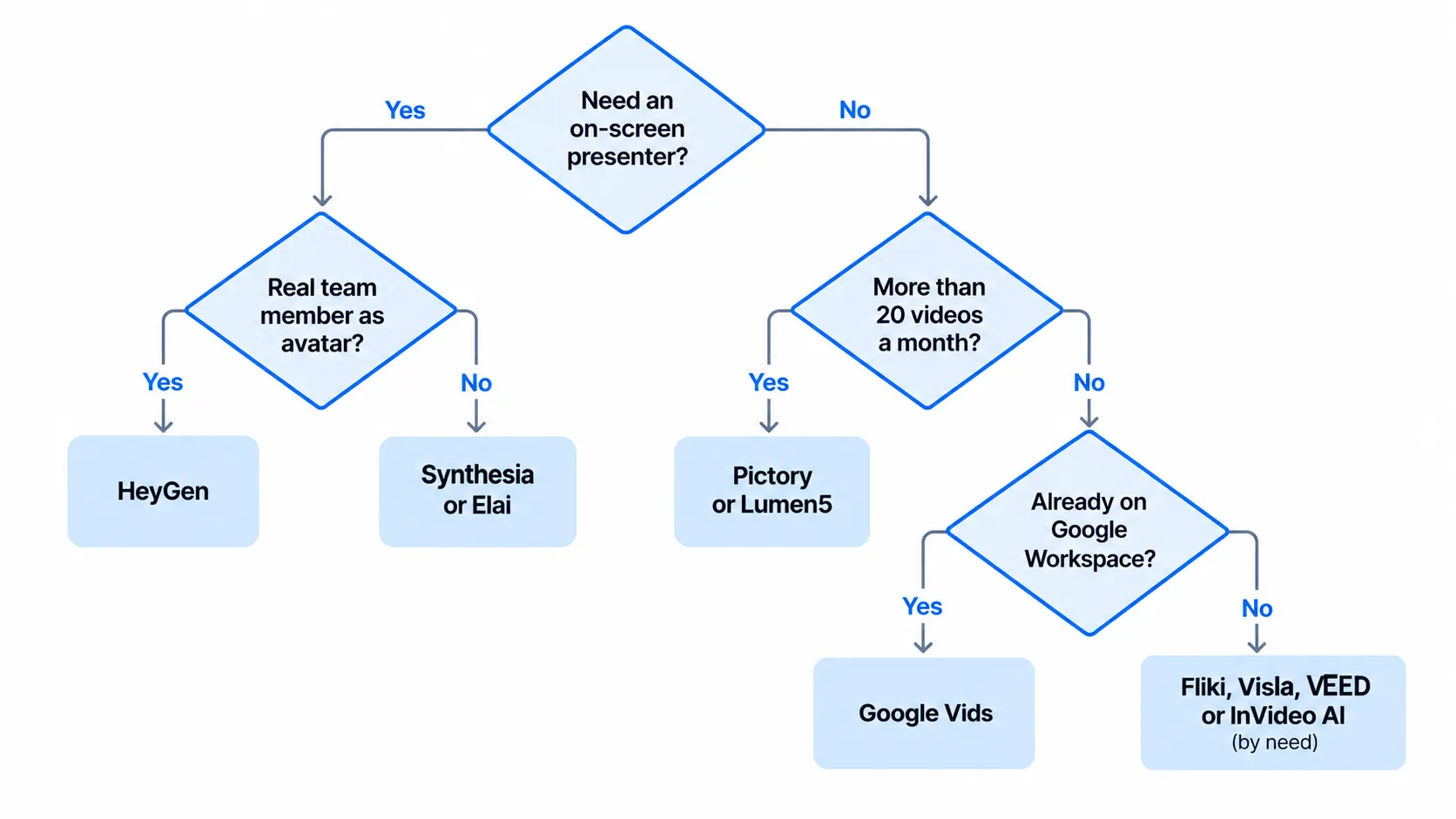
Which Blog-to-Video Tool Should You Choose?
Choose by answering three questions in order: does the video need a human-like presenter, does it need to follow the article closely, and how many videos will you make each month? Presenter needs point to avatar tools. Close fidelity at volume points to stock-assembly tools with script editing. Low volume inside an existing suite points to Google Vids or VEED.
Your situation | Primary pick | Alternative | Why |
|---|---|---|---|
20+ posts a month to repurpose for YouTube and LinkedIn | Pictory | Lumen5 | Large minute allowances and URL-first workflow |
B2B explainer from a thought-leadership post | Synthesia | HeyGen | Presenter-led format builds authority for complex topics |
Founder or executive "voice" without filming | HeyGen | Synthesia | Digital twin avatars of real team members |
Same post in five languages | Fliki | HeyGen, Synthesia | Voice and language breadth |
Abstract topic with no good stock footage | InVideo AI | HeyGen | Generative scenes fill the visual gap |
Several reviewers must approve each video | Visla | Lumen5 | Shared workspaces and comments |
How-to or procedural post | Elai | Synthesia | Slide structure mirrors the steps |
Company runs on Google Workspace, low volume | Google Vids | VEED | No new vendor; works from the draft Doc |
In-house editor wants full control | VEED | Visla | Real editor after generation |
Automated CMS-to-video pipeline | Pictory API | HeyGen API, Visla API | Documented developer access |
Illustrative Scenarios
The following are hypothetical scenarios built to show how the FRAME scorecard changes a decision. They are not real case studies.
Scenario A: A SaaS security vendor with a statistic-heavy blog. The team shortlists Pictory, Lumen5, and HeyGen. On FRAME testing, one tool rounds a cited breach-cost figure and drops the year it refers to. That tool fails the Fidelity threshold despite the best-looking visuals. The team picks the tool with a script review step before rendering and adds a rule: every number in the script is checked against the post.
Scenario B: A manufacturer publishing case studies for international buyers. The marketing lead needs each case study in English, Spanish, and Arabic. Avatar tools score well on Match to format thanks to lip-synced translation, but Economics drops because each language consumes separate minutes. The lead uses Fliki for narrated versions across all languages and reserves avatar videos for the two highest-value case studies.
Scenario C: An AI publication repurposing long-form explainers. Posts run past 4,000 words and cover abstract topics such as model evaluation. Stock-assembly tools return literal visuals (keyboards, glowing brains). The editor writes a separate 150-word video script by hand, uses InVideo AI generative scenes for concepts, and pulls the post's own diagrams into the video. The AI tool becomes an assembly engine, not the writer.
How Much Does Blog-to-Video AI Actually Cost?
Blog-to-video AI costs roughly $20 to $30 per month at entry level, but the real cost is the price per publishable minute, including human review time. Stock-assembly plans include hundreds of video minutes; avatar plans include tens. A 60-second avatar video can cost more than ten times as much in plan allowance as a stock-footage video of the same length.
Plan (list price) | Monthly allowance | Approximate list cost per included minute |
|---|---|---|
Pictory Starter, $29/mo | 200 video minutes | About $0.15 |
Elai Creator, $29/mo | 15 minutes | About $1.93 |
Synthesia Pro, $89/mo | About 60 minutes (plus free allowance) | About $1.48 or less |
Elai Team, $125/mo | 50 minutes | $2.50 |
HeyGen API, pay as you go | Per second ($0.05) | $3.00 |
These figures are calculated from vendor pricing pages and assume you use the full allowance. Credit-based tools (InVideo AI, Fliki, Visla, HeyGen plans) vary by model, voice, and visual type, so measure them in your own trial.
The subscription is usually the smaller cost. A more useful planning formula is:
\text{Cost per publishable minute} = \frac{\text{Subscription} + (\text{Review hours} \times \text{Hourly rate})}{\text{Minutes actually published}}
If a tool saves $30 a month but needs 45 extra minutes of fixing per video, it is the expensive option for any team billing its time.
What Are the Biggest Risks of Turning Blog Posts Into AI Videos?
The biggest risks are factual drift in the AI-written script, generic visuals that weaken the brand, and unclear disclosure of synthetic presenters. Each is manageable with a review step, but none is solved by the tools alone.
Factual drift. Summarization errors are a documented model weakness, as the Vectara hallucination leaderboard shows. Check every number, name, and qualifier in the script before rendering.
Generic visuals. Stock matching favors the literal: "cloud security" becomes a cloud and a padlock. For B2B topics, plan to replace a share of clips or reuse the article's own diagrams.
Disclosure. YouTube requires creators to disclose realistic altered or synthetic content, such as making a real person appear to say something they did not say. It does not require disclosure for production assistance such as AI-written scripts or captions, or for cloning your own voice for voiceovers. A digital twin of a colleague delivering words they never recorded deserves explicit consent and, where realistic, disclosure.
Rights and likeness. Confirm stock licensing terms for commercial use and get written consent from anyone whose face or voice is cloned.
SEO misconceptions. Embedding a video in a blog post does not automatically win video results. Google says that to be eligible for video features, a page's main purpose should be the video, and recommends a dedicated watch page, VideoObject structured data, and video sitemaps.
What Blog-to-Video AI Cannot Solve
There is a serious argument against automating this at all. A video is not a shorter blog post. Strong videos usually lead with one hook and one idea, while a good article earns attention through depth and structure. Tools that compress the article proportionally often produce a video that summarises everything and lands nothing.
The Wyzowl 2026 data is consistent with this concern: AI tool use rose while the share of marketers reporting good video ROI fell. That correlation does not prove AI caused the decline, but it is a reason to measure outcomes rather than output.
The practical response is not to reject the tools but to change what you feed them. Teams that get good results tend to write a short, purpose-built video script (or heavily edit the AI draft), then use the tool for assembly, voice, captions, and resizing. The tool saves production hours; it does not replace the editorial decision about what the video is for.
Frequently Asked Questions
Can AI turn a blog post into a video automatically?
Yes. Tools such as Pictory, Lumen5, Fliki, InVideo AI, Synthesia, HeyGen, Visla, and Elai accept a blog URL and produce a draft video with script, visuals, voiceover, and captions in minutes. "Automatically" means a first draft, not a finished asset. Plan to review the script for accuracy and swap weak visuals before publishing, especially for technical or statistic-heavy posts.
What is the best free AI tool to convert a blog post into a video?
For a no-cost test, Synthesia's free plan includes 10 minutes per month and HeyGen's free plan allows three videos of up to one minute. Lumen5 and Fliki offer free tiers with lower resolution, branding, or few credits. Free plans are useful for evaluating script quality, but most add watermarks or limits that make them unsuitable for published brand content.
How long should a video made from a blog post be?
For social feeds, 30 to 90 seconds is a sensible default; for YouTube or an embedded explainer, two to five minutes. Wyzowl's 2026 survey found 63% of people say they would most like to watch a short video to learn about a product or service. Cut to one core idea for short formats rather than compressing the whole article.
Do I need to disclose that a video was made with AI?
It depends on the platform and the content. YouTube requires disclosure when realistic content makes a real person appear to say or do something they did not, or depicts realistic events that did not happen. Using AI for scripts, captions, or your own cloned voiceover does not require disclosure under YouTube's policy. Check each platform's rules and your own legal guidance.
Will adding an AI video to my blog post improve SEO?
Not automatically. A video can increase engagement on the page, but Google's eligibility for video features favors pages whose main purpose is the video. Google's video SEO guidance recommends dedicated watch pages, VideoObject structured data, and video sitemaps. Publishing the video on YouTube with chapters and linking it to the article is often the more reliable route to search visibility.
Are avatar videos or stock-footage videos better for B2B content?
Avatar videos work better for explainers, tutorials, and thought leadership where a presenter adds authority. Stock-footage videos work better for quick social teasers and listicles. Avatar minutes cost far more per plan, so most B2B teams use stock-assembly tools for volume and reserve avatars for their most important posts.
Can these tools handle long, technical blog posts?
Partly. Synthesia's URL tool caps input at 4,500 words and VEED at 5,000 characters, and every tool compresses heavily. Long technical posts lose nuance when condensed into 60 to 150 words of narration. For these posts, write a dedicated short script or split the article into a series of videos, one section each.
So, Which AI Tool Should You Use to Turn Blog Posts Into Videos?
Use Pictory or Lumen5 if you need volume, Synthesia or HeyGen if you need a presenter, Fliki if you need many languages, and Google Vids if your team already lives in Workspace. InVideo AI, Visla, Elai, and VEED each win specific situations: generative scenes, team review, slide-style explainers, and hands-on editing.
The tool matters less than the test. Run your three hardest posts through two or three shortlisted tools, score them with the FRAME scorecard, and disqualify anything that misstates your article. The winner is the tool that produces a video you would publish under your name with the least correction, at a cost per publishable minute you can sustain.
Comments (0)
No comments yet. Be the first to share your thoughts!