Best AI Tools for Podcast Editors in 2026 (Tested and Compared)

Author
Ravi Prajapati
The best AI tools for podcast editors, compared by price, features, and workflow fit, so you can cut editing time without cutting quality.
Quick Overview
Best all-in-one editor: Descript, edit audio by editing text
Best for remote interviews: Riverside, local recording plus AI clips
Best for automatic mixing: Auphonic, balances levels and loudness on autopilot
Best for filler word removal: Cleanvoice, strips ums, ahs, and dead air
Best for AI voice and cloning: ElevenLabs, realistic voice generation
Best free cleanup tool: Adobe Podcast, one click audio enhancement
Best for repurposing clips: Opus Clip, turns long episodes into shorts
Realistic starter budget: $0 to $65 a month depending on your stack
Best AI Tools for Podcast Editors in 2026 (Tested and Compared)
If you edit podcasts for a living, or even just for a hobby that's slowly taken over your evenings, you already know the real work isn't recording. It's everything that happens after: cutting the "ums," fixing the guest who sounds like they're talking into a tin can, matching volume levels, writing show notes, and somehow finding three good clips for social media before the episode goes stale.
AI has quietly taken over most of that grind. It won't write your intro or laugh at your guest's joke, but it will remove filler words while you sleep, balance a shaky remote interview in minutes, and turn a 45 minute episode into ten social clips before you've finished your coffee. The tricky part in 2026 isn't finding an AI tool for podcast editing, it's figuring out which ones are actually worth paying for and which ones are just Whisper with a nicer interface.
This guide breaks down the tools we'd actually recommend to a podcast editor right now, organized by what they're best at rather than by hype. We've grouped them by the stage of production they solve for, recording, cleanup, voice, and repurposing, so you can build a stack that fits your workflow instead of buying five tools that do the same thing.
Why Podcast Editors Are Leaning on AI Right Now
Podcasting isn't a niche hobby anymore. Global listenership is projected to hit roughly 619.2 million people in 2026, and other industry estimates put active listeners at over 500 million worldwide. More listeners means more shows, more competition, and less patience for a podcast that sounds like it was edited in a hurry.
At the same time, editors are stretched thin. Before AI tools became standard, a single episode could easily eat five to ten hours of post-production work between transcription, cleanup, show notes, and clip creation. That math doesn't work for a solo creator publishing weekly, let alone an editor juggling multiple shows. This is the gap AI podcast editing tools were built to close: not replacing an editor's judgment, but removing the repetitive parts of the job so there's more time left for actual editing decisions.
What to Look for in an AI Podcast Editing Tool
Before jumping into specific tools, it helps to know what actually matters for editors, versus what's just a marketing checkbox.
Text-based editing: Tools that let you cut audio by deleting words from a transcript save enormous time on interview-heavy shows.
Filler word and silence removal: Look for accuracy on "ums," breaths, and long pauses, not just a basic noise gate.
Loudness and level matching: Especially important for remote interviews where guests record on different microphones.
Speaker separation: Useful for multi-guest shows so you're not manually labeling who said what.
Export flexibility: You want WAV, MP3, and AAF options, not a tool that locks your file into its own ecosystem.
Repurposing features: Since most episodes now live on YouTube, Instagram, and TikTok as clips, not just audio feeds.
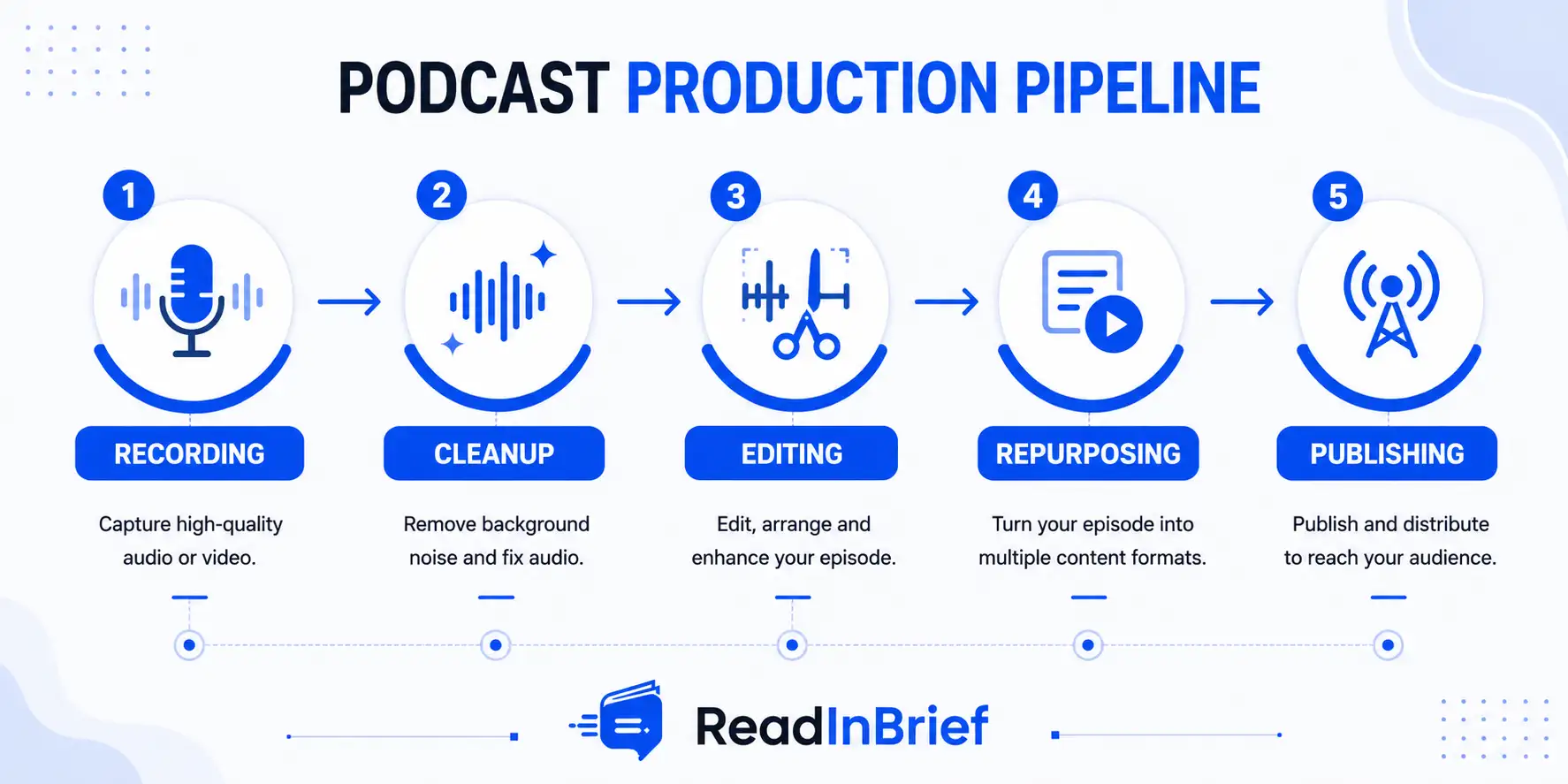
The Best AI Tools for Podcast Editors in 2026
1. Descript, Best All-in-One Editor
Descript remains the tool most editors reach for first, mainly because it changes how editing actually feels. Instead of scrubbing a waveform, you edit your podcast by editing an automatically generated transcript, deleting text to cut the matching audio. For interview-heavy shows, this alone can cut editing time dramatically.
It also includes AI filler word removal, a "Studio Sound" enhancement feature for cleaning up rough recordings, and Overdub for fixing flubbed lines without a re-record.
Best for: solo podcasters and small teams who want one tool for the whole workflow
Pricing: free tier available, Pro at $24/month, Business at $33/month
Learn more: Descript
2. Riverside, Best for Remote Interviews
If your show depends on remote guests, Riverside solves the single biggest technical headache in podcasting: bad call quality. It records each participant locally in studio quality and syncs the tracks afterward, so a shaky Wi-Fi connection doesn't ruin your audio.
Its "Magic Clips" feature scans a long recording and pulls out the moments most likely to work as standalone social clips, which is a real time-saver even if you still want to pick the final cut yourself.
Best for: remote interviews and co-hosted shows
Pricing: free tier with 2 hours of recording, Standard at $15/month, Pro at $24/month
Learn more: Riverside
3. FlexClip, Best for Turning Podcast Content Into Videos
FlexClip is a browser-based video creation platform that works particularly well when a podcast needs to go beyond audio. It can help editors turn podcast recordings, highlights, or transcripts into visual content for YouTube, Instagram, TikTok, and other social platforms. Its templates, stock media, subtitles, and AI-powered editing features make it possible to create polished promotional clips without rebuilding each video from scratch.
Its newer AI features, including Auto Edit and AI Recreate, can further speed up the process of turning existing footage into usable social content. For podcast teams that already have their audio workflow covered but need a more efficient way to create video assets, FlexClip can fill that gap without requiring a full professional video-editing setup.
Best for: podcast video production and social media repurposing
Key features: AI-powered editing, Auto Edit, AI Recreate, subtitles, templates, stock media, and online video editing
Pricing: free plan available, with paid plans offering additional features and resources
Learn more: FlexClip
4. Auphonic, Best for Automatic Mixing and Mastering
Auphonic is the tool audio engineers quietly rely on. Its standout feature is the Intelligent Leveler, which automatically balances volume differences across single or multitrack recordings, a common problem with remote interviews recorded on different equipment. It also handles noise reduction, tonal consistency, and loudness standards required by platforms like Spotify and Apple Podcasts.
For agencies managing multiple shows, its API and watch folder feature can process raw files and deliver finished audio with no manual steps at all.
Best for: editors who want broadcast-quality mastering without hiring an audio engineer
Learn more: Auphonic
5. Cleanvoice, Best for Filler Word and Noise Removal
Cleanvoice is built around one job and does it well: stripping out filler words, mouth sounds, stutters, and dead air from long interviews. It's not a full timeline editor, so most editors pair it with something like Descript or Auphonic rather than using it alone.
Cleanvoice also generates show notes, transcripts, and audiograms, and has helped clean up audio for more than 15,000 podcasters so far.
Best for: tightening up rambly, dialogue-heavy interviews
Learn more: Cleanvoice
6. ElevenLabs, Best for AI Voice and Cloning
ElevenLabs has become the default choice when editors need AI-generated or cloned voice work, whether that's fixing a flubbed line without asking a guest to re-record, or producing narration for an AI-hosted show. It supports voice cloning from the Creator plan upward, with speech generation across more than 30 languages, and its emotional range is considered best-in-class among voice tools.
Best for: voice correction, narration, and multilingual voiceovers
Pricing: free tier available, paid plans starting around $5/month
Learn more: ElevenLabs
7. Adobe Podcast, Best Free Cleanup Tool
Adobe Podcast's Enhance Speech feature is the tool editors reach for when a guest recorded on a laptop mic in an echoey room. Officially out of beta as of 2026, it now includes AI source separation to isolate vocals, music, and ambient sound into separate stems, along with multitrack remote recording.
Best for: quick, free rescue jobs on rough recordings
Pricing: free tier, Pro from $9.99/month
Learn more: Adobe Podcast
8. Opus Clip, Best for Repurposing Long Episodes
Opus Clip takes a full-length episode and automatically finds the moments most likely to perform as short-form video, formatting them for YouTube Shorts, Reels, and TikTok. For editors who are expected to hand over "a few clips" after every episode, this turns a multi-hour task into a review-and-approve job.
Best for: editors also responsible for social media repurposing
Learn more: Opus Clip
9. Lemonfox.ai, Best Budget Transcription Engine
For editors who need accurate transcription without paying enterprise prices, Lemonfox.ai runs on Whisper large-v3 and includes speaker diarization to automatically label who's speaking, which is genuinely useful for interview shows.
Its pricing is the real draw: plans starting at $5/month, with transcription costing under $0.17 per hour after the trial period.
Best for: developers and editors who need transcription at scale on a budget
Learn more: Lemonfox.ai
How to Build an AI Podcast Editing Stack Without Overspending
You don't need all eight tools above. Most editors land on a stack of two or three that cover recording, cleanup, and repurposing. A workable setup for a solo editor or small show looks like this:
Record: Riverside for remote guests, or a direct recording if everyone's in person
Clean and edit: Descript for transcript-based editing and filler word removal
Repurpose: Opus Clip or Riverside's built-in clip feature for social content
That combination typically lands under $65 a month total, which covers the vast majority of what a working podcast editor actually needs day to day.
Frequently Asked Questions
What is the best AI tool for podcast editing in 2026?
Descript is the most commonly recommended all-in-one option because it lets you edit audio by editing text, which speeds up interview-based editing significantly. For pure audio cleanup and mastering, Auphonic and Cleanvoice are stronger specialist picks.
Can AI fully edit a podcast without a human editor?
Not reliably yet. AI tools handle repetitive tasks well, cutting filler words, balancing levels, generating transcripts, but judgment calls about pacing, tone, and what to keep for storytelling still need a human editor reviewing the final cut.
Is there a free AI tool for podcast editing?
Yes. Adobe Podcast's Enhance Speech feature is free and handles noise reduction and voice clarity well. Descript and Riverside also offer usable free tiers for smaller shows.
How much does AI podcast editing software cost?
Most editors can build a solid stack for $30 to $65 a month, combining a recording tool, an editing tool, and a repurposing tool. Free tiers exist for every stage of the workflow if budget is tight.
Final Thoughts
The AI podcast editing space in 2026 isn't about finding one tool that does everything. It's about picking the right specialist for each stage of your workflow, recording, cleanup, voice, and repurposing, and letting each one do what it's actually good at. Start with a free tier, see where the real time drain is in your own process, and upgrade only the piece that's actually saving you hours.
Looking for more tools to add to your stack? Browse our full AI tools directory to compare options across every category, from transcription to video generation.
Comments (0)
No comments yet. Be the first to share your thoughts!