OpenAI Dots vs Meta Muse: Features, Use Cases and Key Differences

Author
Ravi Prajapati
OpenAI Dots vs Meta Muse compared across features, autonomy, integrations, security, use cases and the future of always-on AI agents.
AI assistants are starting to cross an important line.
They are no longer waiting for a prompt, generating an answer, and disappearing until the next conversation. The emerging model is an AI agent that stays available, remembers what matters, works across applications, continues tasks in the background, and can take actions on a user's behalf.
Meta made that idea concrete with Muse in September 2026. Less than a month later, OpenAI introduced Dots.
At first glance, the two products sound remarkably similar. Both are persistent AI agents. Both operate through cloud computers. Both can interact with other applications and continue working while the user is elsewhere.
But OpenAI Dots vs Meta Muse is not simply a comparison between two versions of the same product.
The bigger difference is what each company appears to be optimizing for.
Meta Muse is primarily being built around the individual and their digital life. OpenAI Dots arrives with a much stronger emphasis on professional workflows, connected workplace applications and collaboration.
That difference may matter more than which underlying AI model performs better.
OpenAI Dots vs Meta Muse: Quick Answer
OpenAI Dots and Meta Muse are both persistent AI agents designed to take actions rather than simply answer prompts. The main difference is their initial orientation.
OpenAI Dots is positioned heavily around professional work. It runs on GPT-6 Astra, can work through thousands of connected applications, operates from its own cloud computer, integrates with workplace environments such as Slack and Microsoft Teams, and connects with OpenAI's new collaborative ChatGPT Space.
Meta Muse is positioned primarily as a personal AI agent. It runs on Meta's Muse Spark model and a dedicated Muse Secure VM, connects with services such as email, calendars and Instagram, browses the web, handles errands and purchases, tracks longer-term goals and can proactively suggest actions.
That produces a useful shorthand:
Area | OpenAI Dots | Meta Muse |
|---|---|---|
Primary orientation | Work and professional productivity | Personal productivity and everyday life |
Underlying model | GPT-6 Astra | Muse Spark |
Persistent background work | Yes | Yes |
Dedicated cloud environment | Yes | Muse Secure VM |
Web/browser interaction | Yes | Yes |
Connected apps | 4,000+ reported through OpenAI's ecosystem | Email, calendar, Instagram and other connectors |
Workplace collaboration | Strong emphasis | Less central to initial product |
Slack / Teams interaction | Yes | Not the main interaction model |
Personal errands and shopping | Possible, but not core launch positioning | Core use case |
Proactive suggestions | Yes | Yes |
Sensitive-action approvals | Yes | Yes |
Auditability / activity visibility | Controls available | Explicit activity trail |
Free access | Not at initial launch | Limited free tier |
Initial audience | Paid professional and enterprise users | Consumers, with business use expanding |
The comparison is based on information available as of September 30, 2026. Both products are new, so capabilities, pricing and availability may change quickly.
What Is OpenAI Dots?
Dots is OpenAI's new class of persistent AI agents designed to continue working on a user's behalf rather than requiring a new prompt for every task.
OpenAI introduced Dots at its September 29 DevDay. Launch-day reporting from Reuters describes the agents as powered by GPT-6 Astra and capable of managing goals across applications while operating from dedicated cloud infrastructure.
Reporting from The Verge says a Dot can connect with more than 4,000 apps and can be reached through ChatGPT, Slack and Microsoft Teams, including through text and voice.
That changes the normal ChatGPT interaction pattern.
Instead of:
Prompt → response → conversation ends
a persistent agent can behave more like:
Goal → plan → actions → monitoring → update → next action
Imagine giving an agent responsibility for preparing a weekly customer meeting.
It could potentially collect recent communication, examine project documents, update a briefing, identify unresolved issues and prepare material before the meeting rather than waiting for someone to request every individual step.
OpenAI also introduced ChatGPT Space alongside Dots, giving teams an environment where people and agents can collaborate around shared work.
That combination suggests Dots should be understood less as another ChatGPT mode and more as part of OpenAI's broader move toward persistent AI workers.
What Is Meta Muse?
Meta describes Muse as a personal AI agent that gets things done on your behalf.
Unlike a conventional chatbot, Muse can continue running after the user closes the application. It can browse websites, interact with connected services, make purchases, create documents, track goals and monitor things over time.
According to Meta's official Muse announcement, the agent is powered by Muse Spark and runs inside a dedicated virtual environment called Muse Secure VM.
Muse can connect with email, calendars, Instagram and other services. Meta says that if Muse encounters a task for which an appropriate tool does not exist, it can also build tools to help complete the work.
Its examples are deliberately everyday:
booking travel
managing appointments
sending emails
shopping
filling out forms
tracking goals
planning events
monitoring information
remembering personal preferences
Muse also operates through WhatsApp, which is significant because it reduces the need for users to adopt an entirely new interaction model.
The objective is not simply a smarter chatbot.
It is an agent that gradually becomes familiar with a person's goals, preferences and digital environment.
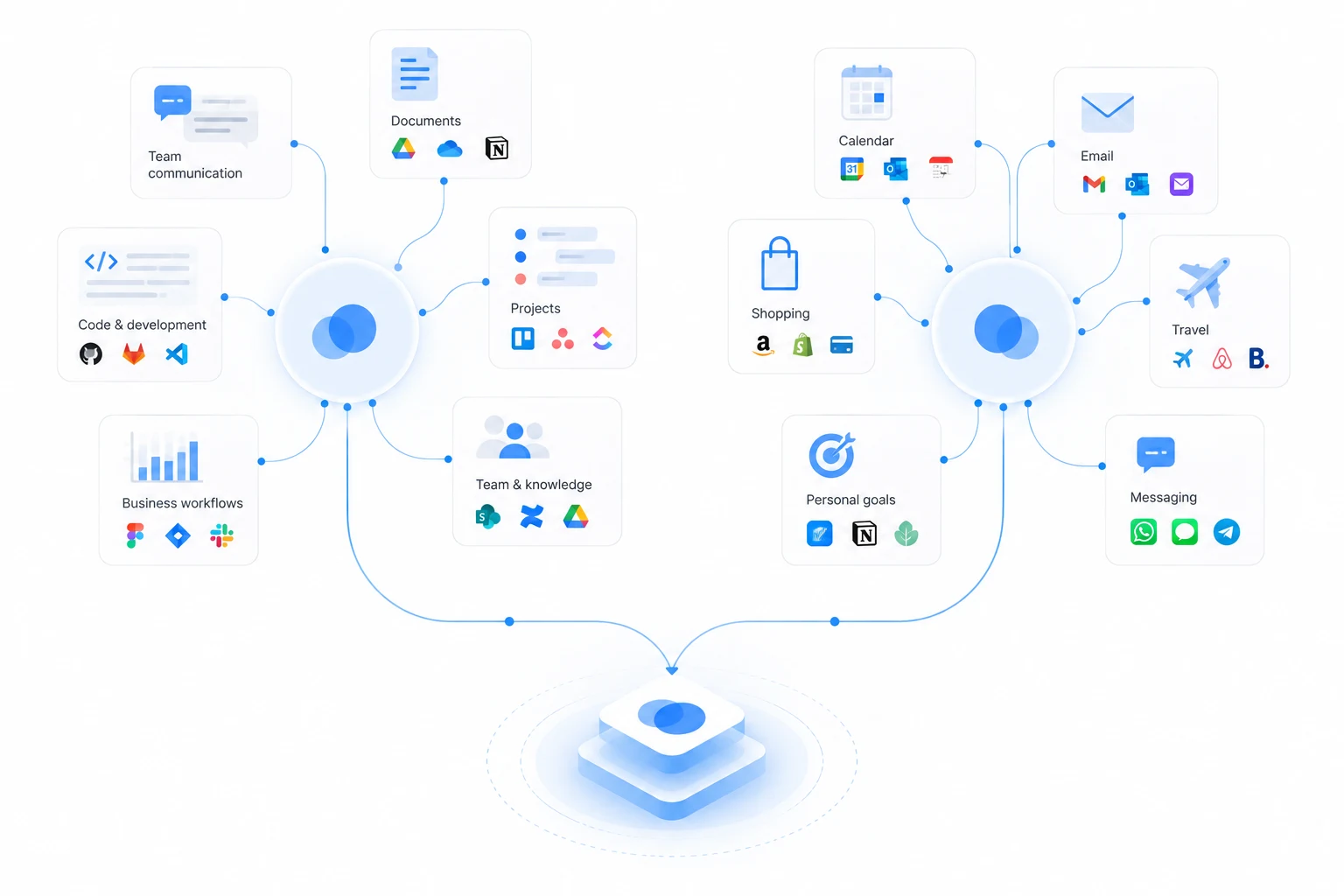
The Biggest Difference Is Not the Model. It Is the Context.
It would be easy to turn OpenAI Dots vs Meta Muse into another model comparison.
GPT-6 Astra versus Muse Spark.
That misses the more interesting question.
Where does each agent live?
An AI agent becomes increasingly valuable when it has three things:
enough context to understand what you are trying to accomplish,
enough access to take meaningful actions,
enough persistence to continue working without constant prompting.
The quality of the underlying model matters, but the agent's environment determines what it can actually accomplish.
Muse is being positioned close to an individual's personal context.
Dots is being positioned close to an individual's work context.
Consider the difference.
A personal agent might know:
your travel plans
appointments
shopping preferences
family commitments
saved Instagram content
emails
personal goals
A workplace agent might know:
current projects
Slack discussions
customer conversations
documents
product requirements
code repositories
team priorities
meeting history
Both agents may be intelligent.
But they become useful in different ways because they operate around different context.
OpenAI Dots vs Meta Muse: Detailed Comparison
1. Persistent Work
This is where the two products are closest.
Muse explicitly continues working after the application closes. Meta says users can ask it to monitor something over time and receive an alert when something changes.
Dots follows the same broader persistent-agent model. Launch reporting describes it as an "always-on" agent that can continue handling goals and workflows.
This is a fundamental departure from prompt-based AI.
The unit of interaction changes from a question to a goal.
Instead of asking:
Summarize these competitor announcements.
a user might eventually delegate:
Keep track of these competitors and update our positioning document whenever a meaningful product announcement occurs.
The second request requires memory, monitoring, judgment and action over time.
That is what makes persistent agents fundamentally different from conventional chat interfaces.
2. Application Access
Dots appears particularly ambitious in application connectivity.
Launch coverage reports support for more than 4,000 applications through OpenAI's ecosystem.
Muse takes a combination of connectors and browser-based interaction. Meta's product documentation says Muse can connect with email, calendar, Instagram and other applications while its dedicated browser allows it to navigate websites directly.
This creates two ways for modern agents to interact with software:
Structured integration: the agent connects through APIs, connectors, plugins or other machine-readable interfaces.
Computer interaction: the agent operates a browser or computer more like a human would.
The strongest agent systems will likely combine both.
Structured integrations are generally more predictable. Browser interaction expands coverage to software that was never designed for AI agents.
3. Collaboration
OpenAI currently has the clearer collaboration story.
Dots can interact through workplace communication platforms, while ChatGPT Space provides a shared environment where teams can work with agents.
This matters because many business processes do not belong to one employee.
A sales proposal may involve sales, finance and engineering.
A product launch may involve design, engineering, marketing and legal.
A customer escalation may cross support, product and account management.
An agent working inside those processes needs to understand not only an individual user but also shared organizational context.
Muse can certainly perform business tasks, and Meta is already extending it toward small-business users. But its original architecture and positioning remain much more personal.
4. Personal Context
Muse has the clearer personal-context story.
Meta wants the agent to understand what matters to a person over time.
A good example from Meta's launch material involves a saved recipe. Muse could theoretically recognize the recipe, turn it into a shopping list, remember dietary restrictions among friends and help organize a dinner around that information.
No individual step is particularly impressive.
The value comes from connecting information that previously lived in separate applications and moments.
That is a different form of intelligence from simply producing a better answer.
5. Proactivity
Both products are moving toward proactive AI.
Muse can track goals and return with suggestions without waiting for a fresh prompt.
Dots similarly learns user preferences and can suggest or execute work based on ongoing context, according to launch reporting.
This introduces one of the most important design problems in agentic AI:
When should an agent act, when should it ask, and when should it stay silent?
An agent that asks permission before every trivial action becomes frustrating.
An agent that acts too freely becomes dangerous.
The useful middle ground will depend on permissions, risk levels and user preferences.
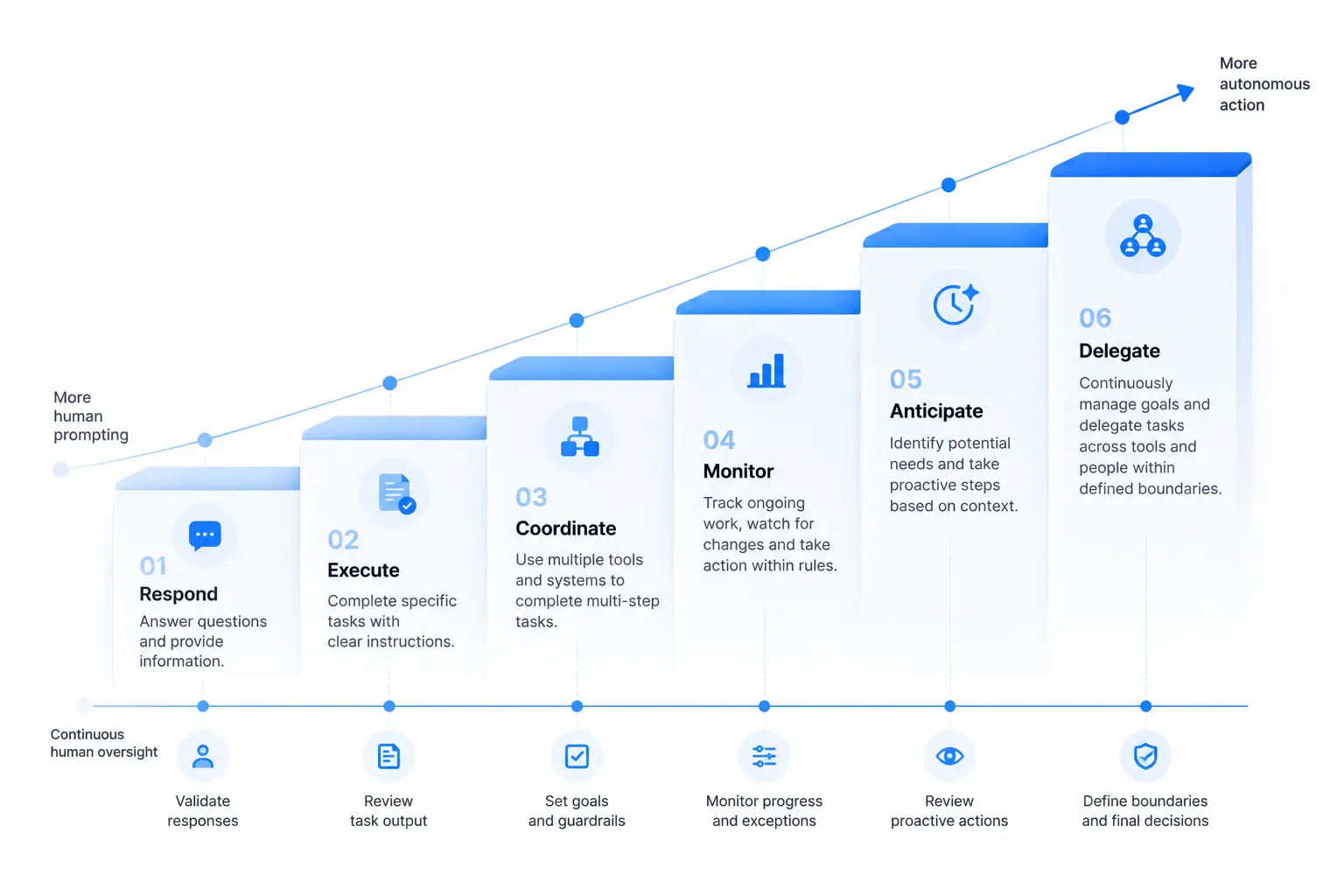
The Agent Autonomy Ladder
A more useful way to compare persistent agents is by autonomy, not by the number of features they advertise.
The following is an analytical framework rather than an industry standard.
Level | Agent Behaviour | Example |
|---|---|---|
1. Respond | Answers when asked | "Summarize this email." |
2. Execute | Performs a requested task | "Draft a response." |
3. Coordinate | Completes multiple connected steps | "Find a meeting time and prepare an agenda." |
4. Monitor | Watches for a future condition | "Tell me when the price falls." |
5. Anticipate | Suggests useful actions based on context | "Your flight changed. Should I move the dinner reservation?" |
6. Delegate | Handles a defined responsibility continuously | "Manage my weekly sales briefing and keep it current." |
Traditional chatbots mostly operated around Levels 1 and 2.
The important development with Dots and Muse is the movement toward Levels 3 through 6.
That is why calling them "AI assistants" can undersell what is changing.
They are early attempts to create persistent software actors.
Security May Become More Important Than Intelligence
Persistent agents create a security problem that ordinary chatbots largely avoid.
A chatbot that gives a bad answer is inconvenient.
An agent with access to email, files, browsers, payment systems and workplace applications can cause real-world consequences.
Meta's architecture acknowledges this explicitly.
Muse operates inside a dedicated Muse Secure VM. Meta says credentials are stored separately so the agent cannot directly see passwords or payment information. A separate Sentinel system reviews outgoing actions, and sensitive actions can require user approval. Meta also provides an activity trail showing what the agent has done and intends to do.
OpenAI has similarly emphasized permissions and safeguards around Dots. Reuters reports that Dots use dedicated cloud infrastructure with customizable permissions and protections for sensitive actions.
The Verge additionally reports custom action rules and automated review mechanisms.
These controls matter because agent security is not simply about protecting a conversation.
It is about controlling authority.
The question becomes:
What is this AI allowed to do with what it knows?
That may become one of the defining questions of the persistent-agent era.
A Practical Trust Model for Always-On Agents
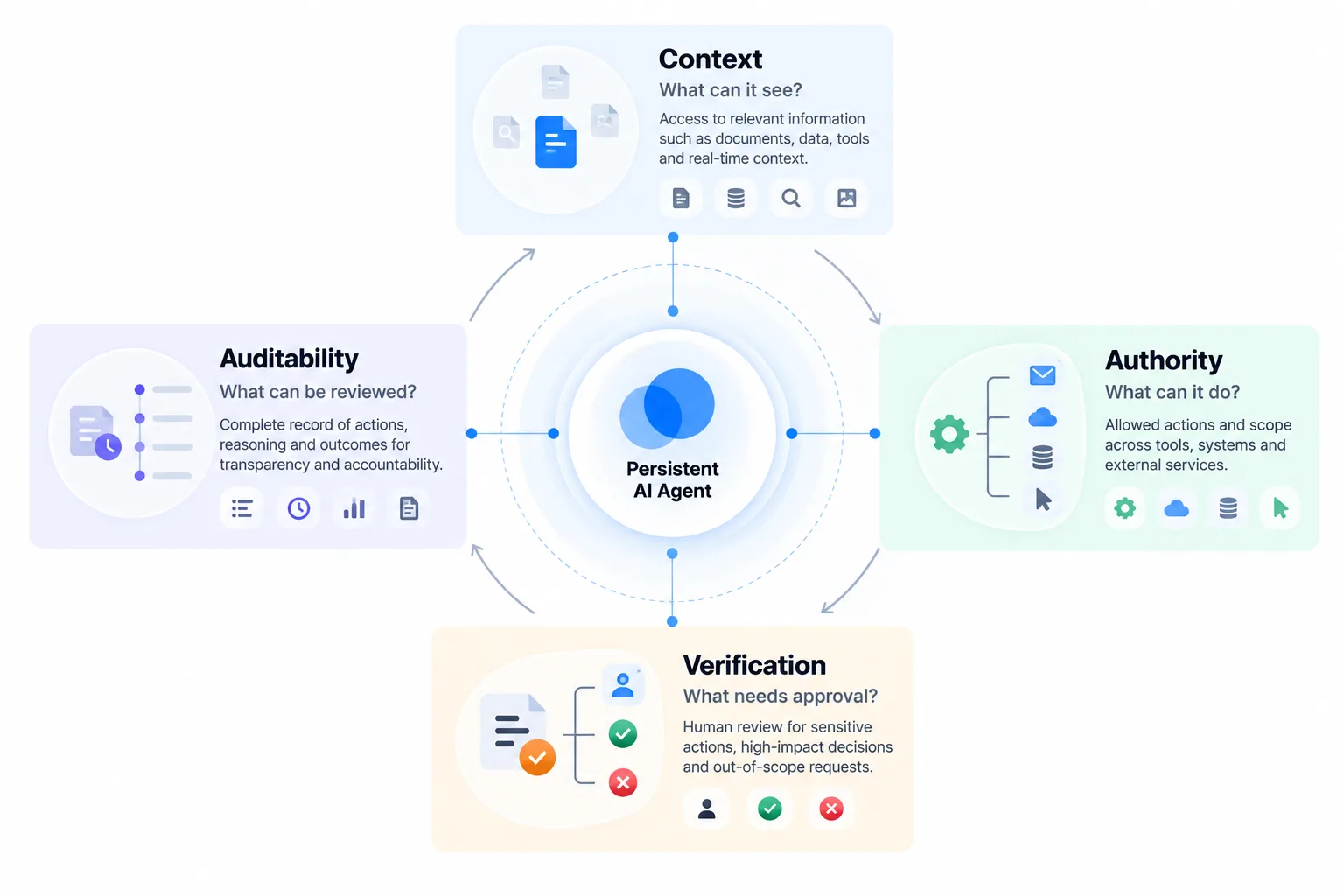
Before giving an always-on agent access to important systems, evaluate four layers.
Context
What information can the agent read?
Email access and calendar access are very different from access to payroll, medical information or confidential company documents.
Authority
What actions can it take?
Reading an inbox carries less risk than sending email. Drafting a purchase carries less risk than completing one.
Verification
Which actions require human approval?
Higher-consequence actions should generally have stronger approval requirements.
Auditability
Can users reconstruct what happened?
Persistent agents need clear histories showing what information they accessed, what decisions they made and which actions they performed.
Together these produce what we can call the CAVA model: Context, Authority, Verification and Auditability.
An agent should not be evaluated only by what it can do.
It should also be evaluated by how precisely those four dimensions can be controlled.
Where OpenAI Dots Looks Strongest
Dots' most interesting advantage is not necessarily GPT-6 Astra.
It is OpenAI's growing work ecosystem.
OpenAI already has ChatGPT, Codex, Work, connected applications, workspace agents and enterprise controls. Dots can potentially sit above those systems as a persistent coordination layer.
That could make workflows such as these particularly compelling:
Software engineering: monitor a project, investigate issues, work with code and coordinate updates.
Sales: prepare proposals, gather customer context and keep sales material current.
Research: continuously monitor a topic and update working documents when evidence changes.
Operations: coordinate repetitive tasks across multiple internal applications.
Content workflows: process interviews or source material and prepare downstream content.
The value comes from connecting steps that previously required someone to repeatedly move information between applications.
Where Meta Muse Looks Strongest
Muse has a different distribution advantage.
Meta already sits inside billions of people's communication and social habits through WhatsApp, Instagram and its broader ecosystem.
A personal agent that understands those environments could remove considerable friction.
Potentially valuable scenarios include:
Travel: monitoring bookings, finding alternatives and coordinating schedules.
Shopping: researching options, remembering preferences and completing approved purchases.
Personal administration: forms, appointments, reminders and recurring tasks.
Planning: maintaining goals and turning them into smaller actions.
Communication: identifying relevant messages and helping users respond.
Muse's advantage could therefore be less about sophisticated enterprise workflows and more about becoming a background operating layer for everyday digital life.
Can Businesses Use Meta Muse?
Yes, although its original positioning is consumer-first.
Meta is already pushing Muse toward small-business use. Axios reported on September 29 that Meta is extending the product toward small businesses, with early users employing it for business accounts and operational work.
A founder could use Muse for scheduling, customer communication, research and administrative tasks without needing a sophisticated enterprise AI deployment.
That creates an interesting overlap.
Dots may move from professional users toward personal life.
Muse may move from personal users toward work.
The products could therefore become more similar over time even though they started from different directions.
Which One Should You Use?
The answer depends less on benchmark performance and more on where you want an agent to operate.
Your Need | Product Direction That Currently Aligns More Closely |
|---|---|
Cross-app professional workflows | Dots |
Team collaboration | Dots |
Slack / Teams-based work | Dots |
Software and technical workflows | Dots |
Enterprise workflow context | Dots |
Everyday personal errands | Muse |
Personal goal tracking | Muse |
Shopping and purchases | Muse |
Consumer messaging workflows | Muse |
Personal calendar and life administration | Muse |
Small-business general assistance | Both are increasingly relevant |
This is not a permanent verdict. Both products are evolving rapidly, and there is substantial overlap already.
A better selection process is to ask:
Where is the information?
Which actions should the agent perform?
How sensitive are those actions?
Who needs to collaborate with it?
How much autonomy are you comfortable granting?
Those questions reveal more than a generic feature checklist.
The Bigger Shift: From Apps to Outcomes
Dots and Muse point toward a potentially larger change in software.
Today, users normally decide which application they need before doing something.
Need to schedule a meeting? Open the calendar.
Need to reply to someone? Open email.
Need to research a trip? Open several websites.
Need to update a project? Open the project-management system.
Persistent agents invert that relationship.
The user describes an outcome.
The agent decides which tools, websites and applications are required to produce it.
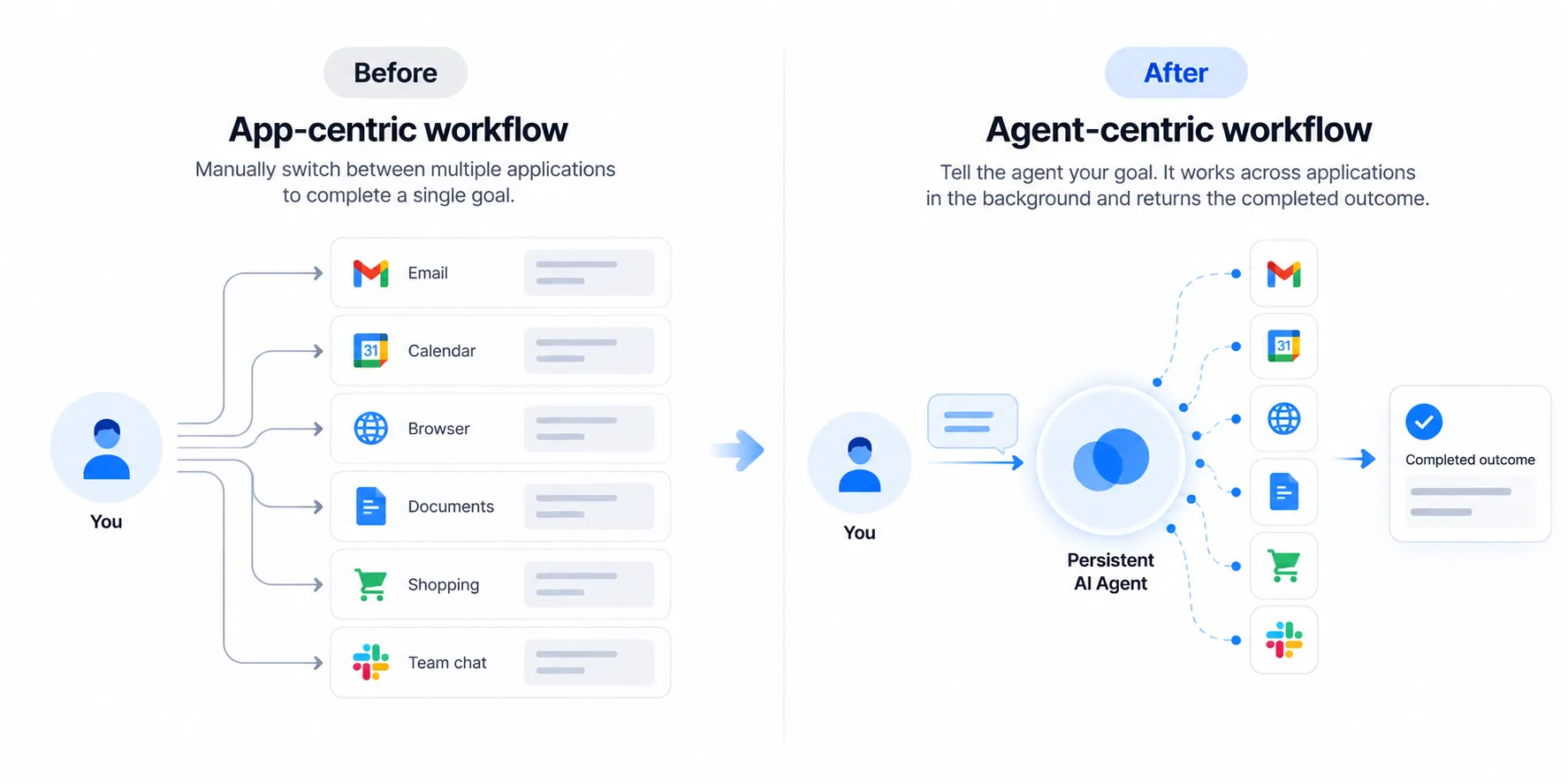
That changes the interaction model from:
User → App → Action
to:
User → Agent → Apps → Action
If that model becomes reliable, applications do not disappear. But users may interact with many of them less directly.
The agent becomes the coordination layer.
What Neither Dots Nor Muse Has Proven Yet
The most important question is not whether these agents can perform impressive demos.
It is whether people will trust them with recurring responsibility.
Persistent agents still have several unresolved challenges.
Reliability: a 95% success rate may sound excellent until an agent performs hundreds of actions every week.
Permission design: users need enough control without being overwhelmed by constant approval requests.
Prompt injection: agents browsing external content can encounter instructions designed to manipulate their behaviour.
Context errors: remembering information is useful only when the agent correctly understands when that information applies.
Accountability: organizations need to know who is responsible when autonomous software performs the wrong action.
Cost: persistent cloud computers and background reasoning can be significantly more expensive than occasional chatbot requests.
The winning agent may therefore not be the one that demonstrates the most autonomy.
It may be the one users feel comfortable leaving unattended.
Frequently Asked Questions
What is the main difference between OpenAI Dots and Meta Muse?
The main difference is their initial context and audience. Dots is being positioned strongly around professional workflows, connected workplace applications and team collaboration. Muse is primarily positioned as a personal AI agent for everyday tasks, goals, communication, shopping and planning. Both can work persistently and take actions on a user's behalf.
Is OpenAI Dots just another version of ChatGPT?
No. Dots represents a more persistent agent model. Rather than simply answering individual prompts, a Dot can continue working toward goals, interact with connected applications and perform multi-step tasks from its cloud environment. It still connects with ChatGPT, but the interaction model is closer to delegating ongoing work than conducting a normal chatbot conversation.
Does Meta Muse keep working when the app is closed?
Yes. Meta explicitly says Muse can continue working in the background after the user closes the application. It can monitor conditions, maintain goals and return with updates or suggestions. This persistence is one of the major differences between personal agents and conventional AI chatbots.
Can Meta Muse take actions without permission?
Muse can act on a user's behalf, but Meta has built approval controls for sensitive operations. Users can configure permissions, and actions such as sending messages or completing purchases may require approval depending on settings. Meta also provides an activity trail for reviewing agent behaviour.
Can OpenAI Dots work with Slack and Microsoft Teams?
Yes. Launch reporting indicates Dots can interact through both Slack and Microsoft Teams, allowing users to communicate with their agent from tools already used for work.
Are OpenAI Dots and Meta Muse autonomous AI agents?
They are better described as semi-autonomous persistent agents. Both can plan and perform multi-step actions with less continuous prompting than conventional chatbots, but both include permission systems and human approval mechanisms for sensitive actions. Their autonomy is therefore bounded rather than unlimited.
Is Meta Muse free?
Meta offers Muse with a limited free tier and paid options for higher usage. The official Muse product material describes the service as free with usage limits, although pricing and availability remain subject to rollout and regional changes.
Will AI agents replace apps?
Probably not in the near term. A more plausible change is that agents become an interface above applications. Instead of manually opening several apps to accomplish a task, users may increasingly give the goal to an agent, which then coordinates the required software. Apps remain important infrastructure even when the user interacts with them less directly.
OpenAI Dots vs Meta Muse: The More Important Competition
OpenAI and Meta are clearly competing for a new layer of computing.
But Dots versus Muse is bigger than a feature race between two AI products.
It represents two early approaches to the same idea.
Meta is asking what happens when an AI agent understands your life well enough to continuously help manage it.
OpenAI is increasingly asking what happens when an AI agent understands your work well enough to continuously help execute it.
Those paths will increasingly overlap.
The real test will not be which agent can complete the most impressive demo. It will be which one can accumulate enough context and authority to become genuinely useful without accumulating so much authority that users stop trusting it.
For always-on AI, intelligence is only one part of the product.
Trust, context and controlled autonomy may matter just as much.
Comments (0)
No comments yet. Be the first to share your thoughts!