10 Best AI Tools for Turning Podcasts Into LinkedIn Posts

Author
Ravi Prajapati
Compare 10 AI tools for turning podcast episodes into LinkedIn posts and clips, with pricing, features, and honest limitations to help you pick the right fit.
Recording a podcast is the easy part. Turning that hour of conversation into something your LinkedIn network actually stops scrolling for is where most creators, founders, and B2B marketers lose momentum. The episode gets published, the RSS feed updates, and then nothing happens on LinkedIn for another two weeks because nobody has time to relisten, pull the good lines, and write a post that doesn't read like a transcript dump.
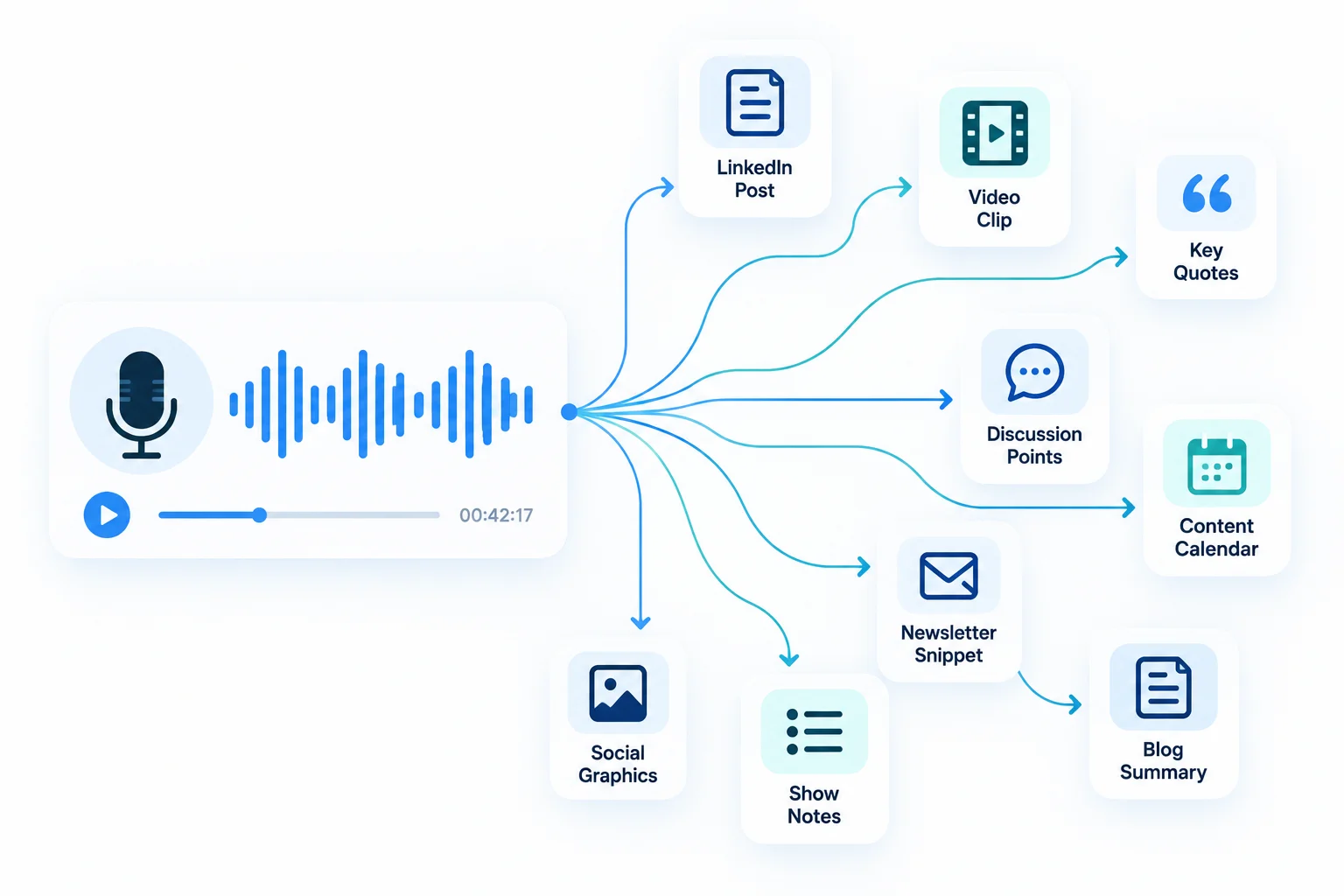
That gap is exactly what a new category of AI tools for podcast to LinkedIn posts exists to close. Some tools write the post itself, pulling insights, quotes, and structure straight out of your audio. Others generate short video clips from your episode and hand you a caption to go with it. A few try to do both. None of them is a "set it and forget it" content machine, and understanding the difference between what each tool actually automates versus what it still expects you to edit is the single biggest factor in picking the right one.
This guide breaks down ten tools worth evaluating in 2026, how they differ in what they actually produce, what they cost, and a decision framework for matching a tool to how you already work rather than to whichever one has the loudest marketing.
Quick Answer
For most podcasters, Castmagic is the strongest all-around pick because it turns one upload into a written LinkedIn post, show notes, and a newsletter from the same transcript. If you specifically want short LinkedIn video clips rather than text posts, Opus Clip and quso.ai are purpose-built for that. If you already run an active LinkedIn presence and want scheduling and analytics bundled in, Taplio is the more complete platform.
Two Different Jobs Hide Behind One Keyword
Most roundups of "podcast to LinkedIn" tools blur together two genuinely different products, and that's the first thing worth untangling before you spend money on the wrong one.
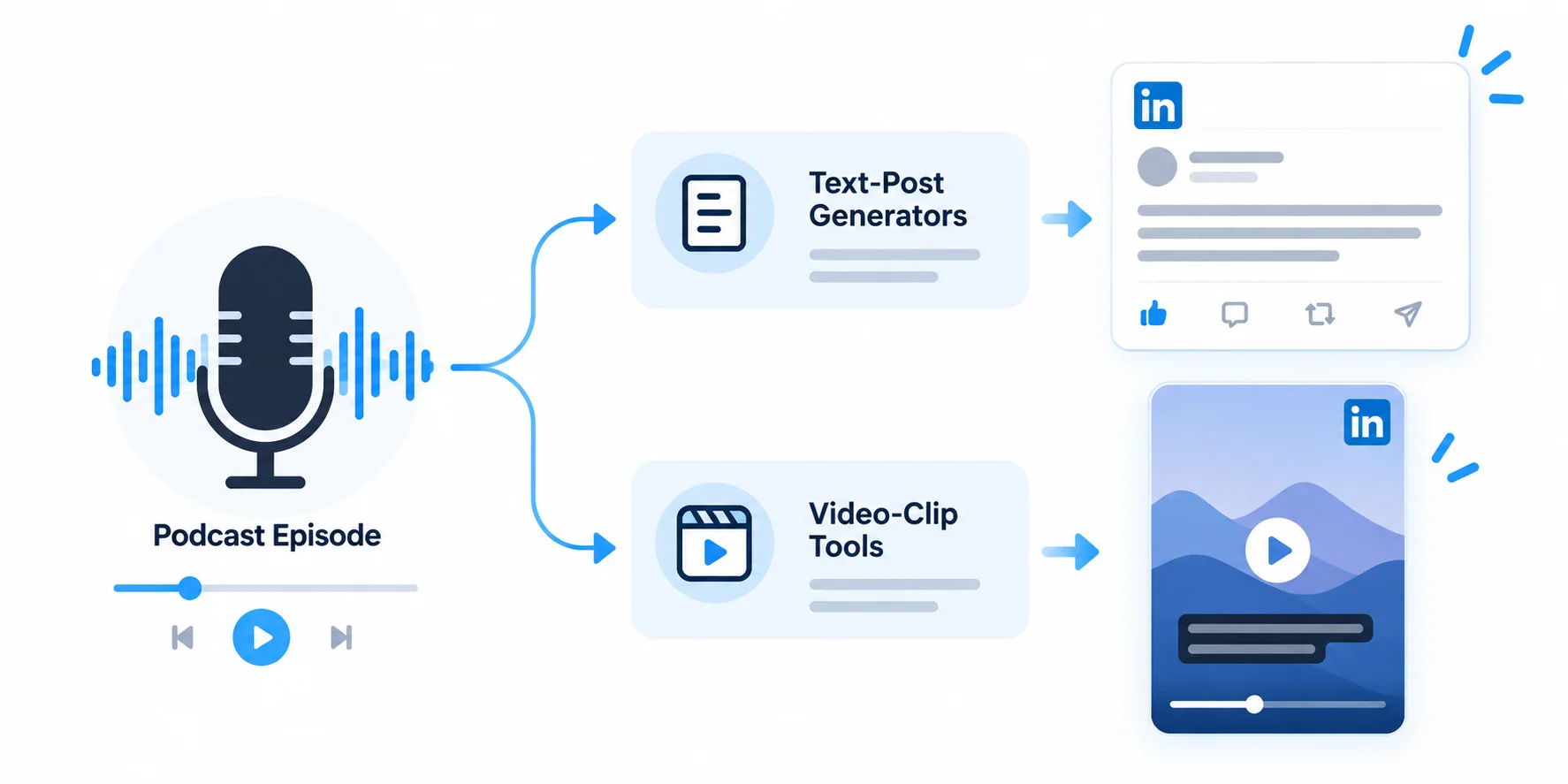
Text-post generators take your audio or a source URL, transcribe it, and write a LinkedIn-native text post: a hook, a few structured paragraphs or a numbered list, and a closing line meant to invite comments. Castmagic, Swell AI, Tugan.ai, Taplio, Postiv AI, and ViralBrain fall into this group.
Video-clip tools take your recorded video (not just audio) and cut it into short, captioned clips sized for LinkedIn's feed, sometimes with a suggested caption but rarely with a fully drafted post. Opus Clip, Repurpose.io, and quso.ai fall here, and Descript straddles both categories since it edits video and generates written outputs from the same project.
If what you actually want is a paragraph of text that sounds like you wrote it after a great conversation, a clip tool alone will not get you there, no matter how good its captions are. If you want native LinkedIn video, a text generator is the wrong starting point. Picking the wrong category is the most common reason people try one of these tools once and abandon it.
The 10 Best AI Tools for Podcast-to-LinkedIn Content
1. Castmagic — Best Overall for Multi-Format Repurposing
Castmagic uploads a podcast or video recording and generates dozens of outputs from one transcript: show notes, a blog draft, an email newsletter, pull quotes, and LinkedIn-formatted social posts, all through a template and prompt system you can customize to match your voice. Reviewers report the platform's transcription accuracy sits in the 90 to 95 percent range for typical English-language podcasts recorded in decent conditions, which is generally clean enough for the AI-generated content downstream to be usable with light editing. A standout feature called Magic Chat lets you ask follow-up questions against your own episode, similar to chatting with an AI assistant that has already listened to the recording, so you can request a specific angle for a LinkedIn post rather than accepting the first draft.
Pricing: Castmagic's paid plans start around $23 per month, with tiered plans scaling up by transcribed-hour allowance; a separate pricing breakdown lists a free tier for three files a month, a Starter plan near $39 monthly, a Pro plan near $99 monthly, and a Business plan around $295 monthly for teams and API access. Exact figures vary by source and billing cycle, so confirm current pricing on Castmagic's own pricing page before committing.
Limitation to know: Castmagic does not currently support custom vocabulary training, so heavy accents, overlapping speakers, and niche terminology such as medical, legal, or crypto jargon reduce transcription accuracy and the quality of everything generated afterward.
2. Swell AI — Best for Developer-Friendly, API-Driven Pipelines
Swell AI is built for podcasters, media agencies, and content teams who want to automate audio and video into written assets using speech-to-text, large language models, and REST API access rather than a purely manual dashboard workflow. Beyond LinkedIn posts, it generates transcripts, clips, show notes, articles, summaries, titles, and newsletters, and it integrates with Apple Podcasts, YouTube, RSS, Zoom, Dropbox, Google Drive, and webhooks, which makes it a reasonable fit for teams that want to wire podcast repurposing into an existing content pipeline rather than copy-pasting from a web app every week.
Pricing: Swell AI offers a free Hobby plan limited to one upload a month, a Studio plan at $29 monthly for 300 transcription minutes, and an Agency plan at $49 monthly for 600 minutes, plus pay-as-you-go pricing at $8.99 per upload for teams that don't want a recurring subscription.
Limitation to know: The API and integration depth is the selling point, but it also means Swell AI rewards technical users more than solo creators who just want to paste a file and copy a finished post.
3. Tugan.ai — Best for Fast, Single-URL to LinkedIn Post
Tugan.ai turns a YouTube video, blog post, or other URL into email sequences, Twitter threads, LinkedIn posts, newsletters, and ad copy in one pass, starting from a URL rather than a blank prompt. For podcasters who publish video versions of episodes on YouTube, this makes Tugan.ai one of the fastest paths from "episode is live" to "LinkedIn post is drafted," since there's no separate upload or transcription wait.
Pricing: Plans start at $29 monthly (billed annually) for 250,000 credits on the Premium tier, with a Pro tier at $79 monthly for 1,000,000 credits, and a 7-day free trial.
Limitation to know: Tugan.ai has no native publishing integrations, so generated content has to be exported and posted manually wherever you take it. It's a content-transformation step, not a scheduling or distribution platform.
4. Taplio — Best All-in-One LinkedIn Growth Suite
Taplio is built specifically for LinkedIn rather than as a general repurposing tool, combining AI post drafting, a searchable library of viral LinkedIn posts, scheduling, analytics, and engagement automation. The AI generator can draft a post from scratch, repurpose a YouTube URL, or remix a blog article into LinkedIn-native formats, and the source-to-post workflow works reasonably well for podcasters who publish video episodes on YouTube first.
Pricing: The Starter plan costs $39 monthly but includes zero AI generation credits, which makes the Growth plan at $65 monthly the realistic entry point for anyone evaluating Taplio specifically for its AI features; the Pro plan at $149 monthly adds a lead database and outreach automation that overlaps with dedicated prospecting tools.
Limitation to know: The most consistent complaint across reviews is that AI-generated drafts don't learn your voice and require meaningful manual editing to sound like you rather than a generic LinkedIn post. Some reviewers describe the output as generic and in need of heavy editing, and note the platform can feel steep for solo users on a limited budget.
5. quso.ai — Best for Clips Plus Scheduling in One Dashboard
quso.ai handles the full post-production and distribution workflow for podcasters: an AI clip generator identifies engaging, shareable moments and cuts them into short clips, auto-captions every clip, and schedules them directly to TikTok, Instagram Reels, YouTube Shorts, LinkedIn, X, and Facebook from one dashboard. The pitch is collapsing a manual repurposing workflow that typically takes five to ten hours per episode down to under 30 minutes.
Pricing: A free plan includes 75 monthly upload minutes with 720p rendering, a Lite plan runs around $29 monthly with 1080p exports, an Essential plan around $39 monthly adds premium AI tools and a content scheduler, and a Growth plan around $49 monthly unlocks full scheduling automation, bulk publishing, analytics, and custom templates.
Limitation to know: This is a video-clip tool, not a text-post generator. If your goal is a written LinkedIn post rather than a native video clip, quso.ai isn't the right starting point.
6. Repurpose.io — Best for Hands-Free Multi-Platform Distribution
Repurpose.io automates the distribution of long-form media across platforms through configurable workflows: content from a source such as a podcast feed or YouTube channel is automatically resized, captioned, and published to destinations including Facebook, Instagram, TikTok, and LinkedIn. Once a workflow is set up, new episodes flow through it without you touching the dashboard again, which is the main draw for creators publishing on a fixed weekly schedule.
Pricing: A Starter plan runs $35 monthly ($29 monthly billed annually), a Pro plan runs $79 monthly, and an Agency plan runs $179 monthly, with a 14-day trial and 10 free publishes to test the workflow before paying.
Limitation to know: This is a distribution-automation platform, not a content generator; the AI components are limited to automatic captioning and cropping rather than writing post copy. You'll still need a separate tool if you want an AI-drafted LinkedIn text post to accompany the clip.
7. Opus Clip — Best for Short, Captioned LinkedIn Video Clips
Opus Clip scans an uploaded long-form video end to end, identifies the moments most likely to perform, and automatically generates captioned, speaker-framed clips scored for predicted performance before you decide which to post. For podcasters and B2B consultants who already record video and want LinkedIn-native clips without a video editor, this is one of the more mature tools in the category.
Pricing: A free plan offers 60 monthly credits with watermarked exports, a Starter plan costs $15 monthly for 150 credits, and a Pro plan costs $29 monthly or $174 annually for 300 monthly credits, with custom Business pricing for teams; credits are consumed at one credit per minute of source footage processed.
Limitation to know: Opus Clip requires existing long-form video to work from, so it's a repurposing tool rather than a content-creation tool, and there is no direct LinkedIn publishing integration, meaning clips must be exported and uploaded manually.
8. Postiv AI — Best for Source-to-Post Text Generation at Volume
Postiv AI takes a pasted article, a YouTube or podcast link, or an uploaded PDF, extracts the key points, and rewrites them as a native LinkedIn post, turning one long-form asset such as a webinar or call recording into several feed-ready posts. The underlying principle is the same across most tools in this category: the more real, specific input you feed the AI, the less generic the output reads, and Postiv AI is built around that pattern specifically for LinkedIn.
Pricing: Publicly listed pricing details were not consistently available at the time of writing; check Postiv AI's own pricing page for current tiers before subscribing.
Limitation to know: Like every source-to-post tool, output quality depends heavily on how information-dense the source episode is. A rambling, loosely structured conversation gives the AI less to extract than a tightly focused interview.
9. ViralBrain — Best for Voice-Matched Posts That Don't Sound Like AI
ViralBrain positions itself around turning existing material into voice-matched LinkedIn posts that sound like the creator wrote them rather than generic AI output, which addresses one of the most common complaints about this entire tool category: that AI drafts carry a recognizable, slightly hollow "LinkedIn voice" regardless of who the source material came from.
Pricing: Publicly listed pricing details were not consistently available at the time of writing; check ViralBrain's own pricing page for current tiers.
Limitation to know: Voice-matching tools still need a sample of your actual writing or past posts to calibrate against. Without that training input, the output defaults to a generic tone like any other generator.
10. Descript — Best for Podcasters Who Also Want to Edit the Episode
Descript generates edited short clips for social media with automatic captions, show notes in paragraph form, chapter markers with timestamps, and highlight reels from a single recording, but its core differentiator is that it's also a full transcript-based audio and video editor, so podcasters who want to clean up the episode itself and pull LinkedIn assets from the same project can do both without switching tools.
Pricing: A free plan covers 60 media minutes monthly, paid plans start around $16 monthly (Hobbyist, billed annually) or $24 monthly on the Creator tier, and a Business plan runs around $50 monthly (billed annually) for higher-volume production teams.
Limitation to know: Descript's content-repurposing library is more limited than a purpose-built tool like Castmagic; its AI co-editor can draft show notes and clips, but the breadth of output formats (blog drafts, newsletters, tweet threads, LinkedIn posts) is narrower than dedicated repurposing platforms.
Comparison Table: Podcast-to-LinkedIn AI Tools at a Glance
Tool | Output Type | Starting Price | Best For | Native LinkedIn Publishing |
|---|---|---|---|---|
Castmagic | Text posts + show notes, blog, newsletter | ~$23–39/mo | All-round multi-format repurposing | No (export/copy) |
Swell AI | Text posts + articles, transcripts | Free–$29/mo | API-driven, developer pipelines | No |
Tugan.ai | Text posts from URL | $29/mo | Fast single-source posts | No |
Taplio | Text posts + scheduling/analytics | $39–65/mo (AI needs Growth tier) | Full LinkedIn growth suite | Yes |
quso.ai | Video clips + scheduling | Free–$39/mo | Clips plus multi-platform scheduling | Yes |
Repurpose.io | Video clips (distribution only) | $29–79/mo | Hands-free automated publishing | Yes |
Opus Clip | Video clips | Free–$29/mo | High-quality captioned clips | No (manual upload) |
Postiv AI | Text posts from URL/PDF | Not publicly listed | Volume source-to-post generation | Unclear |
ViralBrain | Text posts, voice-matched | Not publicly listed | Authentic-sounding AI drafts | Unclear |
Descript | Video editing + clips + written outputs | Free–$24/mo | Editing and repurposing in one tool | No |
A Framework for Choosing: The Repurposing Fit Matrix
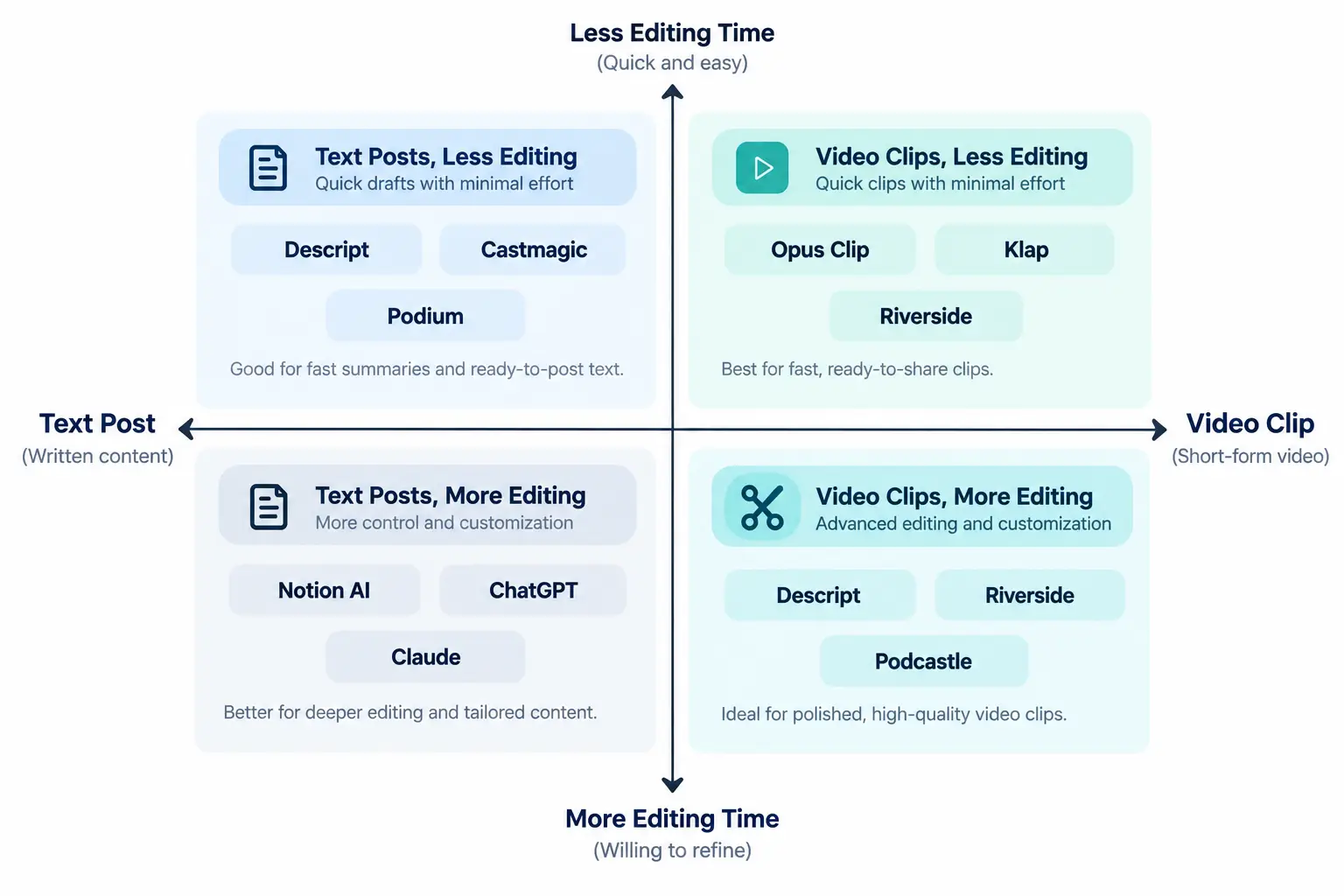
Rather than picking the tool with the best marketing page, match your choice to two questions: what format do you actually want to publish, and how much editing time are you realistically willing to spend per episode? This is an original analytical framework for this article, not a scientifically validated model, but it reflects the trade-offs visible across every tool above.
If you want text posts and have 10 minutes to edit: Castmagic, Tugan.ai, or Postiv AI. These give you a full draft fast; expect to rewrite the hook and tighten the close yourself.
If you want text posts and have almost no editing time: ViralBrain's voice-matching approach or a tool with a strong custom-prompt/template system (Castmagic, Swell AI) reduces post-generation editing, though it rarely eliminates it entirely.
If you want video clips and already have video recordings: Opus Clip or quso.ai for clip quality and virality scoring; add Repurpose.io on top if you want the clips auto-published rather than manually uploaded.
If you want everything in one workspace, including scheduling: Taplio (for text-first LinkedIn strategy) or quso.ai (for video-first, multi-platform strategy).
If you also need to edit the raw episode before repurposing it: Descript is the only tool here that combines real audio/video editing with AI-generated outputs from the same project.
Why This Matters More Than It Did Two Years Ago
The case for repurposing podcast content into LinkedIn posts isn't just workflow convenience anymore; the underlying platform data has shifted. LinkedIn Creative Labs' internal research found that video viewership on the platform surged 36 percent in 2024, reaching 154 billion views, with video posts shared 20 times more than other content types.
Separately, a large-scale analysis of LinkedIn posts by Storykit found that video content generates higher dwell time, shareability, and follower growth than other formats, yet still represents only 10 to 15 percent of corporate posts compared to 70 percent for static images, while top-performing accounts publish 3.5 times weekly versus an industry average of 1.8 and use a more balanced 40 percent video, 30 percent image, 20 percent carousel content mix.
On the supply side, podcasting keeps growing too. Edison Research's Infinite Dial 2026 study found that 58 percent of Americans age 12 and older consumed a podcast in the last month and 45 percent consumed one in the last week, both record highs, while Listen Notes counted at least 3.77 million podcasts as of May 2026.
A separate industry estimate from Signal Hill put weekly podcast listenership among senior executives at 83 percent, which is precisely the audience most B2B podcasters are trying to reach on LinkedIn. The combination is straightforward: more executives listening to podcasts, and a LinkedIn algorithm that is measurably underserved by video relative to how well video performs. That gap is the actual opportunity these tools are built around, not a marketing narrative invented by the tool vendors themselves.
Realistic Workflow Scenarios
These are illustrative, hypothetical scenarios based on how the tools above are typically used, not real case studies of specific companies.
A solo B2B podcast host publishing weekly
After recording, the host uploads the audio to Castmagic, which drafts a LinkedIn post, a newsletter section, and show notes from the same transcript in about ten minutes. The host edits the hook line, adds one first-person detail from the conversation the AI couldn't have known to include, and publishes. Total added time per week: roughly 20 minutes instead of the 90 minutes manual writing used to take.
A two-person marketing team running a client's interview-style podcast
The video version goes into Opus Clip, which generates five candidate clips with a virality score. The team picks the top two, exports them, and separately runs the transcript through Taplio to draft accompanying post copy for each clip, then schedules both through Taplio's calendar.
An agency managing podcast repurposing for multiple clients
Swell AI's API and multi-show dashboard let the agency batch-process several clients' episodes into drafts overnight, with account managers reviewing and personalizing each draft the next morning rather than starting from a blank page for every client.
Risks and Limitations Worth Knowing Before You Commit
AI-generated LinkedIn posts have a recognizable tell
Reviewers across this category consistently note that AI-led content generation can produce generic or "cringe-worthy" posts that lack authenticity, and that leaning on templates and viral-post libraries for inspiration can lead to a loss of originality and prevent creators from building a distinct voice. No tool in this list fully solves that; all of them reduce the AI-cadence problem, none eliminates it without a human editing pass.
Transcription accuracy sets a ceiling on everything downstream
If your podcast has heavy accents, overlapping speakers, background noise, or specialized terminology, expect to correct the transcript before trusting any AI-generated post built on it, since inaccurate source text produces confidently wrong summaries.
Most text-generation tools have no native publishing step
Several tools on this list, including Castmagic, Tugan.ai, Swell AI, and Postiv AI, expect you to copy the finished draft and paste it into LinkedIn manually. If seamless auto-publishing matters to you, that narrows the field to Taplio, quso.ai, and Repurpose.io.
Pricing structures are inconsistent and change often
Several tools meter usage by transcription minutes, others by generation credits, and others by monthly upload counts. The headline "starting at" price is rarely what a weekly podcaster actually pays once real usage kicks in, so it's worth running your own monthly minute count against each tool's calculator before subscribing annually.
The Counterargument: Is This Worth Automating at All?
Not every podcaster needs an AI tool for this. If you publish monthly rather than weekly, the time saved by automation may not offset the subscription cost, and a freelance writer or a simple manual process (relisten, jot down three ideas, write the post yourself) can produce content with more personal voice than most AI drafts manage without heavy editing. The tools in this guide earn their subscription cost specifically at publishing frequencies of weekly or higher, or in agency contexts managing multiple shows at once, where the manual-writing time genuinely adds up to hours per week. For an occasional podcaster, the honest recommendation is often to skip the software and write the post yourself.
What These Tools Cannot Do
No tool on this list can substitute genuine expertise or a distinct point of view for a post that has neither. AI repurposing tools are strongest at extraction: pulling a structured draft, a quote, or a clip out of material that already contains something worth saying. They are weakest at invention: none of them will turn a forgettable, unfocused conversation into a compelling LinkedIn post, no matter how good the prompt engineering is. The practical takeaway is to treat these tools as a first-draft accelerator, not a replacement for editorial judgment about which parts of an episode are actually worth repurposing.
Frequently Asked Questions
Can AI turn a podcast episode directly into a LinkedIn post without editing?
Most tools produce a usable first draft, not a publish-ready final post. Expect to rewrite the opening hook and add at least one specific, first-person detail the AI couldn't have generated, since that's usually what separates an authentic-sounding post from a generic one.
Do I need video, or does audio alone work for these tools?
It depends on the tool category. Text-post generators like Castmagic, Swell AI, and Tugan.ai work from audio-only podcasts. Video-clip tools like Opus Clip and quso.ai require an actual video recording of the episode, since they're cutting and captioning footage, not just transcribing audio.
Which tool is cheapest for someone just starting out?
Opus Clip's free plan offers 60 monthly credits and quso.ai's free plan offers 75 monthly upload minutes, making them the lowest-cost entry points for video clips. For text posts, Swell AI's free Hobby plan allows one upload monthly, which suits testing the workflow before subscribing.
Will LinkedIn penalize AI-generated posts?
LinkedIn has not published a policy that penalizes AI-assisted writing specifically, and text-post generation is not the same category of concern as fully automated, unedited mass-posting. The more relevant risk is reader-perceived quality rather than a platform penalty: generic, obviously AI-sounding posts tend to underperform because readers disengage, not because the algorithm suppresses them by rule.
Can one of these tools completely replace a human social media manager?
For a solo podcaster on a limited budget, these tools can replace a meaningful chunk of the writing workload. For a brand managing a consistent LinkedIn presence, most teams use these tools to generate first drafts and still rely on a human to edit for voice, add real commentary, and manage the engagement and reply side of LinkedIn, which none of these tools automate well.
How much time do these tools actually save per episode?
Industry estimates from quso.ai put the fully manual repurposing workflow at five to ten hours per episode, with AI tools collapsing that to well under an hour of review and light editing for most users, though the exact savings depend heavily on how much manual correction your specific episode's transcript needs.
What's the difference between Castmagic and Descript?
Castmagic is a pure content-repurposing tool with no audio or video editing capability; you have to finish editing your episode elsewhere before uploading it. Descript is primarily a transcript-based audio and video editor that also generates repurposed content, making it the better fit if you want to edit and repurpose in the same workspace.
Do any of these tools post directly to LinkedIn automatically?
Taplio, quso.ai, and Repurpose.io all support scheduling or direct publishing to LinkedIn from within the platform. Most of the pure text-generation tools, including Castmagic, Tugan.ai, and Swell AI, require you to copy the finished draft and post it manually.
The Bottom Line
The right tool depends less on which one has the most features and more on what you're actually trying to publish: a written post, a video clip, or both, and how much of your own editing time you're willing to spend making the AI draft sound like you rather than a template. Castmagic remains the strongest general-purpose starting point for text-first podcasters, Opus Clip and quso.ai lead for video clips, and Taplio is the more complete choice if scheduling and LinkedIn growth tracking matter as much as the drafting itself. Whichever tool you choose, the time you save on the first draft is only valuable if you reinvest a few minutes of it back into making the post sound like a real person said it, because that's still the part no AI tool in this category has fully solved.
Read Also:
We Tried 12 AI Note-Taking and Meeting Summary Tools So You Don't Have To
10 Best AI Tools for Turning Webinars Into Social Media Content
15 Free Google AI Tools You Should Try
Top 5 Best AI Text-to-Speech Tools
Best AI Tools for Wedding Photographers
Comments (0)
No comments yet. Be the first to share your thoughts!