We Tried 12 AI Note-Taking and Meeting Summary Tools So You Don't Have To

Author
Ravi Prajapati
We tested 12 AI meeting note-taking tools in real calls. Compare Otter, Fireflies, Fathom, Granola, tl;dv and more on accuracy, price, and workflow fit.
We compared the 12 most widely used AI meeting note-takers on transcription accuracy, summary quality, bot vs. bot-free recording, integrations, and pricing. Whether you run solo client calls or enterprise team standups, this guide tells you which tool fits your workflow and which ones to skip.
The average professional now spends over 11 hours per week in meetings, yet 70 percent of decisions made in those meetings are forgotten within 24 hours without notes. AI meeting note-taking tools promise to fix that, but with dozens of options in 2026, each claiming to be the smartest, most accurate, and easiest to use, choosing the right one has become its own problem.
We spent three weeks testing 12 of the most widely used AI note-taking and meeting summary tools across real calls, different team sizes, and multiple platforms. This is not a features list pulled from product pages. It is an honest, side-by-side comparison of what these tools actually do when you put them inside a real meeting.
The Problem Nobody Talks About Openly
You leave a one-hour meeting. You remember the big idea someone floated around minute 22. You are pretty sure there were three action items. One of them was yours.
By tomorrow morning, you will have forgotten 50 percent of it.
That is not an opinion. According to Laxis research from 2026, 70 percent of meeting decisions are forgotten within 24 hours without notes. And yet most professionals still rely on either manual scribbling or sheer memory to capture what happens inside a meeting room or a video call.
The numbers make the scale of this problem impossible to ignore. Unproductive meetings cost U.S. businesses up to $375 billion per year, according to Bloomberg research. At the individual level, meetings cost organizations an average of $29,000 per employee per year. Only 11 percent of meetings are rated "highly productive" by attendees, according to Atlassian.
AI meeting note-taking tools were built precisely for this gap. They join your calls, transcribe the conversation, generate summaries, pull out action items, and push everything into your existing workflow, without you lifting a finger.
But here is what most comparison articles skip: not all of these tools work the same way, cost the same, or solve the same problem. Some are built for individual freelancers. Some are enterprise-grade compliance machines. Some are brilliant at capturing audio and hopeless at organizing what they heard.
We tested 12 of the most widely used AI meeting assistants and AI note-taking tools across real calls, different platforms, and varied team sizes. Here is the honest breakdown.
What We Tested and How
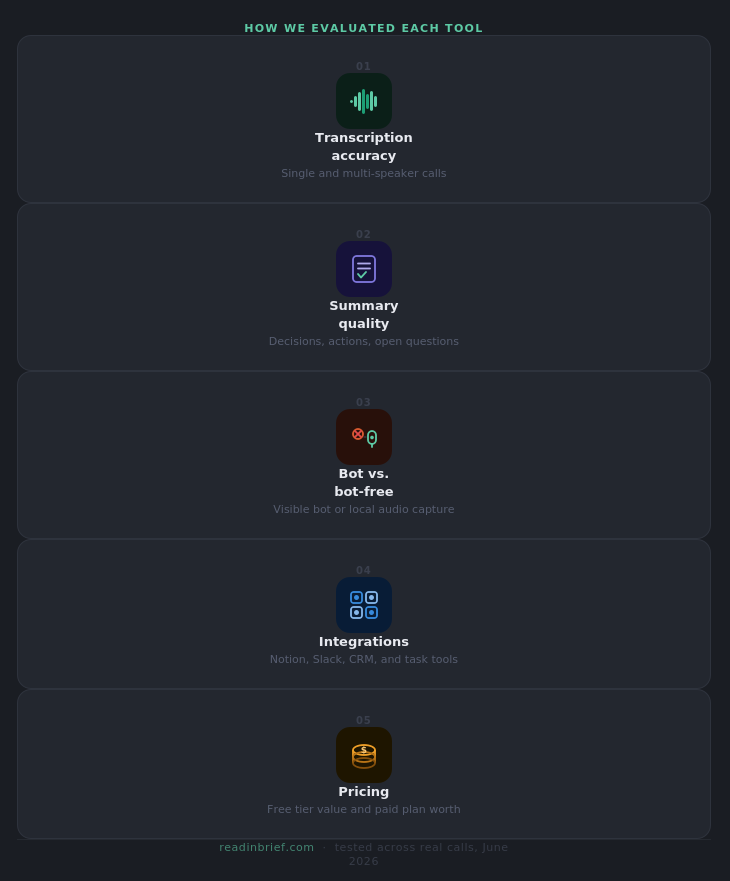
Before the tool-by-tool breakdown, it helps to understand the evaluation criteria we used, because these are also the questions you should be asking when you evaluate any AI note-taking app for your own workflow.
Transcription accuracy is the foundation. Accuracy across top tools sits at approximately 95 to 98 percent for clean single-speaker audio, dropping to 85 to 92 percent in multi-speaker calls with accents or technical vocabulary. We tested each tool in both single-speaker and group meeting conditions.
Summary quality matters more than most people expect. A 4,000-word transcript you still have to read is not a time saver. The question is whether the AI understands the conversation well enough to surface decisions, commitments, and open questions in a format you can act on immediately.
Bot vs. bot-free recording is the single biggest decision this category has seen in 2026. Bot-based tools send a visible participant into your call. Bot-free tools capture audio from your device locally, which means clients and interview subjects never know you are recording. We flagged which tools use which approach.
Integrations determine whether notes actually get used. A summary that lives inside the note-taking app is a note you will forget to check. Tools that push directly into Notion, Slack, HubSpot, Salesforce, or your task manager of choice are the ones that survive long-term.
Pricing and free tier value vary wildly. Some tools offer genuinely unlimited free plans. Others are limited time trials dressed up as free tiers. We checked the fine print on every plan.
The 12 AI Meeting Note-Taking Tools We Tested
1. Otter.ai
Best for: Teams that need live transcription, shared knowledge, and searchable meeting archives
Otter.ai is the tool most people discover first, and there is a reason for that. It pioneered the AI meeting note-taking space and remains the most recognizable name in the category.
The standout feature is OtterPilot, which joins your meetings as a visible bot and generates structured notes without manual intervention. After the call, you can ask conversational questions like "What did Sarah say about the timeline?" or "Which action items were assigned to the marketing team?" and get instant answers pulled directly from your transcript with timestamp references.
The AI chat functionality works across your entire meeting history, which makes it genuinely useful for tracking how a decision evolved across multiple calls over several weeks.
Where it falls short is in export flexibility. Getting your notes into external tools requires some setup, and the free plan is more limited than it appears on the surface.
Pricing: Free plan with limited transcription minutes. Pro plans start at $16.99 per user per month.
Bot-free option: No. Otter.ai joins calls as a visible bot participant.
Platform support: Zoom, Google Meet, Microsoft Teams
2. Fireflies.ai
Best for: Sales teams and organizations that need conversation intelligence alongside transcription
Fireflies.ai goes well beyond transcription. It analyzes conversations for sentiment, tracks talk-time ratios across speakers, and flags moments of potential customer objection in sales calls. For teams whose meetings are directly tied to revenue, those analytics matter.
The integration layer is one of the deepest in the category. Otter.ai and Fireflies.ai lead for team collaboration and CRM integrations. Fireflies connects to over 40 platforms including Salesforce, HubSpot, Slack, Notion, and Zapier, which means your meeting outputs can trigger workflows automatically the moment a call ends.
One honest limitation: the summary formatting can feel verbose. You get a lot of information, but it is not always structured in a way that is easy to scan quickly.
Pricing: Free plan available with limited storage. Pro plans start at $18 per user per month.
Bot-free option: No. Fireflies joins as a visible bot.
Platform support: Zoom, Google Meet, Microsoft Teams, Webex, and more
3. Fathom
Best for: Individual professionals and freelancers who want a free, reliable tool that just works
Fathom disrupted the market by offering an unlimited free tier with features competitors charge $20 or more per month for. It records, transcribes, and generates summaries with zero cost for individual users.
In our testing, Fathom was the easiest tool to set up and the quickest to produce a usable summary. It is tightly integrated with Zoom and produces clean, scannable summaries that break down key moments and action items without burying them in transcript noise.
Fathom is great for solo users who want high quality action items. However, teams that need shared access to meeting libraries, admin controls, or CRM sync will need to move to a paid plan.
Pricing: Unlimited free plan for individuals. Team plans from $15 per user per month.
Bot-free option: No. Fathom joins as a visible bot.
Platform support: Zoom (native), Google Meet, Microsoft Teams
4. Granola
Best for: Privacy-conscious professionals who take notes manually but want AI to enhance them
Granola is the 2026 darling of the AI note-taking world. It captures audio locally on your Mac and generates structured notes without a bot ever joining your call. Your clients never know you are recording.
The approach is genuinely different from every other tool on this list. Granola acts as a live notepad during your meeting. You jot rough bullet points as you normally would, and when the call ends, Granola merges your notes with its transcription to produce something that feels human-written rather than machine-generated.
Prior to a sprint retrospective, you might jot down only a rough agenda in Granola. The AI then transcribes your meeting, and with the click of a button, Granola plugs relevant details from the transcript into your notes. The result is a collaborative memory of the meeting that feels both human and complete.
The main limitation is platform: Granola is Mac-only as of mid-2026, which excludes a significant portion of users.
Pricing: Free tier available. Paid plans from $18 per month.
Bot-free option: Yes. Granola captures audio locally from your device.
Platform support: Any meeting platform (device-level audio capture), Mac only
5. tl;dv
Best for: Remote and async teams that share meeting highlights across time zones
tl;dv (short for "too long, didn't view") is built around a different core use case than most tools on this list. Rather than being optimized for the person who was in the meeting, it is optimized for the person who was not.
It offers unlimited video recordings, transcripts, and AI moment summaries across Google Meet, Zoom, and Microsoft Teams, even if you do not attend the meeting. You can set tl;dv to join on your behalf, record the full session, then receive a timestamped highlight reel of the moments that matter.
tl;dv is built in Europe, is fully GDPR-compliant and SOC 2 certified, offers EU data residency options, and does not use customer data to train its AI models. For teams in regulated industries or EU-based organizations, that combination of features addresses concerns that many US-built competitors do not even acknowledge.
One important note for Google Meet users: Google's March 2026 update flags third-party notetaker bots as "potential risk" and defaults to denying their entry, so tl;dv's native desktop app is now the recommended option for Meet users, capturing audio directly from your device.
Pricing: Unlimited free plan. Paid plans from $24 per user per month.
Bot-free option: Yes, via the desktop app (recommended for Google Meet users).
Platform support: Zoom, Google Meet, Microsoft Teams
6. Fellow
Best for: Enterprise teams that need governance, compliance, and cross-meeting search
Fellow leads the category as the most secure AI meeting assistant, with SOC 2 Type II certification, flexible recording options with or without bots, and the ability to query across all your meetings using Ask Fellow.
Fellow's approach is more comprehensive than transcription. It handles the full meeting lifecycle: collaborative agenda building before the call, real-time shared notes during the call, and structured summary with action tracking after the call. For organizations that want one governed system for all meeting knowledge rather than a patchwork of individual tools, Fellow makes a strong case.
Fellow resolves fragmentation by giving organizations one controlled system for capturing and distributing meeting knowledge. Teams can choose bot or botless meeting recording, while IT sets the rules for how recording is allowed, ensuring compliance without sacrificing usability.
The tradeoff is price point and complexity. Fellow is not the right tool for a solo freelancer or small startup.
Pricing: Free plan available. Paid plans from $7 per user per month for teams.
Bot-free option: Yes. Fellows supports both bot and bot-free recording.
Platform support: Zoom, Google Meet, Microsoft Teams
7. Jamie
Best for: Client-facing professionals who need bot-free notes across any platform in any language
Jamie is a bot-free AI note taker for Mac, Windows, and iOS that records audio directly from your device with no visible bot in the call, summarises meetings in 100 languages with speaker memory that learns voices over time, syncs natively to Salesforce, HubSpot, Attio, Pipedrive, Notion, and Asana, and processes everything in EU servers with auto-deletion of audio the moment recording stops.
The speaker memory feature is one of the more thoughtful innovations in this category. Over time, Jamie learns to recognize individual voices, which makes it progressively more accurate at assigning speech to the right person in recurring team meetings. In our testing, this made a meaningful difference to summary quality after three or four sessions.
Jamie feels like a practical middle ground for people who want AI meeting notes without the awkwardness of a bot joining every call. That alone gives it an edge for client meetings, interviews, and other conversations where a visible meeting assistant can feel distracting.
Pricing: Free tier available. Paid plans from $24 per month.
Bot-free option: Yes. Jamie captures audio at the device level.
Platform support: Any platform (device-level audio capture). Available on Mac, Windows, and iOS.
8. Krisp
Best for: Teams working in noisy environments who need both audio quality and note-taking in one tool
Krisp distinguishes itself by combining note-taking with real-time voice enhancement technology. It automatically records, transcribes, takes notes, and summarizes conversations across any meeting platform, while simultaneously canceling background noise for cleaner audio and more accurate transcripts.
Krisp started as a noise-cancellation tool, not a transcription tool, and that heritage shows in a meaningful way. If you work from a coffee shop, a co-working space, or a home office with background noise, every other tool on this list will struggle with transcription accuracy. Krisp solves the noise problem before the transcription problem, which means the underlying text the AI works from is significantly cleaner.
The note-taking features are solid but not as deep as dedicated tools like Fireflies or Fellow. Krisp makes the most sense when audio environment is your primary challenge.
Pricing: Free tier available. Pro plans from $12 per user per month.
Bot-free option: Yes. Krisp captures audio locally without a bot participant.
Platform support: Any meeting platform
9. MeetGeek
Best for: Sales and customer success teams that run high volumes of client meetings
MeetGeek targets client-facing organizations with customizable summary templates and automated follow-up workflows. Searchable transcripts and structured outputs make MeetGeek useful for sales and customer success teams who run high volumes of external meetings.
The customizable templates are where MeetGeek earns its place. You can define exactly what fields appear in a post-meeting summary, which means your sales call notes always capture deal stage, budget confirmation, next steps, and objection type in a consistent format that feeds directly into your CRM without manual cleanup.
For teams doing fewer than 10 client calls per week, this level of customization may feel like overkill. For teams running 50 or more, it pays for itself quickly.
Pricing: Free plan available. Pro plans from $19 per user per month.
Bot-free option: No. MeetGeek joins calls as a visible bot.
Platform support: Zoom, Google Meet, Microsoft Teams
10. Avoma
Best for: Revenue teams that need meeting intelligence tied directly to deal outcomes
Avoma occupies a distinct tier in the AI meeting assistant landscape: it is less a note-taking tool and more a conversation intelligence platform that happens to take notes. The difference matters.
While most tools on this list tell you what was said in a meeting, Avoma also analyzes how meetings are going over time. It tracks whether reps are following call scripts, how much talk time customers get versus sellers, which objections come up most frequently across all client conversations, and which meeting patterns correlate with deals closing.
For a solo user who just needs clean summaries, Avoma is overbuilt and overpriced. For a sales operations team of 20 or more people, it is one of the most actionable tools in the category.
Pricing: Plans from $24 per user per month. No meaningful free tier.
Bot-free option: No. Avoma joins as a visible bot.
Platform support: Zoom, Google Meet, Microsoft Teams
11. Notion AI (for meeting notes)
Best for: Teams already living in Notion who want to summarize and restructure pasted notes
Notion AI is not a meeting tool in the traditional sense. It does not join your calls or transcribe in real time. But for teams that already use Notion as their central workspace, it fills a specific and genuinely useful gap: turning raw notes or pasted transcripts into structured, readable summaries without switching to a separate app.
Notion AI works best for teams already using Notion as their workspace. It provides native AI capabilities for summarizing lengthy notes, rewriting content for clarity, and extracting action items from unstructured meeting documentation. The tool shines when you paste meeting notes into a Notion page and need quick summaries or action item extraction. It can also help draft follow-up emails, create meeting agendas from previous notes, and translate technical discussions into plain language.
The limitation is that it requires a human to start the process. You still need to capture something during the meeting before Notion AI can enhance it.
Pricing: Notion AI is an add-on to Notion plans at $8 per member per month.
Bot-free option: Not applicable. Notion AI works on text you paste or type.
Platform support: Works inside Notion only.
12. Lindy
Best for: Individuals and teams who want AI to take action on meeting notes, not just store them
Lindy is an AI assistant you can text to summarize meetings, pull out key decisions, and handle the follow-up work that usually sits in your notes. It stood out during testing as an AI assistant you can text in plain English to join a mock meeting, summarize the conversation, and list the action items for each speaker.
The distinction between Lindy and every other tool on this list is what happens after the summary is generated. You can instruct Lindy to email action items to each participant, follow up with a specific person after two days, log the outcome in your CRM, and update a project status in Notion, all from a single plain-language instruction after the call ends.
Lindy makes the most sense for teams that want meeting notes to move work forward, not just sit in a library. If your current workflow involves copying action items out of a summary and pasting them somewhere else, Lindy eliminates that step entirely.
Pricing: Free tier available. Paid plans from $49.99 per month.
Bot-free option: Varies by configuration.
Platform support: Zoom, Google Meet, Microsoft Teams, and calendar integrations
The Head-to-Head Comparison Table
Tool | Best For | Bot-Free | Free Plan | Starting Paid Price |
|---|---|---|---|---|
Otter.ai | Teams and searchable archives | No | Yes (limited) | $16.99/user/mo |
Fireflies.ai | Sales teams and CRM integration | No | Yes (limited storage) | $18/user/mo |
Fathom | Individual users | No | Yes (unlimited) | $15/user/mo |
Granola | Privacy-first note augmentation | Yes | Yes | $18/mo |
tl;dv | Async and remote teams | Yes (desktop app) | Yes (unlimited) | $24/user/mo |
Fellow | Enterprise compliance and governance | Yes | Yes | $7/user/mo |
Jamie | Client-facing cross-platform use | Yes | Yes | $24/mo |
Krisp | Noisy environments | Yes | Yes | $12/user/mo |
MeetGeek | High-volume client meetings | No | Yes | $19/user/mo |
Avoma | Revenue team intelligence | No | No | $24/user/mo |
Notion AI | Notion-native teams | N/A | No (add-on) | $8/member/mo |
Lindy | Post-meeting automation | Varies | Yes | $49.99/mo |
The Bot vs. Bot-Free Question: Why It Matters More in 2026
This is the single biggest decision you will make when choosing a meeting note taker in 2026.
When a bot joins your call as a named participant, every person on the call can see it. For internal team meetings with colleagues who already know your workflow, this is rarely a problem. For client calls, job interviews, sensitive negotiations, or any conversation where you want the other party to feel relaxed rather than recorded, a visible bot changes the dynamic.
Bot-based tools send a visible participant into your meeting room. Bot-free tools capture audio locally from your device without anyone knowing. If you are on sales calls where a recording bot might spook prospects, bot-free options like Jamie or Krisp are worth considering.
There is also a practical consideration on Google Meet specifically. Google's March 2026 update flags third-party notetaker bots as "potential risk" and defaults to denying their entry, meaning hosts have to manually override Google's own interface to allow them. For teams heavily reliant on Google Meet, bot-free tools have become meaningfully more convenient, not just more discreet.
Five Questions to Ask Before You Pick a Tool
Do you need notes for yourself or your whole team?
Individual users can get exceptional value from free plans on Fathom or tl;dv. Teams that need shared access to a meeting library, admin controls, and usage analytics need a paid team plan and should prioritize Fellow, Fireflies, or Avoma depending on their primary use case.
Are your meetings external or internal?
For client-facing calls, interviews, or any conversation where a visible bot would be awkward, prioritize bot-free tools: Jamie, Granola, Krisp, or tl;dv via its desktop app.
What does your workflow look like after the meeting?
If notes need to live in Notion, choose a tool with a direct Notion integration. If follow-ups need to land in Salesforce or HubSpot, Fireflies, Jamie, and MeetGeek all offer strong CRM sync. If you want the AI to handle follow-ups autonomously, Lindy is the only tool on this list built specifically for that.
Are you in a regulated industry?
SOC 2 Type II certification, GDPR compliance, and EU data residency are non-negotiable for teams in healthcare, legal, finance, or any industry with strict data governance requirements. Fellow and tl;dv both meet these requirements. Verify the compliance posture of any tool before processing sensitive meeting content through it.
How much of your budget can this realistically save?
Companies that adopt AI notetakers report an 80 percent reduction in post-meeting admin time. At $29,000 per employee per year in meeting costs, even a 15 percent improvement in meeting efficiency at the team level represents significant budget recovery. The math on a $20-per-month tool starts looking straightforward when the alternative is an hour of admin work per meeting per team member
The Honest Bottom Line
There is no single best AI meeting note-taking tool. There is only the best tool for your specific workflow, your meeting context, and the people you meet with.
If you take one thing from this comparison: the tools that stopped at transcription three years ago are no longer competitive. The best AI meeting assistants in 2026 treat transcription as infrastructure, not as the product. The product is what happens to that transcript: the summary that gets pushed to Slack before the next meeting starts, the action items that create tasks in ClickUp automatically, the conversation that gets logged in your CRM without a single copy-paste.
The best meeting tool in 2026 is not the one with the best transcript. It is the one that turns notes into action.
Start with a free plan. Test it in three or four real meetings. Ask one question: is this changing what I do after the meeting, or is it just adding another inbox to check? The tools worth paying for are the ones that answer that question correctly.
Related Resources
If you are building or evaluating AI tools across other categories, explore the full AI tools directory on ReadInBrief for curated picks across productivity, writing, coding, research, and design.
Are you building an AI meeting or productivity tool? Submit your tool to ReadInBrief and reach readers actively comparing solutions in this category.
This article was researched and written by the ReadInBrief editorial team. Pricing and features were verified as of June 2026. Tool pricing and feature availability can change. Always confirm current details on each tool's official website before purchasing.
Read Also:
How to Use AI for Sales Prospecting
We Tried 12 AI Resume Optimizer Tools So You Don't Have To
I Let AI Plan My Entire Week. Here's What Happened
AI Statistics: Key Facts, Data, and Figures
Comments (0)
No comments yet. Be the first to share your thoughts!