10 Best AI Tools for Repurposing Customer Interviews Into Marketing Content

Author
Ravi Prajapati
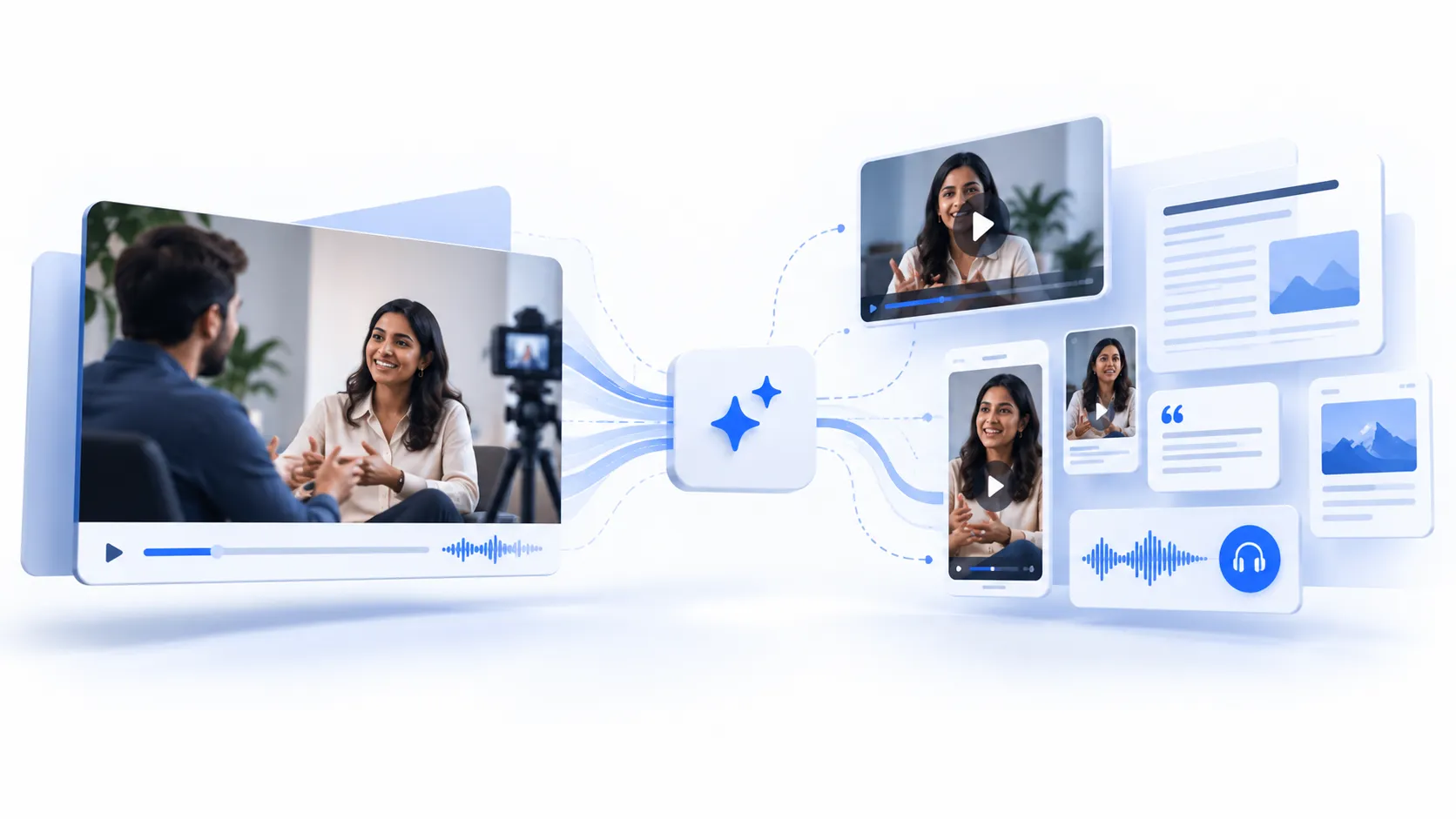
Compare 10 AI tools for repurposing customer interviews into case studies, clips and posts, scored on quote accuracy, brand control and workflow fit.
A single 45-minute customer interview can hold a case study, a dozen social clips, three sales objection answers, a webinar hook and the exact phrasing your buyers use to describe their problem. In most B2B teams, it holds none of those things. It sits in a shared drive as an unwatched recording because turning it into marketing content takes more editorial hours than anyone has.
AI tools for customer interview content repurposing promise to close that gap. Many of them do speed up transcription, clipping and first drafts. The harder question is whether they protect the one thing that makes customer content valuable: that a real customer actually said it. Content Marketing Institute's B2B Content and Marketing Trends: Insights for 2026 found that while 9 in 10 B2B marketers use AI to produce content, fewer than 4 in 10 say it has improved performance. Speed is not the problem these tools need to solve. Credibility is.
This guide compares 10 tools by where they sit in the interview-to-content pipeline, scores them on how well they keep published content traceable to the customer's actual words, and shows which two or three a given team actually needs.
Quick Answer: What Is the Best AI Tool for Repurposing Customer Interviews?
The best AI tool for repurposing customer interviews depends on your bottleneck. For video clips, use Descript, Riverside or OpusClip. For turning one recording into many written assets, use Castmagic. For mining themes across many interviews, use Dovetail. For quote-accurate drafting, use NotebookLM. For brand-governed production at scale, use Jasper or Writer. For collecting video testimonials, use Vocal Video. Most teams need two tools, not ten.
The 10 tools covered, grouped by job:
Capture and transcribe: Otter.ai, Riverside, Vocal Video
Mine and synthesize: Dovetail, NotebookLM
Edit and clip video: Descript, OpusClip
Draft and multiply written assets: Castmagic, Jasper, Writer
What Does Repurposing Customer Interviews With AI Actually Involve?
Repurposing customer interviews with AI means using speech recognition, language models and video tools to turn a recorded customer conversation into multiple marketing assets, such as case studies, testimonial clips, social posts, sales enablement snippets and messaging research, while keeping each asset traceable to what the customer actually said.
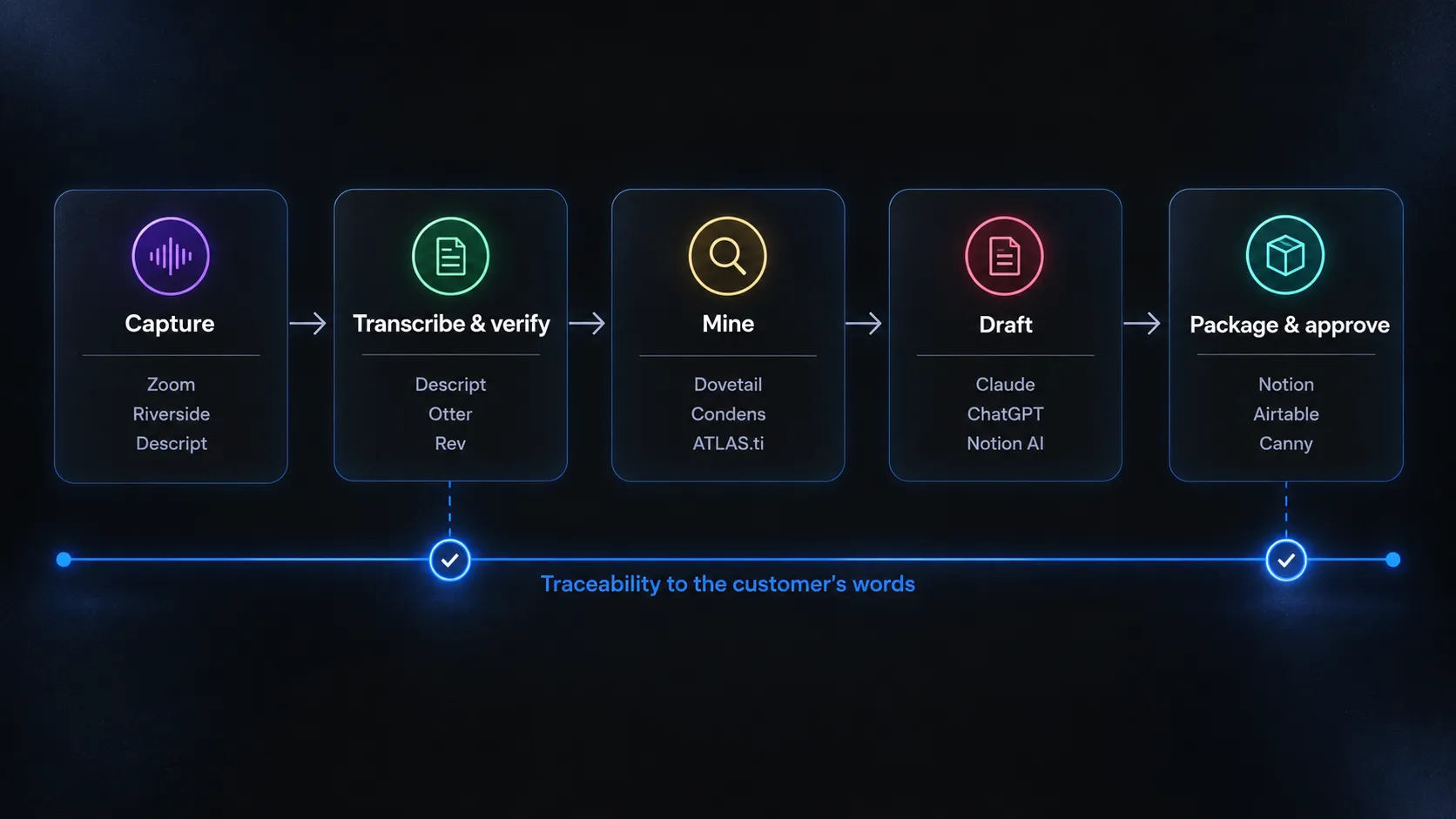
That last clause is where most tool comparisons stop paying attention. A useful way to evaluate tools is to break the job into five stages and ask which stage each tool owns:
Capture. Record the conversation with clean, separate audio tracks and documented consent. Poor audio here degrades every later stage.
Transcribe and verify. Convert speech to text, label speakers and check the transcript against the recording. If transcription is your main bottleneck, we also tested 12 AI meeting note-taking tools for accuracy, summaries and workflow fit. This step is not optional. In the peer-reviewed study Careless Whisper: Speech-to-Text Hallucination Harms, presented at ACM FAccT 2024, researchers found that roughly 1% of transcriptions from OpenAI's Whisper contained entire phrases that did not exist in the audio. Cornell's summary of the research notes OpenAI has since improved the model, but the lesson holds: a fabricated phrase in a transcript can become a fabricated customer quote.
This is a form of the broader AI hallucination problem, where generated output can sound convincing while being unsupported by the source.Mine. Find the moments worth publishing: outcome statements, before-and-after descriptions, objections overcome, vivid language and themes repeated across several customers.
Draft. Turn those moments into formats: a written case study, short video clips, LinkedIn posts, email copy, website proof points and sales talk tracks.
Package and approve. Apply brand standards, get customer sign-off on quotes and claims, and publish.
No single tool does all five stages well. Recording platforms are strongest at stages 1 and 2. Research repositories own stage 3. Repurposing and brand-voice platforms own stage 4. Stage 5 remains largely a human process, which is why the tools that make approval easier deserve extra credit.
How We Evaluated These Tools: The Source Fidelity Scorecard
We scored each tool with the Source Fidelity Scorecard, an editorial planning model built for this article. It rates tools on five criteria from 1 (weak) to 5 (strong), for a maximum of 25. It is an analytical framework based on each vendor's documented features and published reviews as of October 2026, not a lab benchmark or a scientifically validated methodology.
Criterion | Question it answers | Why it matters for interview content |
|---|---|---|
Source traceability | Can you jump from a generated sentence back to the exact moment in the recording or transcript? | Customer content is only credible if every quote and claim can be verified. |
Voice and brand control | Can the tool apply your style guide, terminology and tone consistently? | Interview language is raw. Published content has to sound like your brand without rewriting the customer. |
Format range | How many output types can it produce from one source: clips, articles, posts, emails, briefs? | Range determines how much value you extract per interview. |
Governance | Does it support permissions, approvals, workspaces and enterprise security? | Interviews often include confidential details, pricing and named individuals. |
Interview workflow fit | How naturally does it handle recorded conversations specifically, as opposed to generic text? | General writing tools force you to do the transcript work yourself. |
Two cautions apply. First, the total score matters less than the profile: a tool that scores 5 on traceability and 1 on brand control may be exactly what a research team needs. Second, pricing and plans in this category change often. Treat every price mentioned below as a signal of the pricing model, and confirm current terms on the vendor's own pricing page before you buy.
The 10 Best AI Tools for Repurposing Customer Interviews Into Marketing Content
The tools below are ordered by pipeline stage, from capture to final packaging, rather than by an overall rank. That ordering reflects how teams actually buy: you fix the stage that is slowing you down.
1. Dovetail: Best for Mining Themes Across Many Interviews
Dovetail is a customer research repository that stores interview recordings and transcripts, then uses AI to cluster, summarize and search across them. It fits product marketing teams that run interview programs, not one-off testimonials.
Where it helps: Its value appears at volume. When you have 20 or 40 interviews, Dovetail lets you find every customer who described the same pain point, so your messaging rests on a pattern rather than one quotable outlier. The Dovetail pricing page lists AI chat, AI summaries, AI dashboards and agents that track signals across feedback, and highlights link back to source material.
Limits: Dovetail is an analysis and storage layer. It does not record interviews or produce finished marketing assets, so you will still need a drafting or clipping tool.
Pricing signal: A free plan plus custom-priced paid tiers. Dovetail has restructured plans more than once, so confirm the current tiers directly.
2. Otter.ai: Best for Capturing Customer Calls Automatically
Otter.ai is a meeting assistant that joins Zoom, Google Meet and Microsoft Teams calls, transcribes them with speaker labels and generates summaries. For marketers, its main value is that interviews get captured without anyone remembering to press record.
We also included Otter in our broader comparison of AI meeting note-taking tools, where we looked at transcription accuracy, summaries, integrations and workflow fit.
Where it helps: Otter's AI Chat lets users ask natural-language questions across their full transcript library, which is useful for pulling every mention of a product feature or competitor from months of customer calls, including sales and success calls that were never meant as interviews.
Limits: Output stops at transcripts, summaries and search. Reviewers also note a lack of downstream workflow automation. Treat Otter as the intake layer, not the content engine.
Pricing signal: Freemium with tiered paid plans. Check Otter.ai for current limits.
3. Riverside: Best for Recording Interviews You Plan to Publish as Video
Riverside records remote and in-person interviews with separate, high-quality audio and video tracks, then adds AI editing, clipping and drafting on top. If the interview itself will become a video asset, recording quality is the constraint that matters most, and Riverside is built around it.
For teams producing interview-led audio or video regularly, our AI podcast editing tools comparison also covers Riverside’s recording and repurposing workflow.
Where it helps: Riverside's Magic Clips identify highlights and turn them into standalone, captioned social clips. Its Co-Creator feature, as shown in Riverside's own walkthrough of its AI tools, can draft newsletters, blog posts and show notes from a recording.
Limits: Users on AWS Marketplace reviews describe AI-selected moments as hit or miss. Expect to choose clips yourself for anything customer-facing.
Pricing signal: Tiered subscriptions based on recording hours and features.
4. Descript: Best for Editing Interview Video by Editing Text
Descript turns a recording into a transcript and lets you edit the video by deleting or rearranging words. For customer interviews, that is a natural fit: marketers can build a tight testimonial cut the same way they would edit a document.
Where it helps: Descript's agentic co-editor, Underlord, accepts instructions such as splitting a recording into short clips or finding 60 to 90 second segments for social and reformatting them vertically, according to Descript's Underlord help documentation. Because every edit maps to the transcript, it is easy to confirm that a clip contains only words the customer said.
Limits: Descript's own documentation acknowledges that its AI features can get things wrong. Its features, including regenerated speech and voice cloning, also create a temptation to alter a customer's words. Do not use speech regeneration on customer testimonial audio without explicit written consent.
Pricing signal: Free plan with limited AI credits; paid tiers add more AI credits and full Underlord access.
5. OpusClip: Best for High-Volume Short-Form Clips
OpusClip takes long videos and automatically produces short vertical clips with captions and brand templates. It suits teams that publish customer video on social channels at volume.
Where it helps: According to OpusClip's marketing page, it supports shared brand templates with custom fonts and logos, and it assigns each clip an AI virality score with improvement suggestions. Team workspaces share credits, videos and templates.
Limits: A virality score is the vendor's prediction, not evidence of business impact. A clip that scores well because it is dramatic may still misrepresent the customer's overall experience. OpusClip is built for reach, so pair it with a human review of context.
Pricing signal: Free tier with credit-based paid plans.
6. Castmagic: Best for Turning One Recording Into Many Written Assets
Castmagic converts a single audio or video recording into transcripts, summaries, blog drafts, social posts, newsletters and custom outputs. Of the tools here, it is the most directly aimed at the "one interview, many assets" job.
Where it helps: Castmagic markets a dedicated workflow for marketers that turns webinars, interviews and event recordings into campaign-ready content, and its features include custom prompt templates, so you can build a reusable "customer interview to case study draft" template that applies your structure every time.
Limits: Output quality depends heavily on prompt configuration, and one independent review flags lower transcription accuracy on interviews with heavy accents or overlapping speech. It produces text, not finished video.
Pricing signal: According to Creator Stack Club's review, pricing is built around upload minutes rather than features. Check Castmagic pricing for current tiers.
7. NotebookLM: Best for Quote-Accurate Synthesis and Drafting
NotebookLM is Google's source-grounded research assistant. You upload transcripts, recordings or documents, and it answers questions and drafts summaries using only those sources, with inline citations that link to the exact passage.
Where it helps: For customer content, citation-level traceability is the feature that matters most. Ask "What did customers say about implementation time?" across ten transcripts and every claim in the answer links back to the passage that supports it, as university guides such as VCU's NotebookLM quick start describe. That makes it a strong drafting environment for case studies, where every quote must be verifiable.
Limits: NotebookLM has no brand-voice controls and limited output formats for marketing. Its Audio Overviews are AI-generated discussions, not your customer's voice, and should never be presented as customer content. Google has also been folding the product into its wider Gemini branding, so check the current name and plan on NotebookLM's site.
Pricing signal: Free tier; higher limits through Google's paid AI and Workspace plans.
8. Jasper: Best for On-Brand Content From Interview Material
Jasper is a marketing content platform built around brand voice, a knowledge base and pre-built marketing agents. Its relevance here is that interview transcripts can become approved source material for brand-consistent drafting.
Where it helps: Jasper states that its Knowledge Base ingests approved source material including research reports and interview transcripts, so agents can generate derivative assets grounded in them. Brand Voice and style rules then shape tone across channels, and agencies can keep each client's voice separate.
Limits: Jasper's strength is consistency, not traceability. Generated copy does not automatically link each claim to a transcript moment, so a human still needs to check every customer quote. Its entry plan caps brand voices and knowledge assets.
Pricing signal: Third-party reviews such as Rework's Jasper overview list the Pro plan at $59 per seat per month billed annually, with custom-priced Business plans.
9. Writer: Best for Enterprise and Regulated Teams
Writer is an enterprise AI platform that combines its own Palmyra models, a Knowledge Graph connected to internal data and guardrails that enforce brand, terminology and compliance rules. It suits large organizations where a customer claim can create legal or regulatory exposure.
Where it helps: Writer's Knowledge Graph grounds generation in connected company sources, and reviewers such as AISOTools highlight claim detection and fact-checking features that flag potential inaccuracies before content ships. For financial services, healthcare or public companies, those controls matter more than format range.
Limits: Setup is heavier than any other tool here. The Knowledge Graph is only as good as the documents you feed it, and getting full value requires uploading guidelines, building terminology lists and training staff. It is not designed for video.
Pricing signal: Enterprise contracts with custom pricing. See Writer.
10. Vocal Video: Best for Collecting Testimonial Video at Scale
Vocal Video collects customer testimonials asynchronously through guided links, then automatically produces branded, subtitled videos. It solves a different problem from the other tools: getting customers on record without scheduling a call.
Where it helps: Customers record answers to your prompts on their own device, and the platform applies motion graphics, subtitles and branding automatically, according to Vocal Video's testimonial use-case page. Because output is the customer's own unaltered recording, traceability is inherently high.
Limits: Async answers are shorter and less probing than a live interview, so you get testimonials rather than deep case study material. Review aggregators such as G2 note that some essential features require plan upgrades.
Pricing signal: Free plan with paid subscriptions; check the vendor's pricing page.
What about ChatGPT, Claude and Gemini? General-purpose assistants can handle much of stage 4 if you paste in a verified transcript and a clear brief. They are not on the list because they do not own any stage of the pipeline: no capture, no clip editing, no repository and no built-in approval workflow. For a small team, though, a general assistant plus Descript or Riverside is a credible, low-cost stack.
How Do These AI Tools Compare?
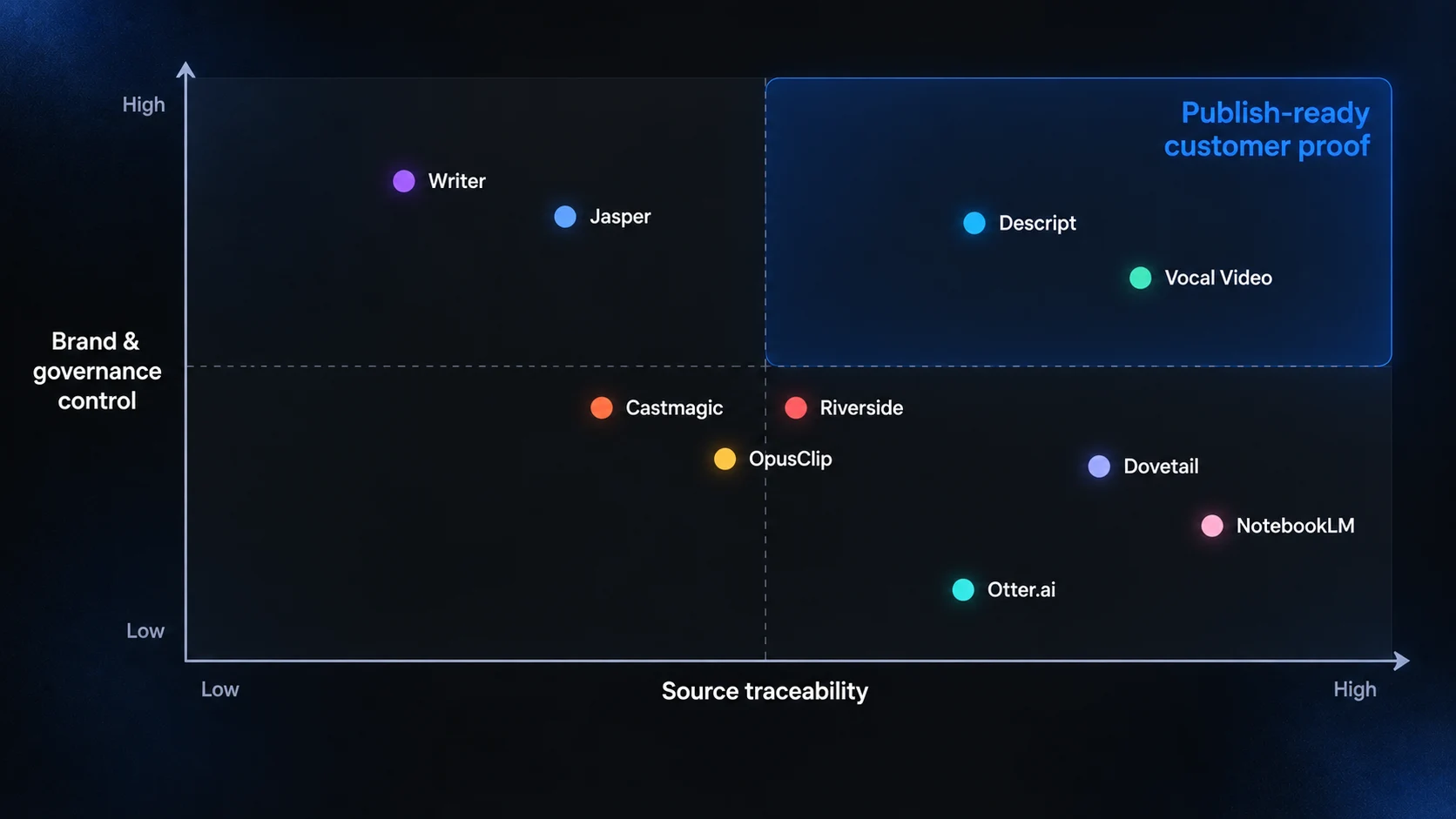
The strongest tools for customer interview content split into specialists: recorders, researchers, clippers and writers. Writer, Castmagic, Descript and Jasper score highest on the Source Fidelity Scorecard, but for different reasons, and the right choice depends on whether your weakest stage is capture, mining, video or drafting.
Tool overview by pipeline stage
Tool | Pipeline stage | Primary output | Pricing model |
|---|---|---|---|
Dovetail | Mine | Themes, highlights, research summaries | Free plan plus custom-priced tiers |
Otter.ai | Capture, transcribe | Transcripts, summaries, searchable archive | Freemium, tiered |
Riverside | Capture, draft | Studio-quality recordings, clips, written drafts | Tiered subscription |
Descript | Draft (video) | Edited video and audio, clips | Free plan plus AI-credit tiers |
OpusClip | Draft (video) | Short vertical clips with captions | Free tier plus credits |
Castmagic | Draft (text) | Case study drafts, posts, newsletters | Usage-based (upload minutes) |
NotebookLM | Mine, draft | Cited summaries and drafts | Free tier plus Google AI plans |
Jasper | Draft, package | On-brand multichannel copy | Per seat, plus custom Business plan |
Writer | Draft, package | Governed enterprise content | Custom enterprise contract |
Vocal Video | Capture, package | Branded testimonial videos | Free plan plus subscriptions |
Source Fidelity Scorecard results
Scores are editorial judgments from 1 to 5 based on documented features, using the criteria defined earlier. They are not results of controlled testing.
Tool | Traceability | Voice control | Format range | Governance | Interview fit | Total (of 25) |
|---|---|---|---|---|---|---|
Writer | 3 | 5 | 4 | 5 | 3 | 20 |
Castmagic | 3 | 3 | 5 | 2 | 5 | 18 |
Descript | 4 | 3 | 4 | 3 | 4 | 18 |
Jasper | 2 | 5 | 4 | 4 | 3 | 18 |
Dovetail | 5 | 2 | 2 | 4 | 4 | 17 |
Vocal Video | 4 | 4 | 2 | 3 | 4 | 17 |
Riverside | 3 | 2 | 4 | 3 | 4 | 16 |
NotebookLM | 5 | 1 | 3 | 3 | 3 | 15 |
OpusClip | 3 | 3 | 3 | 2 | 3 | 14 |
Otter.ai | 4 | 1 | 2 | 3 | 3 | 13 |
Read the profile, not just the total. Dovetail and NotebookLM score lower overall but lead on traceability, which is the criterion most closely tied to credibility. Writer's lead comes from governance, which only pays off for organizations with compliance review.
Which tool stack fits your team?
Team type | Main bottleneck | Recommended stack | Why |
|---|---|---|---|
Solo marketer or small startup | No time to edit or write | Riverside or Descript, plus a general AI assistant | One tool records and clips; the assistant drafts from a verified transcript. |
SaaS content team publishing weekly | Too few assets per interview | Riverside or Descript for video, Castmagic for written assets | Splits video and text so each gets a specialist. |
Product marketing with a research program | Insights trapped in many interviews | Dovetail or NotebookLM, then Jasper for drafting | Mine patterns first, then write on-brand from evidence. |
Enterprise or regulated industry | Legal and brand risk | Writer, with Descript for video | Governance and claim checks matter more than speed. |
Agency serving several clients | Keeping voices separate | Castmagic or Jasper workspaces, plus OpusClip | Per-client voices, spaces and brand templates. |
Customer marketing or advocacy team | Getting customers on record | Vocal Video, plus Descript for longer edits | Async collection removes scheduling friction. |
What Are the Biggest Risks of Using AI to Repurpose Customer Interviews?
The biggest risk is publishing words or claims your customer never said. AI can introduce errors at two points: transcription, where speech-to-text can insert phrases absent from the audio, and drafting, where language models paraphrase, compress or embellish. Customer content that drifts from the source damages trust and can create legal exposure.
The legal line: real customers, real experiences
In August 2024, the US Federal Trade Commission finalized a rule on consumer reviews and testimonials. As Sidley's analysis of the FTC rule explains, it bans businesses from creating or promoting testimonials that misrepresent the identity, experience or existence of the testimonialist, which covers AI-generated testimonials. Wilson Sonsini's summary adds a practical warning for marketers: companies should not pre-populate or generate draft reviews for customers, including through AI.
That does not mean you cannot use AI to edit a real interview. It means the published testimonial must reflect what a real customer experienced and said. Rules differ by country, and B2B case studies are not always treated like consumer reviews, so confirm requirements with your legal team. Recording consent and data-protection obligations, such as those under GDPR for EU participants, also apply before any AI tool touches the file.
The Quote Distance Ladder: how much review does each asset need?
The Quote Distance Ladder is an original planning model for this article. It ranks repurposed assets by how far they move from the customer's verbatim words. The further an asset sits from the source, the more verification and customer approval it needs.
Level | Asset type | Example | Minimum review |
|---|---|---|---|
0. Verbatim | Unedited clip or full quote | A 40-second video clip with captions | Check the transcript and captions against the audio |
1. Trimmed | Shortened quote, filler removed | "We cut onboarding from six weeks to two" from a longer answer | Confirm the trim does not change meaning |
2. Attributed paraphrase | Your summary of what they said, attributed to them | "The operations lead says the rollout freed her team for planning work" | Customer approval of the wording |
3. Synthesized claim | A claim drawn from several interviews | "Customers report faster onboarding" | Evidence log linking the claim to specific interviews |
4. Generated copy | Posts or ads written in a customer's voice | A LinkedIn post styled as a customer story | Avoid in a customer's voice. Rewrite as brand voice citing a verified quote |
Most AI repurposing tools default to producing Level 2 to 4 assets because that is where the time savings look largest. The safest workflow uses AI heavily at Levels 0 and 1, where verification is fast, and treats Levels 2 and 3 as drafts that require a named human reviewer.
A practical workflow: one interview, eight assets
The following is an illustrative scenario, not a real case study. A B2B software company records a 45-minute interview with a customer's operations lead.
Record in Riverside with consent captured on the call and in writing.
Export the transcript and spend 15 to 20 minutes checking speaker labels, numbers, names and product terms against the audio.
Load the verified transcript into NotebookLM or Dovetail and ask for every outcome statement, metric and before-and-after description, each with a citation.
Cut three Level 0 clips in Descript from the cited moments.
Draft a case study in Castmagic or Jasper using a fixed template, quoting only the cited passages.
Write two LinkedIn posts in your brand's voice that reference verified quotes, plus a sales one-pager line.
Send the customer every Level 1 and Level 2 quote, plus the full case study, for written approval.
Publish, and log which interview and timestamp each claim came from.
AI shortens steps 2 through 6. It does not remove steps 2, 7 or 8, and teams that skip them are the ones that end up retracting content.
Do you actually need a specialized tool?
The strongest counterargument is that you may not. A careful marketer with a good transcription service and a general-purpose assistant can produce an excellent case study, and specialized platforms add subscription costs, learning curves and another place for sensitive recordings to live. The CMI finding that most marketers see no performance gain from AI content suggests the tool is rarely the limiting factor. Editorial judgment, customer relationships and a clear story are.
Specialized tools earn their cost in three situations: when you run enough interviews that searching across them matters, when video is a primary channel, or when brand and compliance review must be enforced across many writers. If none of those apply, start with one recording tool and one general assistant, and add a specialist only when a specific stage becomes the bottleneck.
Frequently Asked Questions
Can AI write a customer case study from an interview transcript?
Yes, AI can draft a solid case study from a verified transcript, but it should not publish one. Tools such as Castmagic, Jasper and NotebookLM can structure a challenge, solution and results narrative in minutes. A human still needs to confirm every quote and metric against the recording, fill gaps the interview did not cover and get the customer's written approval before publication.
Is it legal to use AI to edit customer testimonials?
Editing a real customer's testimonial with AI is generally acceptable if the result still reflects what they actually said and experienced. Creating testimonials that misrepresent a customer's identity or experience is not. In the US, the FTC's 2024 rule on reviews and testimonials explicitly covers AI-generated fakes. Get written approval for edited quotes and consult legal counsel for your jurisdiction.
Which AI tool is best for turning customer interviews into short video clips?
Descript is best when you want precise, transcript-based control over each clip. Riverside is best when you also need studio-quality recording. OpusClip is best for high-volume social clipping with brand templates. For customer testimonials, pick the tool that makes it easiest to verify each clip contains only the customer's real words in their original context.
How accurate are AI transcripts of customer interviews?
Modern AI transcription is accurate enough for drafting but not for publishing without review. Peer-reviewed research presented at ACM FAccT 2024 found that about 1% of Whisper transcriptions contained phrases that never appeared in the audio. Accents, crosstalk, poor audio and long pauses raise error risk. Always check names, numbers and quoted sentences against the recording.
How many marketing assets can one customer interview produce?
A well-run 30 to 60 minute interview can typically support one case study, several short clips, a handful of social posts, website proof points and sales enablement snippets. The real limit is not the AI tool but how many distinct, specific and verifiable moments the customer offers, which depends heavily on interview preparation and questioning.
Should I upload customer interviews to AI tools that train on my data?
Check each vendor's data-use terms before uploading. Customer interviews can include confidential business details, personal data and unreleased results. Prefer tools that state they do not train models on customer content, offer enterprise data controls and support deletion. Tell interviewees in your consent process that AI tools will process the recording.
Do I need a different tool for research interviews and testimonial interviews?
Often, yes. Research interviews benefit from repositories such as Dovetail or NotebookLM that surface patterns across many conversations. Testimonial interviews benefit from recording and video tools such as Riverside, Descript or Vocal Video that produce publishable assets. Teams that run both programs usually connect a repository to a production tool rather than forcing one platform to do everything.
So Which AI Tool Should You Choose for Customer Interview Content?
Choose based on your weakest pipeline stage, and choose for traceability before speed. If you struggle to get customers on record, start with Vocal Video or Riverside. If recordings exist but never become video, add Descript or OpusClip. If written assets are the bottleneck, add Castmagic, or Jasper and Writer where brand governance matters. If you run many interviews and need defensible messaging, start with Dovetail or NotebookLM.
Whichever stack you pick, keep the Quote Distance Ladder in view. The value of customer content comes from a real person vouching for your product. AI can multiply that voice across formats, but only verification keeps it the customer's voice.
Comments (0)
No comments yet. Be the first to share your thoughts!