AI Integration in Existing Software: Key Considerations for Businesses

Author
Samrat Biswas
AI integration in existing software can go wrong fast. Check these five things first, before a rushed rollout costs you.
What happens when you rush to match a competitor's AI feature, only to find your own software isn't ready for it?
Your competitor just launched an AI assistant that answers customer questions in seconds. You decide to catch up and add one to your portal. Then the problems start. Your data is inconsistent, your legacy systems don't connect properly, and your team spends its time fixing AI-generated errors instead of serving customers.
Integrating AI is not the problem here. But the real problem started when nobody checked whether the system underneath could carry it.
So, before you invest in AI integration in your existing software, what are the factors you should consider? Read this blog to get the answer.
What to Check Before Adding AI to Existing Software
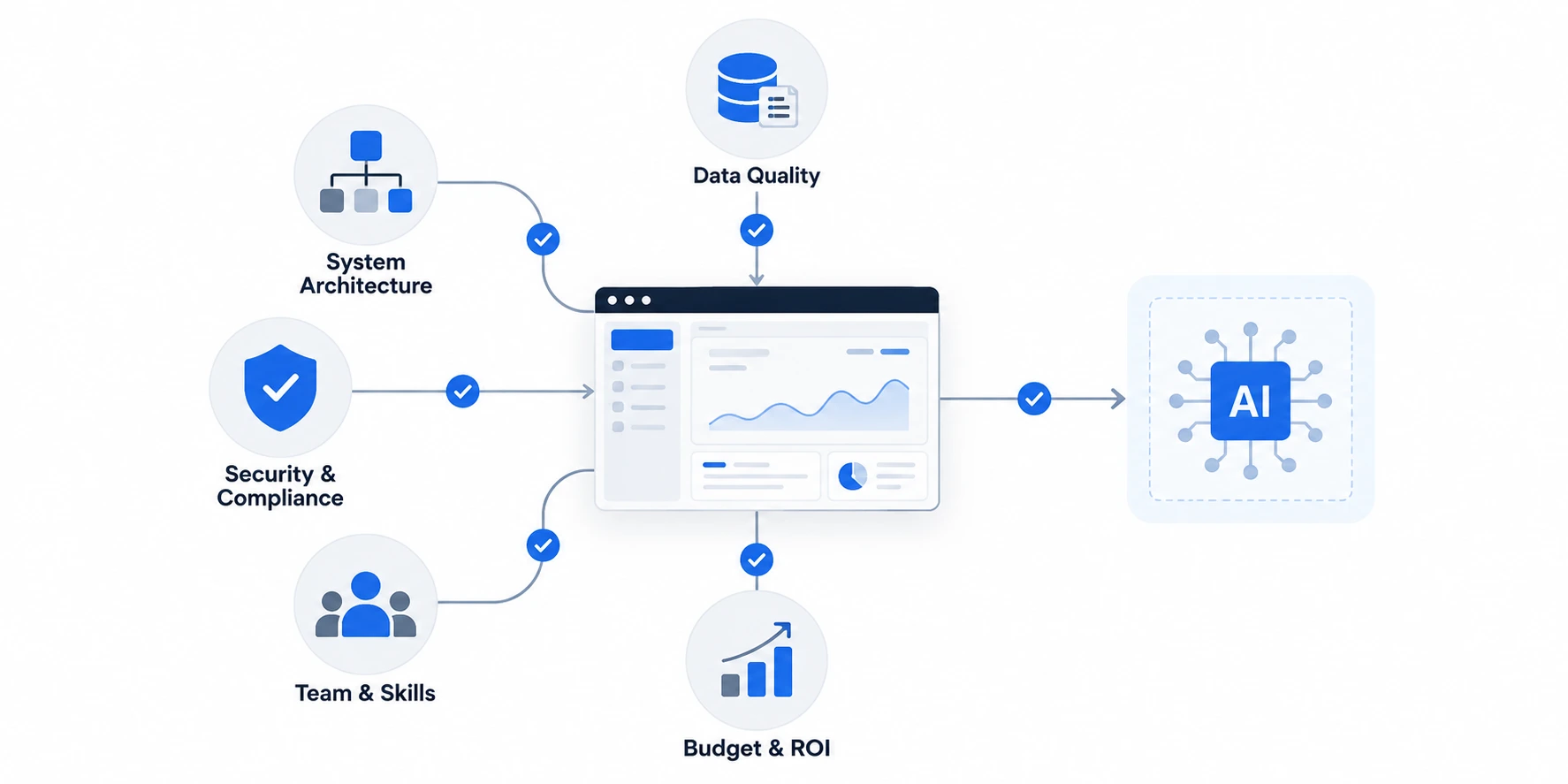
There are multiple factors, such as your data, architecture, security configuration, team and budget, that influence how you can build AI integration strategies. Each determines whether AI will make your software stronger or weaker.
Skipping one of these checks can be costly, as it may resurface mid-project when fixing is generally expensive. According to Gartner, 40% of enterprise applications will carry task-specific AI agents by the end of 2026, up from less than 5% in 2025. Businesses that run these checks now move with that shift.
Data Quality and Structure
Your software has all your customer data, inventory lists or financial logs from years ago. However, these all exist in unstructured formats, duplications or silos in legacy systems. Your data needs to be AI-ready for an AI-powered solution to work reliably.. So, it is important to:
● See if your customer, order and support information is centralized or spread across multiple unconnected tools
● Ensure data has a structure, is clean and real-time
● Verify who owns the data, and who is responsible for cleaning of the data
System Architecture and Technical Debt
If you are using legacy systems, they are built on monolithic architectures. This architecture is not always suitable for generative intelligence requirements of real time and non-deterministic nature. Before you start the AI integration process, ensure you:
● Identify clean vs. unclean APIs for your system
● Figure out how to split monolithic code to integrate with AI APIs in real-time
● Identify any part that's already under strain and has trouble with the existing load, since AI processing will make it even harder. The architecture you need will also depend on whether your use case requires a standalone LLM, RAG system or AI agent.
Security and Compliance
AI tools often need access to sensitive customer and financial data. This poses security and privacy concerns. Strong AI governance, security and compliance controls can help manage these risks.
● Perform audit of access controls and ensure that AI tools can only access data that is necessary
● Check regulatory requirements that apply to your industry, such as data residency or audit trails
● Speak directly to the vendor and ask if they have trained on your data
Team Skills and Capacity
Your team may be able to manage the software today. But it does not mean that they have the skills or time to add AI to it. So, it’s better to check their skills and capacity beforehand.
● Determine if anyone in the organization has experience with APIs, data pipelines or model integration
● Decide if you should hire, train or bring in an outside partner
● Ensure that the ownership of the project is clear on a “day to day” basis, as projects with no clear owner of the day die the quickest with AI projects
Budget and Realistic Return
Let's first examine this data. According to Deloitte's fourth State of Generative AI in the Enterprise report, published in January 2025, most companies pilot AI successfully, then struggle to scale it. This is primarily due to data gaps and unmanaged risk. That struggle almost always costs more than the tool itself.
This gap between experimentation, scaling and measurable AI ROI is showing up across broader enterprise adoption data as well.
● Plan for integration costs and future maintenance, beyond just the cost of license
● Establish one or two measurable objectives, e.g., quicker response time, prior to beginning
● Plan for a pilot period before committing to a full rollout
These checks do not take a long time to run. But once you complete them together, you'll know exactly where your software is ready and where it isn't.
How to Add AI Without Putting Your Software at Risk
Once you know where your system stands, the challenge is to integrate AI without compromising existing functionality. But how do you add AI safely? The short answer is that you add it in small, reversible steps. Here is what you need to do.
Start With One Pilot
Good AI implementation for businesses usually starts small. Pick one workflow where the problem is clear, such as ticket routing, and test AI there first. Set a clear success measure before you launch. Once the pilot holds up under real traffic, expand to the next workflow.
Use APIs Instead of a Rebuild
You don’t need to change the current software applications to integrate AI automation. Use APIs or a middleware layer to connect AI, without touching your production database. This means you can try out new features without impacting any code that is essential for your business. You can also disconnect anything that underperforms.
Pick an Integration Strategy That Fits
There are different ways of integrating AI into different systems. When speed counts, a third-party solution with AI speeds up. If your data and use case is specific to your business, then a custom or fine-tuned model fits better. In either case, just make sure that you have the flexibility to transfer your data and change providers if necessary.
Prepare Your Team
New tools fail when the people using them are not ready. Prepare employees before the day of launch and establish guidelines for when people will review the work of AI. Ensure that you maintain a human-in-the-loop to review and govern, particularly at the beginning, to catch mistakes before they're delivered to a customer. This is essential for seamless integration of AI into the existing software applications.
Turning AI Potential into Lasting Software Value
AI integration in existing software is effective when it is approached as a continuous process, not merely as a quick-fix to a competitor's product.
McKinsey's 2026 State of AI report found that 44% of organizations have scaled AI across the business, up from 38% the year before. Yet only 6% qualify as AI high performers, attributing at least 5% of their profit impact to AI. Companies in that smaller group take time to review their systems, then add AI incrementally. That is what sets apart the use of AI from having any value.
Comments (0)
No comments yet. Be the first to share your thoughts!